`, a ``, or a `
`.
## A Complete YAML Test Example
Here is a full YAML test file for an e-commerce checkout flow, demonstrating the range of actions and assertions available.
```yaml
name: Complete checkout flow
url: https://store.example.com
tags:
- checkout
- critical-path
statements:
- action: CLICK
target: first product card
- action: VERIFY
assertion: product detail page is displayed
- action: CLICK
target: add to cart button
- action: VERIFY
assertion: cart badge shows "1"
- action: CLICK
target: cart icon
- action: VERIFY
assertion: cart contains 1 item
- action: CLICK
target: proceed to checkout
- action: FILL
target: shipping address
value: 123 Test Street, San Francisco, CA 94102
- action: FILL
target: card number
value: "4242424242424242"
- action: FILL
target: expiration date
value: "12/28"
- action: FILL
target: CVV
value: "123"
- action: CLICK
target: place order button
- action: VERIFY
assertion: order confirmation page is displayed
- action: VERIFY
assertion: page contains "Thank you for your order"
- action: VERIFY
assertion: order number is displayed
```
This test will likely survive a complete frontend redesign as long as the checkout flow itself does not change. The equivalent Playwright script would be roughly 60-80 lines of JavaScript with selectors, waits, and assertions.
## Getting Started with YAML Tests
If you are currently writing Playwright scripts and want to try YAML-based testing, you do not need to rewrite everything at once. Shiplight runs alongside your existing test suite through its [plugin system](/plugins).
Start with your most-maintained tests — the ones that break frequently due to UI changes. Convert those to YAML format and let them run in parallel with your existing scripts. For teams generating tests with AI coding agents, YAML is the natural output format. See how this works in the context of [PR-ready E2E tests](/blog/pr-ready-e2e-test).
References: [Playwright Documentation](https://playwright.dev), [YAML Specification](https://yaml.org)
---
### Best AI Testing Tools in 2026: 11 Platforms Compared
- URL: https://www.shiplight.ai/blog/best-ai-testing-tools-2026
- Published: 2026-03-31
- Author: Shiplight AI Team
- Categories: Guides, Engineering
- Markdown: https://www.shiplight.ai/api/blog/best-ai-testing-tools-2026/raw
An honest comparison of 11 AI testing tools — from agentic QA platforms to visual testing. Includes pricing, pros/cons, and a practical selection guide.
Full article
The AI testing tools market was valued at $686.7 million in 2025 and is projected to reach $3.8 billion by 2035. The space is crowded — and choosing the right platform matters more than ever.
We build [Shiplight AI](https://www.shiplight.ai/plugins), so we have a perspective. Rather than pretend otherwise, we'll be transparent about where each tool shines and where it falls short. This guide is designed to help you make a decision, not just read a marketing list.
Here's what we evaluated: self-healing capability, test generation approach, CI/CD integration, learning curve, pricing model, and support for AI coding agent workflows.
## The 3 Types of AI Testing Tools
Before diving into individual tools, it helps to understand the landscape. AI testing tools in 2026 fall into three categories:
### Agentic QA Platforms
These tools use AI to autonomously generate, execute, and maintain tests. They interpret intent rather than relying on brittle DOM selectors. Tests adapt when the UI changes without manual intervention.
Examples: Shiplight AI, Mabl, testRigor, QA Wolf
### AI-Augmented Automation Platforms
Traditional test automation frameworks enhanced with AI features like self-healing locators, smart element recognition, and assisted test authoring. You still write scripts, but AI reduces the maintenance burden.
Examples: Katalon, Testim (Tricentis), ACCELQ, Functionize, Virtuoso QA
### Visual & Specialized AI Testing
AI applied to specific testing domains — visual regression, accessibility, or screenshot comparison. These complement full E2E platforms rather than replacing them.
Examples: Applitools, Percy, Checksum
## Quick Comparison Table
| Tool | Category | Best For | Self-Healing | No-Code | CI/CD | AI Agent Support | Pricing |
|------|----------|---------|-------------|---------|-------|-----------------|---------|
| **Shiplight AI** | Agentic QA | AI-native teams using coding agents | Yes (intent-based) | Yes (YAML) | CLI, any CI | Yes (MCP) | Contact |
| **Mabl** | Agentic QA | Low-code E2E with auto-healing | Yes | Yes | Built-in | No | From ~$60/mo |
| **testRigor** | Agentic QA | Non-technical testers | Yes | Yes | Yes | No | From ~$300/mo |
| **Katalon** | AI-Augmented | All-in-one mixed skill teams | Partial | Partial | Yes | No | Free tier; from ~$175/mo |
| **Applitools** | Visual AI | Visual regression testing | N/A | Yes | Yes | No | Free tier; from ~$99/mo |
| **QA Wolf** | Agentic (Managed) | Fully managed QA service | Yes | N/A (managed) | Yes | No | Custom |
| **Functionize** | AI-Augmented | Enterprise NLP-based testing | Yes | Yes | Yes | No | Custom |
| **Testim** | AI-Augmented | Fast web test creation | Partial | Partial | Yes | No | Free community; enterprise varies |
| **ACCELQ** | AI-Augmented | Codeless cross-platform | Yes | Yes | Yes | No | Custom |
| **Virtuoso QA** | AI-Augmented | Enterprise Agile/DevOps | Yes | Yes | Yes | No | Custom |
| **Checksum** | AI Generation | Session-based test creation | Yes | Yes | Yes | No | Custom |
## The 11 Best AI Testing Tools in 2026
### 1. Shiplight AI
**Category:** Agentic QA Platform
**Best for:** Teams building with AI coding agents (Claude Code, Cursor, Codex) who want verification integrated into development
Shiplight connects to AI coding agents via [Shiplight Plugin](https://www.shiplight.ai/plugins) (Model Context Protocol), enabling the agent to open a real browser, verify UI changes, and generate tests during development — not after. Tests are written in [YAML with natural language intent](https://www.shiplight.ai/yaml-tests), live in your git repo, and self-heal when the UI changes.
**Key features:**
- [Shiplight Plugin](https://www.shiplight.ai/plugins) for Claude Code, Cursor, and Codex with built-in [agent skills](https://agentskills.io/) for verification, test generation, and automated reviews
- Intent-based YAML tests (human-readable, reviewable in PRs)
- Self-healing via cached locators + AI resolution
- Built on Playwright for cross-browser support
- Email and authentication flow testing
- SOC 2 Type II certified
**Pros:** Tests live in your repo and run in Shiplight Cloud — portable, no lock-in, works inside AI coding workflows, near-zero maintenance, enterprise-ready security
**Cons:** Newer platform with a smaller community than established tools, no self-serve pricing page
**Pricing:** Shiplight Plugin is free (no account needed). Platform pricing requires contacting sales.
**Why we built it:** AI coding agents generate code fast, but there was no testing tool designed to work inside that loop. We built Shiplight to close the gap between "code written" and "code verified."
### 2. Mabl
**Category:** Agentic QA Platform
**Best for:** Teams wanting low-code E2E testing with strong auto-healing and cloud-native execution
Mabl is a mature, cloud-native platform that uses AI to create, execute, and maintain end-to-end tests. It offers auto-healing, cross-browser testing, API testing, and visual regression in a single platform.
**Key features:** AI-driven test creation, auto-healing, cross-browser, API testing, visual regression, performance testing
**Pros:** Mature and well-integrated, good documentation, strong cloud-native architecture
**Cons:** Can become expensive at scale, no AI coding agent integration, tests live on Mabl's platform
**Pricing:** Starts around $60/month (starter); enterprise pricing varies
### 3. testRigor
**Category:** Agentic QA Platform
**Best for:** Non-technical testers who want to write tests in plain English without any coding
testRigor takes "no-code" to its logical conclusion — tests are written entirely in plain English from the end user's perspective. No XPath, no CSS selectors, no Selenium. The platform supports web, mobile, API, and desktop testing.
**Key features:** Plain English test authoring, generative AI test creation, cross-platform support (web, mobile, desktop)
**Pros:** Truly accessible to non-engineers, broad platform support, active development
**Cons:** Less developer-oriented than code-based tools, proprietary test format (tests aren't portable)
**Pricing:** Starts around $300/month
### 4. Katalon
**Category:** AI-Augmented Automation
**Best for:** Teams at mixed skill levels who need a comprehensive all-in-one platform
Katalon covers web, mobile, API, and desktop testing in a single platform. Named a Visionary in the Gartner Magic Quadrant, it balances accessibility for non-technical users with extensibility for developers.
**Key features:** Web/mobile/API/desktop testing, AI-assisted test authoring, Gartner-recognized, built-in reporting
**Pros:** Comprehensive platform, strong community, free tier available, Gartner recognition
**Cons:** Heavier platform with steeper learning curve, AI features feel bolted-on rather than core architecture
**Pricing:** Free basic tier; Premium from approximately $175/month
### 5. Applitools
**Category:** Visual AI Testing
**Best for:** Visual regression testing and cross-browser UI validation
Applitools specializes in visual AI — trained on millions of screenshots to detect layout shifts, visual bugs, and cross-browser inconsistencies. It integrates with Selenium, Cypress, and Playwright as an assertion layer.
**Key features:** Visual AI screenshot comparison, cross-browser layout testing, integration with major test frameworks
**Pros:** Best-in-class visual testing accuracy, broad framework integrations, strong track record
**Cons:** Focused on visual layer only — not a full E2E testing solution. You still need another tool for functional testing.
**Pricing:** Free tier available; paid plans from approximately $99/month
### 6. QA Wolf
**Category:** Agentic QA (Managed Service)
**Best for:** Teams that want to outsource QA entirely with guaranteed 80% automated coverage
QA Wolf is unique — it's a managed QA service, not just a tool. Their team of QA engineers builds, runs, and maintains Playwright-based tests for you. They guarantee 80% automated E2E coverage within 4 months. The AI Code Writer is trained on 700+ scenarios from 40 million test runs.
**Key features:** Managed QA service, AI-generated Playwright tests, dedicated QA engineers, zero flaky tests guarantee
**Pros:** Eliminates internal QA burden, fast ramp-up, tests are open-source Playwright code (you own them)
**Cons:** Higher cost than self-serve tools, less control over test authoring decisions
**Pricing:** Custom pricing (managed service model)
### 7. Functionize
**Category:** AI-Augmented Automation
**Best for:** Enterprise teams wanting NLP-based test creation with high element recognition accuracy
Functionize uses natural language processing to let non-technical users write tests in plain English, with machine learning-powered element recognition that the company claims achieves 99.97% accuracy.
**Key features:** NLP test authoring, ML element recognition, self-healing, enterprise-grade infrastructure
**Pros:** High element recognition accuracy, enterprise-ready, accessible to non-engineers
**Cons:** Enterprise pricing excludes smaller teams, less suited for fast-moving startup workflows
**Pricing:** Custom enterprise pricing
### 8. Testim (Tricentis)
**Category:** AI-Augmented Automation
**Best for:** Web application functional testing with fast test creation via record-and-playback
Testim uses AI to stabilize recorded tests — when DOM structures change, the platform identifies updated attributes and adjusts selectors to prevent flaky failures. Acquired by Tricentis, it now has enterprise backing and integration with the broader Tricentis ecosystem.
**Key features:** Record-and-playback with AI stabilization, smart locators, reusable components, Tricentis integration
**Pros:** Fast test creation, reduces flaky tests by up to 70%, enterprise backing via Tricentis
**Cons:** Record-and-playback has limitations, generated code can't be exported, some users report self-healing doesn't always work as advertised
**Pricing:** Free community edition; enterprise pricing varies
### 9. ACCELQ
**Category:** AI-Augmented Automation
**Best for:** Codeless automation across web, mobile, API, and packaged applications (Salesforce, SAP)
ACCELQ is a cloud-based codeless platform with broad coverage — web, mobile, API, database, and enterprise apps like Salesforce and SAP. Its AI features include self-healing locators and intelligent test generation.
**Key features:** Codeless automation, self-healing, unified platform for web/mobile/API/packaged apps
**Pros:** Broad platform coverage including enterprise apps, truly codeless, cloud-based
**Cons:** Less focus on modern AI coding agent workflows, enterprise-oriented pricing
**Pricing:** Custom pricing
### 10. Virtuoso QA
**Category:** AI-Augmented Automation
**Best for:** Enterprise teams scaling QA in Agile and DevOps environments
Virtuoso combines NLP test authoring with self-healing execution, visual regression, and API testing. It positions itself as the most advanced no-code platform for enterprise teams, with strong Agile/DevOps integration.
**Key features:** NLP test authoring, self-healing, visual regression, API testing, enterprise-grade infrastructure
**Pros:** Enterprise-ready, good NLP capabilities, comprehensive testing coverage
**Cons:** Enterprise pricing limits accessibility, steeper learning curve for advanced features
**Pricing:** Custom enterprise pricing
### 11. Checksum
**Category:** AI Test Generation
**Best for:** Teams wanting E2E tests generated from real production user sessions
Checksum takes a different approach — instead of writing tests or recording them, it generates tests from actual user sessions in production. AI maintains these tests as the application evolves.
**Key features:** Test generation from production sessions, AI maintenance, behavior-based coverage
**Pros:** Tests reflect real user behavior (not hypothetical flows), low effort to create initial coverage
**Cons:** Requires production traffic to generate tests (not useful for pre-launch), newer platform
**Pricing:** Custom pricing
## How to Choose the Right AI Testing Tool
### By Team Size
- **Startups and small teams:** Shiplight, testRigor — fast setup, low overhead, focused on velocity
- **Mid-market:** Mabl, Katalon, Testim — balance of features, support, and established track records
- **Enterprise:** Virtuoso, Functionize, ACCELQ, QA Wolf — managed services, enterprise security, broad platform coverage
### By Use Case
- **AI coding agent workflows (Cursor, Claude Code, Codex):** Shiplight — the only tool with Shiplight Plugin
- **Visual regression testing:** Applitools — best-in-class visual AI
- **Non-technical testers:** testRigor — plain English test authoring
- **All-in-one platform:** Katalon — web, mobile, API, desktop in one tool
- **Fully managed QA:** QA Wolf — outsource the entire testing process
### By Budget
- **Free tiers available:** Katalon (free basic), Applitools (free tier), Testim (community edition), Shiplight (free Shiplight Plugin)
- **Mid-range ($60–$300/month):** Mabl, testRigor
- **Enterprise/custom:** QA Wolf, Functionize, Virtuoso, ACCELQ
## What Makes AI Testing Different from Traditional Automation
Traditional test automation tools like Selenium and Cypress require developers to write and maintain test scripts manually. When the UI changes, tests break. Teams spend up to 60% of their time maintaining existing tests rather than writing new ones.
AI testing tools address this with three capabilities that traditional tools lack:
1. **Self-healing:** AI adapts to UI changes automatically. Instead of brittle CSS selectors, tools use intent-based resolution, visual recognition, or smart locator strategies to find elements even when the DOM changes.
2. **Natural language authoring:** Write tests in plain English or YAML rather than code. This makes testing accessible to PMs, designers, and QA engineers who don't write Playwright or Selenium scripts.
3. **Autonomous maintenance:** AI detects when tests need updating, fixes them proactively, and reduces the maintenance tax that makes traditional automation unsustainable at scale.
The AI testing tools market is growing at approximately 18% CAGR — a signal that these capabilities are moving from "nice to have" to table stakes.
## Frequently Asked Questions
### What is the best free AI testing tool?
Katalon offers the most comprehensive free tier (web, mobile, API testing). Applitools has a free tier for visual testing. Testim offers a free community edition. Shiplight Plugin is free with no account required — ideal for teams using AI coding agents.
### What is the best AI testing tool for startups?
Shiplight and testRigor are designed for fast-moving teams. Shiplight is best if you're building with AI coding agents (Claude Code, Cursor). testRigor is strongest for non-technical team members who want to write tests in plain English.
### Can AI testing tools replace manual QA?
Not entirely. AI testing tools can reduce manual regression testing by 80–90%, but manual exploratory testing — finding unexpected bugs by creative investigation — remains valuable. The best approach combines AI-automated regression with targeted manual exploration.
### Do AI testing tools work with Playwright, Selenium, and Cypress?
Most integrate with existing frameworks. Shiplight and QA Wolf are built on Playwright. Applitools integrates with all three. Katalon supports Selenium-based execution. The trend is toward Playwright as the foundation, with AI layered on top.
### What is self-healing test automation?
Self-healing tests automatically adapt when UI elements change — instead of failing because a button's CSS class changed from `btn-primary` to `btn-main`, the AI identifies the element by intent (e.g., "the Submit button") and continues the test. This eliminates the #1 maintenance cost in traditional automation.
### What is agentic QA testing?
Agentic QA uses AI agents that autonomously create, execute, and maintain tests. Unlike traditional tools where humans write scripts, agentic platforms explore applications, generate test coverage, and self-heal — with minimal human intervention. Shiplight, Mabl, testRigor, and QA Wolf fall into this category.
## Final Verdict
There is no single "best" AI testing tool — it depends on your team, workflow, and priorities. Here's our honest recommendation:
- **If you build with AI coding agents** (Claude Code, Cursor, Codex) and want testing integrated into your development loop, [Shiplight AI](https://www.shiplight.ai/demo) is designed for exactly this workflow. Tests live in your repo as YAML (with optional Shiplight Cloud execution), self-heal, and are reviewable in PRs.
- **If you want a comprehensive, established platform** with broad coverage and a free tier, Katalon is the safest bet for teams at mixed skill levels.
- **If visual regression is your primary concern**, Applitools is the clear leader with best-in-class visual AI.
- **If you want fully managed QA**, QA Wolf removes the testing burden entirely with a dedicated team and coverage guarantee.
- **If non-technical testers contribute to QA**, Shiplight's YAML tests are readable by anyone on the team, while testRigor's plain English approach has the lowest barrier to entry.
The AI testing space is evolving rapidly. Whichever tool you choose, the key question isn't "does it have AI?" — every tool claims that now. The question is: **does it reduce the time your team spends on test maintenance, and does it fit into the way you already build software?**
## Get Started
- [Try Shiplight Plugin — free, no account needed](https://www.shiplight.ai/plugins)
- [Book a demo](https://www.shiplight.ai/demo)
- [YAML Test Format documentation](https://www.shiplight.ai/yaml-tests)
- [Shiplight Documentation](https://docs.shiplight.ai)
References: [Playwright Documentation](https://playwright.dev), [Gartner AI Testing Reviews](https://www.gartner.com/reviews/market/ai-augmented-software-testing-tools), [Google Testing Blog](https://testing.googleblog.com/)
---
### Shiplight vs testRigor: Intent-Based Testing Compared
- URL: https://www.shiplight.ai/blog/shiplight-vs-testrigor
- Published: 2026-03-31
- Author: Shiplight AI Team
- Categories: Guides
- Markdown: https://www.shiplight.ai/api/blog/shiplight-vs-testrigor/raw
Both Shiplight and testRigor let you write tests without code — but they take fundamentally different approaches. Here's how they compare on test format, execution, pricing, and developer workflow.
Full article
Both Shiplight and testRigor promise the same thing: write end-to-end tests without code, and let AI handle the maintenance. Both use intent-based approaches instead of brittle DOM selectors. Both claim self-healing.
But they're built for different teams and different workflows. testRigor is designed for non-technical testers who want to write in plain English. Shiplight is designed for developers and engineering teams who build with AI coding agents and want tests in their repo.
We build Shiplight, so we have a perspective. This comparison is honest about where testRigor excels and where we think Shiplight is the better fit.
## Quick Comparison
| Feature | Shiplight | testRigor |
|---------|-----------|-----------|
| **Test format** | YAML files in your git repo (also runs in Shiplight Cloud) | Plain English (only in testRigor's cloud) |
| **Target user** | Developers, QA engineers, AI-native teams | Non-technical testers, manual QA teams |
| **Shiplight Plugin** | Yes (Claude Code, Cursor, Codex) | No |
| **Self-healing** | Intent-based + cached locators | AI-based with plain English re-interpretation |
| **Browser support** | All Playwright browsers (Chrome, Firefox, Safari) | 2,000+ browser combinations |
| **Mobile testing** | Web-focused | iOS, Android, web |
| **Desktop testing** | No | Yes |
| **API testing** | Via inline JavaScript | Built-in |
| **Test ownership** | Your repo + optional cloud execution | testRigor's cloud only (no export) |
| **CI/CD** | CLI runs anywhere Node.js runs | Built-in CI integration |
| **Pricing** | Contact (Plugin free) | From $300/month (3 machines minimum) |
| **Enterprise security** | SOC 2 Type II, VPC, audit logs | SOC 2 Type II |
| **Test stability claim** | Near-zero maintenance | 95% less maintenance vs. traditional tools |
## How They Work — Side by Side
### testRigor: Plain English Testing
testRigor's core idea is that tests should be written from the end user's perspective in plain English. No selectors, no code, no framework knowledge.
A testRigor test looks like this:
```
login
click "New Project"
check that page contains "Project created successfully"
enter "My Project" into "Project Name"
click "Save"
check that page contains "My Project"
```
The platform interprets these instructions at runtime using AI and a proprietary language engine. It supports over 2,000 browser combinations, mobile apps (iOS and Android), desktop applications, and API testing.
**Strengths:**
- Lowest barrier to entry for non-technical users
- Broad platform coverage (web, mobile, desktop, API)
- 2,000+ browser combinations
- AI-powered test generation from recordings or descriptions
- Tests require 95% less maintenance than Selenium-based alternatives
**Trade-offs:**
- Tests exist only in testRigor's cloud — no repo copy, no export
- Plain English syntax still has conventions to learn
- Limited granular control for complex test scenarios
- Less developer-oriented than code-based or YAML-based tools
- Pricing starts at $300/month with 3-machine minimum
### Shiplight: YAML Intent Testing in Your Repo
Shiplight takes a different approach. Tests are YAML files with natural language intent statements combined with Playwright-compatible locators. They live in your git repo, are reviewable in PRs, and run anywhere Node.js runs.
A Shiplight test looks like this:
```yaml
goal: Verify user can create a new project
statements:
- intent: Log in as a test user
- intent: Navigate to the dashboard
- intent: Click "New Project" in the sidebar
- intent: Enter "My Project" in the project name field
- intent: Click the Save button
- VERIFY: the project appears in the project list
```
Shiplight's [MCP server](https://www.shiplight.ai/plugins) connects directly to AI coding agents (Claude Code, Cursor, Codex), so the agent that builds a feature can also verify it in a real browser and generate the test automatically.
**Strengths:**
- Tests live in your repo (with Shiplight Cloud for managed execution) — version-controlled, reviewable in PRs
- Shiplight Plugin with AI coding agents
- Self-healing via intent + cached locators for deterministic speed
- Built on Playwright for cross-browser support
- YAML files are portable — you own your tests even with Shiplight Cloud
- [SOC 2 Type II certified](https://www.aicpa-cima.com/topic/audit-assurance/audit-and-assurance-greater-than-soc-2) with VPC deployment
**Trade-offs:**
- Web-focused (no native mobile or desktop testing)
- More developer-oriented — less accessible for non-technical testers
- Newer platform with a smaller community
- No self-serve pricing page
## The Core Difference: Who Writes the Tests?
Both tools are accessible without coding skills — but they're designed for different workflows.
**testRigor** uses free-form plain English ("click the Submit button"). This makes test authoring easy for non-technical users, but tests live exclusively in testRigor's cloud with no export.
**Shiplight** uses structured YAML with natural language intent. PMs, designers, and QA can all read and review Shiplight tests — but the tests also live in your git repo, run in CI, and integrate directly with AI coding agents via [Shiplight Plugin](https://www.shiplight.ai/plugins). This makes Shiplight the better fit for teams where developers and AI agents are part of the testing workflow, while still being readable by the whole team.
## Test Ownership and Portability
### testRigor
Tests are created and stored exclusively in testRigor's cloud platform. You write them in testRigor's interface, and they execute on testRigor's infrastructure. There is no local copy and no export — the plain English format is proprietary to testRigor's interpreter. If you switch tools, you start over.
### Shiplight
Tests are YAML files committed to your repository — the source of truth lives in git, not in a vendor's cloud. Shiplight Cloud provides managed execution, dashboards, scheduling, and AI-powered failure analysis on top of those same repo-based tests. You get the benefits of a cloud platform (managed infrastructure, team visibility, historical trends) without giving up ownership of your test assets.
**Why this matters:** Both tools have cloud platforms. The difference is where your tests live. With testRigor, tests exist only in their cloud — no repo copy, no export, no portability. With Shiplight, tests are YAML files in your repo that also run in the cloud. If you leave Shiplight, your test specs stay with you.
## Pricing
### testRigor
testRigor starts at approximately $300/month with a minimum of 3 virtual machines. All tiers include unlimited test cases and unlimited users. As test suites grow, additional machines can be added to reduce execution time. This per-machine pricing can scale significantly for large test suites running frequently.
### Shiplight
[Shiplight Plugin is free](https://www.shiplight.ai/plugins) with no account required — AI coding agents can start verifying and generating tests immediately. Platform pricing (cloud execution, dashboards, scheduled runs) requires contacting sales. [Enterprise](https://www.shiplight.ai/enterprise) includes SOC 2 Type II, VPC deployment, RBAC, and 99.99% SLA.
**Honest assessment:** testRigor wins on pricing transparency — you know what you'll pay before talking to sales. Shiplight's free Shiplight Plugin is a strong entry point, but platform pricing requires a conversation.
## When testRigor May Fit
testRigor may be a fit if:
- **Non-technical testers own QA.** If your testing team doesn't code and shouldn't have to, testRigor's plain English approach has the lowest barrier to entry.
- **You need mobile and desktop testing.** testRigor supports iOS, Android, and desktop apps. Shiplight is web-focused.
- **You want broad browser coverage.** testRigor offers 2,000+ browser combinations out of the box.
- **You need API testing built in.** testRigor includes API testing natively. Shiplight handles APIs via inline JavaScript in YAML tests.
- **You want transparent pricing.** testRigor publishes plans and pricing. Shiplight requires contacting sales.
## When to Choose Shiplight
Shiplight is the better fit when:
- **You build with AI coding agents.** [Shiplight Plugin](https://www.shiplight.ai/plugins) connects to Claude Code, Cursor, and Codex — the agent verifies its own work in a real browser during development.
- **You want tests in your repo.** [YAML test files](https://www.shiplight.ai/yaml-tests) live alongside your code, are version-controlled, produce clean diffs, and are reviewable in PRs.
- **Developers own testing.** If engineers are writing and reviewing tests, YAML in git is a natural fit. Plain English in a separate platform adds context-switching.
- **You need enterprise security.** SOC 2 Type II, VPC deployment, immutable audit logs, RBAC, and 99.99% SLA are available. testRigor offers SOC 2 but fewer deployment options.
- **You want no vendor lock-in.** YAML specs are portable. testRigor's tests exist only in their cloud with no export.
- **You need cross-browser with Playwright.** Shiplight runs on Playwright, supporting Chrome, Firefox, and Safari/WebKit. testRigor has broader combinations but uses its own execution engine.
## Frequently Asked Questions
### Can testRigor tests be exported?
No. testRigor tests are written in the platform's proprietary plain English format and executed by testRigor's engine. They cannot be exported as Playwright, Cypress, or Selenium scripts. If you leave testRigor, you'd need to recreate tests in your new tool.
### Does Shiplight support plain English testing?
Shiplight uses YAML with natural language intent statements rather than free-form plain English. The format is structured (intent + action + locator) which makes it deterministic and reviewable, but it requires slightly more structure than testRigor's conversational syntax.
### Which tool has better self-healing?
Both use AI to handle UI changes. testRigor re-interprets plain English instructions on each run. Shiplight uses cached locators for speed and falls back to AI intent resolution when locators break — a two-speed approach that's faster for stable UIs but equally adaptive when things change.
### Can I use both tools together?
In theory, yes — testRigor for mobile/desktop testing and Shiplight for web E2E integrated with AI coding agents. In practice, most teams choose one primary tool to avoid maintaining two test ecosystems.
### What is intent-based testing?
Intent-based testing describes what a test should verify in natural language rather than how to interact with specific DOM elements. Both Shiplight and testRigor use this approach, but implement it differently — testRigor with free-form English, Shiplight with structured YAML intent statements.
## Final Verdict
testRigor and Shiplight solve the same problem — brittle, high-maintenance E2E tests — but for different teams.
testRigor may fit teams where non-technical testers own QA and mobile/desktop coverage is required. However, it comes with vendor lock-in (no test export) and higher costs ($300+/month).
**Shiplight is the stronger choice** for teams where developers and AI coding agents drive the workflow. Tests live in your repo, self-heal automatically, and integrate directly into your coding agent via [Shiplight Plugin](https://www.shiplight.ai/plugins) — with enterprise-grade security and no vendor lock-in. [Book a demo](https://www.shiplight.ai/demo) to see the difference.
## Get Started
- [Try Shiplight Plugin — free, no account needed](https://www.shiplight.ai/plugins)
- [Book a demo](https://www.shiplight.ai/demo)
- [YAML Test Format](https://www.shiplight.ai/yaml-tests)
- [Best AI Testing Tools in 2026](https://www.shiplight.ai/blog/best-ai-testing-tools-2026)
- [Documentation](https://docs.shiplight.ai)
References: [Playwright Documentation](https://playwright.dev), [SOC 2 Type II standard](https://www.aicpa-cima.com/topic/audit-assurance/audit-and-assurance-greater-than-soc-2), [Google Testing Blog](https://testing.googleblog.com/)
---
### From Human-First to Agent-First Testing: What a Year of Building Taught Us
- URL: https://www.shiplight.ai/blog/from-nocode-to-ai-native-testing
- Published: 2026-03-25
- Author: Feng
- Categories: Engineering
- Markdown: https://www.shiplight.ai/api/blog/from-nocode-to-ai-native-testing/raw
We built a cloud-based testing platform for humans. Then AI coding agents changed everything. Here's what we learned building a second product for agent-first workflows.
Full article
[Shiplight Cloud](https://docs.shiplight.ai/cloud/quickstart.html) is a fully-managed, cloud-based natural language testing platform designed to multiply human productivity. Teams author tests visually, the platform handles execution, and results are managed in the cloud. It continues to serve teams that need managed test authoring and execution.
By late 2025, the landscape around us shifted in ways that called for a different product:
- **AI coding agents took off.** They generate testing scripts fast, but the output is hard to review and expensive to maintain. The volume of tests grows, but confidence does not.
- **Roles are collapsing.** The PM → engineer → QA handoff is dissolving. A single person increasingly defines, builds, and verifies with AI. Quality is no longer a separate phase.
- **Specs are becoming the source of truth.** With AI generating code from intent, the canonical representation of product behavior moves upstream from code to structured natural language.
In addition to **Shiplight Cloud**, we built [Shiplight Plugins](https://docs.shiplight.ai/getting-started/quick-start.html) as a new product for developers and automation engineers who work with AI agents. The core principle: AI handles test creation, execution, and maintenance, while the system produces clear evidence at every step for humans to understand and trust.
### Design Goals
1. **Tight feedback loop for AI agents.** AI coding agents produce better results when they get clear, immediate feedback. Verification should happen during development, not after.
2. **Spec-driven.** Tests should read like product specs, not implementation code. Anyone on the team can review what is being tested without technical expertise.
3. **Auto-healing.** Cosmetic and structural UI changes should not break tests as long as the product behavior is unchanged.
4. **Human-readable evidence.** When tests pass or fail, the result should be understandable by anyone on the team without reading code or stack traces.
5. **Performant.** Tests should be fast and repeatable by default. Deterministic replay where possible, AI resolution only when needed.
6. **No new platform to learn.** Extend the tools and workflows developers already use rather than introducing a new system to adopt.
## How **Shiplight Plugins** Works
Here's how this comes together in practice.
### Shiplight Browser MCP Server
Any MCP-compatible coding agent connects to the Shiplight browser MCP server, gaining the ability to open a browser, navigate the app, interact with elements, take screenshots, and observe network activity.
It goes beyond launching a fresh browser: attach to an existing Chrome DevTools URL to test against a running dev environment with real data and authenticated state. A relay server supports remote and headless setups.
The AI agent navigates the application as a human would, producing a structured test as output.
### Tests Are Natural Language, Not Code
We designed Shiplight tests around natural language in YAML format to solve the readability and maintenance problems with AI-generated [Playwright](https://playwright.dev/) scripts:
```yaml
goal: Verify that a user can log in and create a new project
base_url: https://your-app.com
statements:
- URL: /login
- intent: Enter email address
action: input_text
locator: "getByPlaceholder('Email')"
text: "{{TEST_EMAIL}}"
- intent: Enter the password
action: input_text
locator: "getByPlaceholder('Password')"
text: "{{TEST_PASSWORD}}"
- intent: Click Sign In
action: click
locator: "getByRole('button', { name: 'Sign In' })"
- VERIFY: The dashboard is visible with a welcome message
- intent: Click "New Project" in the sidebar
action: click
locator: "getByRole('link', { name: 'New Project' })"
- VERIFY: The project creation form is displayed
```
Each test describes the flow in human terms, following [web testing best practices](https://testing.googleblog.com/) that emphasize clarity and maintainability. The same person who specified the feature can review the test without understanding test code. Files live in the repo, are reviewed in PRs, and produce clean diffs. Intent-based steps resolve via AI at runtime or use cached locators for deterministic replay. Custom logic (API calls, database queries, setup) embeds inline as JavaScript.
### Run, Debug, and Get Reports with the CLI
`shiplight test` runs tests locally. `shiplight debug` opens an interactive debugger to step through tests one statement at a time, inspect browser state, and edit steps in place.
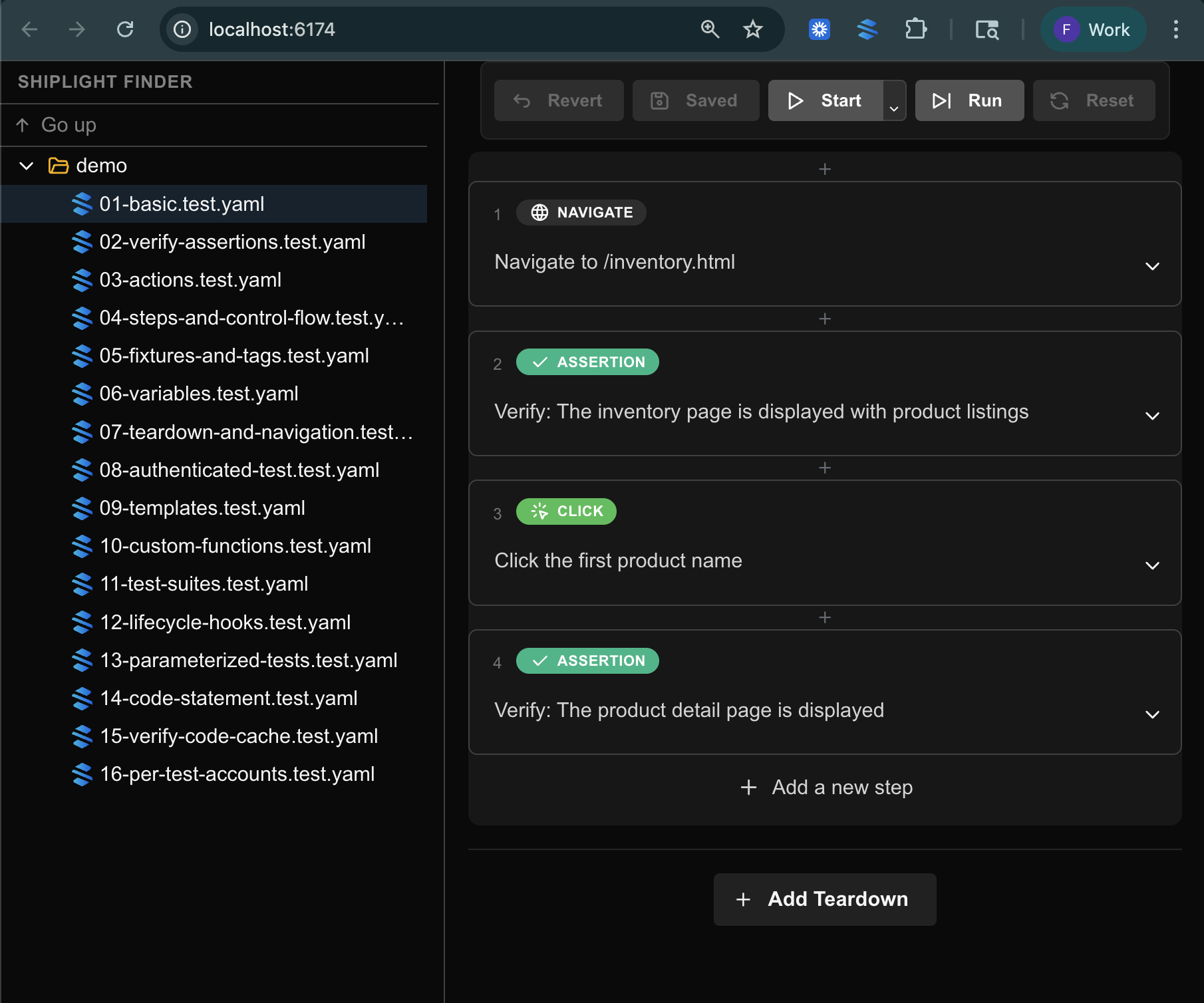
After a run, Shiplight generates an HTML report. We retained the best of [Playwright](https://playwright.dev/) (video recording, trace data) and addressed what was lacking. Instead of cryptic selectors and programmatic steps, reports show natural language steps paired with screenshots.
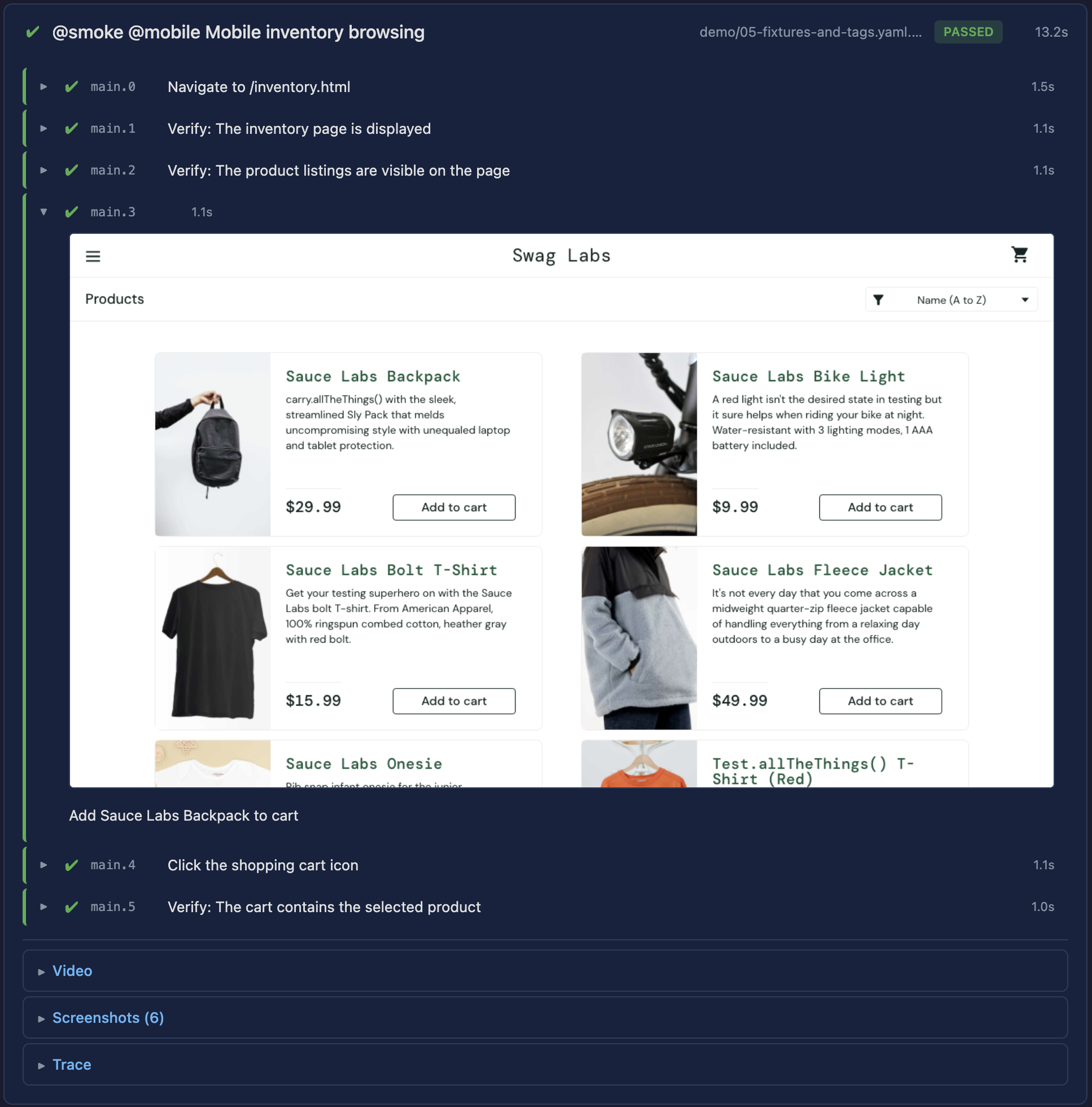
On failure: a screenshot of the actual page state, the expected behavior, and an AI-generated explanation. For example, "Expected a welcome message, but the page displays 'Session Expired'." Readable by anyone on the team without code context.
### Drop Into Your Existing Workflow
Tests are YAML files in the repo. The CLI runs anywhere Node.js runs. GitHub Actions, GitLab CI, CircleCI require minimal configuration: add a step and point it at the test directory.
**Shiplight Cloud** features (scheduled runs, team dashboards, historical trends, hosted reports) are available when needed. But the core loop works entirely with the CLI and existing CI. No lock-in.
## What's Next
A year ago we built a platform to help humans test more productively. Now we are building for a world where one person, operating AI, designs, builds, and verifies a feature in a single session.
The role of testing is not disappearing — it is shifting. The tooling needs to reflect that: verification integrated into the development flow, evidence clear enough to trust without re-doing the work, and tests that maintain themselves as the product evolves.
We are building Shiplight to be that layer.
### Key Takeaways
- **Verify in a real browser during development.** Shiplight's MCP server lets AI coding agents open a browser and validate UI changes before code review — not after deployment.
- **Generate stable regression tests automatically.** Verifications become YAML test files in your repo, building regression coverage as a byproduct of development.
- **Reduce maintenance with AI-driven self-healing.** Intent-based test steps adapt to UI changes automatically. Cached locators keep execution fast; AI resolves only when needed.
- **Enterprise-ready security and deployment.** [SOC 2 Type II](https://www.aicpa-cima.com/topic/audit-assurance/audit-and-assurance-greater-than-soc-2) certified, encrypted data, role-based access, immutable audit logs, and a 99.99% uptime SLA.
- [Quick Start guide](https://docs.shiplight.ai/getting-started/quick-start.html)
- [YAML Test Language Spec](https://github.com/ShiplightAI/examples/blob/main/yaml-examples/YAML-TEST-LANGUAGE-SPEC.md)
- [Shiplight Plugins overview](https://www.shiplight.ai/plugins)
---
### A 30-Day Playbook for Replacing Manual Regression with Agentic E2E Testing
- URL: https://www.shiplight.ai/blog/30-day-agentic-e2e-playbook
- Published: 2026-03-25
- Author: Shiplight AI Team
- Categories: Engineering, Enterprise, Guides, Best Practices
- Markdown: https://www.shiplight.ai/api/blog/30-day-agentic-e2e-playbook/raw
Manual regression testing rarely fails because teams do not care about quality. It fails because it does not scale with product velocity. The moment your UI, permissions, and integrations start changing weekly, the regression checklist becomes a second product that nobody has time to maintain.
Full article
Manual regression testing rarely fails because teams do not care about quality. It fails because it does not scale with product velocity. The test automation ROI case is straightforward: teams that shift from manual regression to automated coverage reduce testing costs by 60-80% while catching regressions earlier — a shift-left testing approach that prevents bugs from reaching staging. The moment your UI, permissions, and integrations start changing weekly, the regression checklist becomes a second product that nobody has time to maintain.
Agentic QA changes the operating model. Instead of treating end-to-end testing as brittle scripts owned by a small QA group, you build intent-based coverage that is readable, reviewable, and resilient as the application evolves. Shiplight AI is designed for exactly that: autonomous agents and no-code tools that help teams scale end-to-end test coverage with near-zero maintenance.
Below is a practical 30-day rollout plan that engineering leaders and QA owners can use to modernize E2E coverage without slowing delivery.
## The goal: make regression a product capability, not a hero effort
A modern regression system has three outcomes:
1. **Coverage grows as the product grows.** New features ship with tests as a default behavior, not a special project.
2. **Failures are actionable.** When something breaks, the team can localize the issue quickly and decide whether it is a product regression or a test that needs adjustment.
3. **Maintenance stays bounded.** UI changes should not trigger a constant rewrite cycle.
Shiplight’s approach starts with tests expressed as *user intent*, then executes them on top of Playwright for speed and reliability, adding an AI layer to reduce brittleness.
## Week 1: Pick the “thin slice” journeys that actually gate releases
Most teams try to automate everything at once. That is how automation initiatives stall. Instead, choose 5 to 10 **mission-critical user journeys** that represent real release risk. Examples:
- Sign up, login, password reset
- Checkout or payment flow
- Role-based access paths (admin vs. member)
- A primary workflow that spans multiple pages and services
Shiplight is built to let teams create tests from natural language, which is useful here because it forces you to define the journey in business terms first.
**Deliverable at the end of Week 1:** a short, shared “release gate list” of journeys with owners and success criteria.
## Week 2: Author readable intent-first tests, then optimize the steps that matter
Shiplight supports YAML test flows written in natural language, designed to stay readable for human review while still running as standard Playwright under the hood.
A minimal test has a goal and a list of statements:
```yaml
goal: Verify user journey
statements:
- intent: Navigate to the application
- intent: Perform the user action
- VERIFY: the expected result
```
In Shiplight’s model, **locators are a cache**. You can start with natural language for clarity, then enrich steps with deterministic locators for speed. If the UI changes, Shiplight can fall back to the natural-language description to find the right element and recover.
In the Test Editor, steps can run in **Fast Mode** (cached selectors, performance-optimized) or **AI Mode** (dynamic evaluation, adaptability). The right pattern for most teams is:
- Use AI Mode for rapid authoring and for steps that commonly shift.
- Convert stable, high-frequency steps to Fast Mode to optimize execution time.
- Keep assertions intent-based so failures stay meaningful.
**Deliverable at the end of Week 2:** your thin-slice journeys automated end to end, readable enough to review in a PR, and stable enough to run repeatedly.
## Week 3: Make tests part of the PR and deployment workflow
Coverage only matters if it runs where decisions get made. Shiplight provides a GitHub Actions integration that runs test suites using a Shiplight API token and suite IDs, and can comment results back on pull requests.
This is the week to introduce two quality gates:
1. **PR gate for critical journeys** (fast feedback, smaller scope)
2. **Scheduled regression gate** (broader coverage, runs daily or pre-release)
If you use preview environments, configure the workflow to pass the preview URL so tests validate the exact artifact under review.
**Deliverable at the end of Week 3:** E2E results are visible in the same place engineers work, and regressions surface before merge, not after release.
## Week 4: Reduce flaky toil with auto-healing and operationalize ownership
UI tests break for two reasons: product regressions and UI drift. A modern system handles both without wasting engineering cycles.
Shiplight’s Test Editor includes **auto-healing behavior**: when a Fast Mode action fails, it can retry in AI Mode to dynamically identify the correct element. In the editor, that change is visible and can be saved or reverted. In cloud execution, it can recover without modifying the test configuration.
At this stage, define ownership and triage rules:
- **Owners by journey**, not by test file
- **A weekly review** of failures: what was real, what was drift, what should become a stronger assertion
- **A standard for test intent**: step descriptions should read like user behavior, not DOM details
If your critical journeys include email verification or magic links, Shiplight also supports email content extraction as part of a test flow, with extracted results stored in variables you can use in subsequent steps.
**Deliverable at the end of Week 4:** fewer “false red builds,” clearer diagnostics, and a steady cadence for expanding coverage beyond the initial thin slice.
## What “enterprise-ready” means in practice
If you operate in a regulated environment, E2E testing needs to meet the same standards as the rest of your tooling. Shiplight positions its enterprise offering around SOC 2 Type II certification and controls like encryption in transit and at rest, role-based access control, and immutable audit logs. It also supports private cloud and VPC deployments and provides a 99.99% uptime SLA.
That matters because quality tooling becomes part of your delivery chain. It needs to be trustworthy, observable, and auditable.
## The takeaway: start small, make it real, then scale
The fastest way to modernize QA is not a grand rewrite. It is a rollout that:
- Automates the journeys that gate releases
- Keeps tests readable in intent-first language
- Optimizes execution where it matters
- Integrates results directly into PR and CI workflows
- Uses auto-healing to keep maintenance bounded
Shiplight’s core promise is simple: ship faster without breaking what users depend on, by letting autonomous agents and practical tooling do the heavy lifting of E2E coverage and upkeep.
## Related Articles
- [intent-cache-heal pattern](https://www.shiplight.ai/blog/intent-cache-heal-pattern)
- [best AI testing tools in 2026](https://www.shiplight.ai/blog/best-ai-testing-tools-2026)
- [PR-ready E2E tests](https://www.shiplight.ai/blog/pr-ready-e2e-test)
## Key Takeaways
- **Verify in a real browser during development.** Shiplight Plugin lets AI coding agents validate UI changes before code review.
- **Generate stable regression tests automatically.** Verifications become YAML test files that self-heal when the UI changes.
- **Reduce maintenance with AI-driven self-healing.** Cached locators keep execution fast; AI resolves only when the UI has changed.
- **Integrate E2E testing into CI/CD as a quality gate.** Tests run on every PR, catching regressions before they reach staging.
## Frequently Asked Questions
### What is AI-native E2E testing?
AI-native E2E testing uses AI agents to create, execute, and maintain browser tests automatically. Unlike traditional test automation that requires manual scripting, AI-native tools like Shiplight interpret natural language intent and self-heal when the UI changes.
### How do self-healing tests work?
Self-healing tests use AI to adapt when UI elements change. Shiplight uses an intent-cache-heal pattern: cached locators provide deterministic speed, and AI resolution kicks in only when a cached locator fails — combining speed with resilience.
### How do you test email and authentication flows end-to-end?
Shiplight supports testing full user journeys including login flows and email-driven workflows. Tests can interact with real inboxes and authentication systems, verifying the complete path from UI to inbox.
### How does E2E testing integrate with CI/CD pipelines?
Shiplight's CLI runs anywhere Node.js runs. Add a single step to GitHub Actions, GitLab CI, or CircleCI — tests execute on every PR or merge, acting as a quality gate before deployment.
## Get Started
- [Try Shiplight Plugin](https://www.shiplight.ai/plugins)
- [Book a demo](https://www.shiplight.ai/demo)
- [YAML Test Format](https://www.shiplight.ai/yaml-tests)
- [Enterprise features](https://www.shiplight.ai/enterprise)
References: [Playwright Documentation](https://playwright.dev), [SOC 2 Type II standard](https://www.aicpa-cima.com/topic/audit-assurance/audit-and-assurance-greater-than-soc-2), [GitHub Actions documentation](https://docs.github.com/en/actions), [Google Testing Blog](https://testing.googleblog.com/)
---
### How to Make E2E Failures Actionable: A Modern Debugging Playbook (With Shiplight AI)
- URL: https://www.shiplight.ai/blog/actionable-e2e-failures
- Published: 2026-03-25
- Author: Shiplight AI Team
- Categories: Engineering, Enterprise, Guides, Best Practices
- Markdown: https://www.shiplight.ai/api/blog/actionable-e2e-failures/raw
End-to-end testing rarely fails because teams do not care about quality. It fails because the feedback loop is broken.
Full article
End-to-end testing rarely fails because teams do not care about quality. It fails because the feedback loop is broken.
A flaky UI test that sometimes passes is not just inconvenient. It is expensive. It trains engineers to ignore red builds, bloats CI time, and turns releases into a negotiation: “Do we trust the failure, or do we ship anyway?”
This post is a practical playbook for turning E2E failures into *actionable signal*. Not “more tests,” not “more dashboards,” not “more heroics.” Just a system that answers three questions fast:
1. **What broke?**
2. **Where did it break?**
3. **What should we do next?**
Shiplight AI is built around that exact loop, from intent-first test authoring to AI-assisted triage and debugging across local, cloud, and CI workflows.
## 1) Start with intent that humans can read (and review)
Actionable failures begin with readable tests. If your test suite is a pile of brittle selectors and framework-specific abstractions, your failures will be brittle too.
Shiplight tests can be written in YAML using natural language statements, including explicit `VERIFY:` assertions. That makes tests reviewable by the whole team, not only the person who wrote the automation.
Here is the basic structure Shiplight documents:
```yaml
goal: Verify user journey
statements:
- intent: Navigate to the application
- intent: Perform the user action
- VERIFY: the expected result
```
In practice, this does something subtle but important: it makes a failure legible. When a test fails, you do not need to reverse-engineer intent from implementation details.
## 2) Make execution fast without making it fragile
Debugging gets painful when every run takes 20 minutes. But speed often comes at a cost: tests become tightly coupled to DOM structure and UI implementation details.
Shiplight’s approach is a hybrid:
- **Natural language steps** can be resolved at runtime by an agent that “looks at the page” and decides what to do.
- Tests can also be **enriched** with explicit Playwright locators for deterministic replay.
- Those locators act as a **cache**, not a hard dependency. If the UI shifts, Shiplight can fall back to the natural language description and recover.
Shiplight also documents that the YAML layer is an authoring layer, and the underlying runner is Playwright with an AI agent on top.
That matters for actionability because it reduces the two biggest E2E taxes:
- The tax of slow feedback
- The tax of constant maintenance after UI changes
## 3) When something breaks, capture evidence that engineers can use
Most E2E tooling fails the moment a test goes red. It gives you a stack trace and a screenshot, then walks away.
Shiplight’s Test Editor includes a debugging workflow designed for investigation, not just execution: step-by-step mode, partial execution, rollback, and a Live View panel with a screenshot gallery, console output, and test context (including variables).
This matters because actionability is not only “why did it fail,” but “can I reproduce it and prove the fix?” A debugger that supports stepping, previewing, and iterating shortens that loop.
## 4) Reduce triage time with AI summaries that point to root cause
Even with good debugging tools, triage time becomes a bottleneck when failures stack up across suites and environments.
Shiplight’s **AI Test Summary** is designed to compress investigation by analyzing failed runs and producing a structured explanation, including root cause analysis, expected vs actual behavior, recommendations, and tagging. The documentation also notes visual context analysis using screenshots.
The goal is not to replace engineering judgment. It is to make the first pass faster, so the team spends time fixing, not deciphering.
## 5) Put actionability where it belongs: in the pull request workflow
E2E tests are most valuable when they act as a release gate, not a nightly report nobody reads.
Shiplight provides a GitHub Actions integration that runs suites from CI using a Shiplight API token and suite and environment IDs. The documented example uses `ShiplightAI/github-action@v1`, supports running on pull requests, and can be configured to comment results back on PRs.
That flow matters because it turns “we should test this” into “this change ships with proof.”
Separately, Shiplight’s results UI is organized around the concept of a *run* as a specific execution of a suite, making it straightforward to review historical executions and filter what you are looking at.
## 6) Test the workflows users actually experience (including email)
For many products, the most failure-prone journeys are not just UI clicks. They are workflows like password resets, magic links, and verification codes.
Shiplight documents an **Email Content Extraction** feature that can read incoming emails and extract verification codes, activation links, or custom content using an LLM-based extractor, without regex-heavy parsing.
For teams trying to build realistic E2E coverage, that is the difference between “we tested the happy path” and “we tested the whole journey.”
## 7) Enterprise readiness: security and deployment options
Quality tooling touches sensitive surfaces: credentials, production-like environments, and mission-critical workflows. Shiplight positions its enterprise offering around SOC 2 Type II certification, encryption in transit and at rest, role-based access control, immutable audit logs, and a 99.99% uptime SLA, along with private cloud and VPC deployment options.
(For legal and corporate context, Shiplight’s Terms identify the company as Loggia AI, Inc. doing business as Shiplight AI.)
## Where to start
If your team wants more reliable releases without adding a maintenance burden, start with one principle: **every failure must pay for itself with clear next steps**.
Shiplight’s workflow is built to make that practical: intent-first tests, Playwright-based execution, self-healing locator caching, deep debugging tools, AI summaries, and CI integrations that bring results back to the PR.
When you are ready, Shiplight’s team offers demos directly from the site.
## Related Articles
- [intent-cache-heal pattern](https://www.shiplight.ai/blog/intent-cache-heal-pattern)
- [modern E2E workflow](https://www.shiplight.ai/blog/modern-e2e-workflow)
- [TestOps playbook](https://www.shiplight.ai/blog/testops-playbook)
## Key Takeaways
- **Generate stable regression tests automatically.** Verifications become YAML test files that self-heal when the UI changes.
- **Reduce maintenance with AI-driven self-healing.** Cached locators keep execution fast; AI resolves only when the UI has changed.
- **Integrate E2E testing into CI/CD as a quality gate.** Tests run on every PR, catching regressions before they reach staging.
- **Enterprise-ready security and deployment.** SOC 2 Type II certified, encrypted data, RBAC, audit logs, and a 99.99% uptime SLA.
## Frequently Asked Questions
### How do self-healing tests work?
Self-healing tests use AI to adapt when UI elements change. Shiplight uses an intent-cache-heal pattern: cached locators provide deterministic speed, and AI resolution kicks in only when a cached locator fails — combining speed with resilience.
### How do you test email and authentication flows end-to-end?
Shiplight supports testing full user journeys including login flows and email-driven workflows. Tests can interact with real inboxes and authentication systems, verifying the complete path from UI to inbox.
### How does E2E testing integrate with CI/CD pipelines?
Shiplight's CLI runs anywhere Node.js runs. Add a single step to GitHub Actions, GitLab CI, or CircleCI — tests execute on every PR or merge, acting as a quality gate before deployment.
### Is Shiplight enterprise-ready?
Yes. Shiplight is SOC 2 Type II certified with encrypted data in transit and at rest, role-based access control, immutable audit logs, and a 99.99% uptime SLA. Private cloud and VPC deployment options are available.
## Get Started
- [Try Shiplight Plugin](https://www.shiplight.ai/plugins)
- [Book a demo](https://www.shiplight.ai/demo)
- [YAML Test Format](https://www.shiplight.ai/yaml-tests)
- [Enterprise features](https://www.shiplight.ai/enterprise)
References: [Playwright Documentation](https://playwright.dev), [SOC 2 Type II standard](https://www.aicpa-cima.com/topic/audit-assurance/audit-and-assurance-greater-than-soc-2), [GitHub Actions documentation](https://docs.github.com/en/actions), [Google Testing Blog](https://testing.googleblog.com/)
---
### The Practical Buyer’s Guide to AI-Native E2E Testing (and What Shiplight AI Gets Right)
- URL: https://www.shiplight.ai/blog/ai-native-e2e-buyers-guide
- Published: 2026-03-25
- Author: Shiplight AI Team
- Categories: Engineering, Enterprise, Guides, Best Practices
- Markdown: https://www.shiplight.ai/api/blog/ai-native-e2e-buyers-guide/raw
Modern release velocity has broken the old QA contract.
Full article
Modern release velocity has broken the old QA contract.
Teams ship UI changes daily. AI coding agents can generate large diffs in minutes. Meanwhile, traditional end-to-end automation still tends to fail in the same two places: it is slow to author, and expensive to maintain once the UI inevitably shifts.
That gap is exactly where "AI-native testing" should help. In practice, many tools stop at test generation and leave teams with the same operational burden: brittle selectors, flaky assertions, and debugging workflows that pull engineers out of flow.
If you are evaluating an AI-powered E2E platform, here is a practical checklist of capabilities that matter in production, plus how Shiplight AI approaches each one.
## 1) Verification has to live where code is written, not after it ships
The biggest shift is not "AI writes tests." It is "verification happens inside the development loop."
Shiplight is built to connect directly to AI coding agents via [Shiplight Plugin](https://www.shiplight.ai/plugins), so your agent can open a real browser, validate a change, and then turn that verification into durable regression coverage. The goal is simple: catch issues before review and merge, not after release.
**What to look for:** tight feedback loops, browser-based verification (not screenshots alone), and a workflow that does not require a separate QA handoff.
## 2) Tests should be readable enough to review, but grounded enough to run deterministically
If E2E coverage is going to scale across a team, test intent needs to be understandable by more than the one person who wrote the script six months ago.
Shiplight’s local workflow uses YAML test flows written in natural language, with a clear structure: a `goal`, a starting `url`, and a list of `statements` that read like user intent. The same YAML tests can run locally with Playwright, using `npx playwright test`, alongside existing `.test.ts` files.
A simple example looks like this:
```yaml
goal: Verify user journey
statements:
- intent: Navigate to the application
- intent: Perform the user action
- VERIFY: the expected result
```
**What to look for:** a format that stays human-reviewable in PRs, but does not rely on "best-effort AI" for every step on every run.
## 3) Self-healing only matters if it preserves speed and determinism
Most teams do not mind a tool that can "figure it out" once. They mind a tool that has to "figure it out" every time.
Shiplight’s approach is pragmatic: locators can be treated as a performance cache. Tests can replay quickly using deterministic actions with explicit locators, but when the UI changes and a cached locator becomes stale, the agentic layer can fall back to the natural-language intent to find the right element.
This is also where Shiplight’s positioning around intent-based execution matters: the test is expressed as user intent, rather than being permanently coupled to brittle selectors.
**What to look for:** self-healing that reduces maintenance without turning every run into a slow, non-deterministic exploration.
## 4) The real "hard parts" of E2E are auth and email, so your platform should treat them as first-class
A surprising number of E2E programs fail not because clicking buttons is hard, but because the workflows are real.
Two examples:
### Authenticated apps
Shiplight’s MCP UI Verifier docs recommend a simple, production-friendly pattern: log in once manually, save session state, and let the agent reuse it so you do not re-authenticate on every verification run. Shiplight stores the state locally so future sessions can restore it.
### Email-driven flows
Shiplight also supports email content extraction for tests, designed to pull verification codes, activation links, or other structured content from incoming emails using an LLM-based extractor, without regex-heavy harnesses.
**What to look for:** explicit support for the flows you actually ship: SSO, 2FA, magic links, onboarding sequences, and transactional email.
## 5) Great tooling reduces context switching, not just test-writing time
Even strong automation fails if debugging is painful.
Shiplight supports a VS Code Extension designed to create, run, and debug `.test.yaml` files with an interactive visual debugger inside the editor. It is built to let you step through statements, inspect and edit action entities inline, and iterate quickly.
For teams that want a local, interactive environment without relying on cloud browser sessions, Shiplight also offers a native macOS desktop app that loads the Shiplight web UI while running the browser sandbox and AI agent worker locally.
**What to look for:** fast local iteration, IDE-native workflows, and debugging that feels like engineering, not archaeology.
## 6) CI integration is table stakes; actionable signal is the differentiator
A testing platform is only as valuable as the signal it produces when something breaks.
Shiplight Cloud includes test management and execution capabilities, and it integrates with CI, including a documented GitHub Actions integration that uses API tokens, suite and environment IDs, and standard GitHub secrets.
When failures happen, Shiplight’s AI Test Summary is designed to analyze failed results and produce root-cause identification, human-readable explanations, and visual context analysis based on screenshots.
**What to look for:** failure output that shortens time to diagnosis, not just a red build badge and a screenshot dump.
## 7) Enterprise readiness should be explicit, not implied
If E2E testing touches production-like data, credentials, or regulated workflows, "security later" is not a plan.
Shiplight positions its enterprise offering around SOC 2 Type II certification, encryption in transit and at rest, role-based access control, and immutable audit logs. It also lists a 99.99% uptime SLA and supports integrations across CI and common collaboration tools.
**What to look for:** clear compliance posture, access controls, auditability, and an availability story that matches how mission-critical E2E becomes.
## A final way to think about it: the platform should scale with your velocity
The promise of AI-native development is speed. The risk is shipping regressions faster.
Shiplight’s core bet is that verification should be continuous, agent-compatible, and resilient by design: validate changes in a real browser during development, convert that work into regression coverage, and keep the suite stable as the UI evolves.
If your current E2E program feels like a maintenance tax, the right evaluation question is not "Can this tool generate tests?" It is: **"Can this tool keep tests valuable six months from now, when the product has changed?"**
## Related Articles
- [best AI testing tools compared](https://www.shiplight.ai/blog/best-ai-testing-tools-2026)
- [intent-cache-heal pattern](https://www.shiplight.ai/blog/intent-cache-heal-pattern)
- [Playwright alternatives for no-code testing](https://www.shiplight.ai/blog/playwright-alternatives-no-code-testing)
## Key Takeaways
- **Verify in a real browser during development.** Shiplight Plugin lets AI coding agents validate UI changes before code review.
- **Generate stable regression tests automatically.** Verifications become YAML test files that self-heal when the UI changes.
- **Reduce maintenance with AI-driven self-healing.** Cached locators keep execution fast; AI resolves only when the UI has changed.
- **Enterprise-ready security and deployment.** SOC 2 Type II certified, encrypted data, RBAC, audit logs, and a 99.99% uptime SLA.
## Frequently Asked Questions
### What is AI-native E2E testing?
AI-native E2E testing uses AI agents to create, execute, and maintain browser tests automatically. Unlike traditional test automation that requires manual scripting, AI-native tools like Shiplight interpret natural language intent and self-heal when the UI changes.
### How do self-healing tests work?
Self-healing tests use AI to adapt when UI elements change. Shiplight uses an intent-cache-heal pattern: cached locators provide deterministic speed, and AI resolution kicks in only when a cached locator fails — combining speed with resilience.
### What is MCP testing?
MCP (Model Context Protocol) lets AI coding agents connect to external tools. Shiplight Plugin enables agents in Claude Code, Cursor, or Codex to open a real browser, verify UI changes, and generate tests during development.
### How do you test email and authentication flows end-to-end?
Shiplight supports testing full user journeys including login flows and email-driven workflows. Tests can interact with real inboxes and authentication systems, verifying the complete path from UI to inbox.
## Get Started
- [Try Shiplight Plugin](https://www.shiplight.ai/plugins)
- [Book a demo](https://www.shiplight.ai/demo)
- [YAML Test Format](https://www.shiplight.ai/yaml-tests)
- [Enterprise features](https://www.shiplight.ai/enterprise)
References: [Playwright Documentation](https://playwright.dev), [SOC 2 Type II standard](https://www.aicpa-cima.com/topic/audit-assurance/audit-and-assurance-greater-than-soc-2), [Google Testing Blog](https://testing.googleblog.com/)
---
### The AI Coding Era Needs an AI-Native QA Loop (and How to Build One)
- URL: https://www.shiplight.ai/blog/ai-native-qa-loop
- Published: 2026-03-25
- Author: Shiplight AI Team
- Categories: Engineering, Guides, Best Practices
- Markdown: https://www.shiplight.ai/api/blog/ai-native-qa-loop/raw
AI coding agents have changed the shape of software delivery. Features ship faster, pull requests multiply, and UI changes happen continuously. But one thing has not magically sped up with the rest of the stack: confidence.
Full article
AI coding agents have changed the shape of software delivery. Features ship faster, pull requests multiply, and UI changes happen continuously. But one thing has not magically sped up with the rest of the stack: confidence.
Most teams still rely on a mix of unit tests, a handful of brittle end-to-end scripts, and human spot checks that happen when someone has time. That model breaks down when development velocity is no longer limited by humans writing code. It is limited by humans proving the code works.
Shiplight AI was built for this moment: agentic end-to-end testing that keeps up with AI-driven development. It connects to modern coding agents via [Shiplight Plugin](https://www.shiplight.ai/plugins), validates changes in a real browser, and turns those verifications into maintainable, intent-based tests that require near-zero maintenance.
This post outlines a practical, developer-friendly approach to building an AI-native QA loop, starting locally and scaling to CI and cloud execution.
## Why traditional E2E testing struggles at AI velocity
End-to-end testing has always been the “truth layer” for user journeys, but it comes with predictable failure modes:
- **Tests are hard to author and harder to maintain.** Most frameworks require scripting expertise and careful selector work.
- **Selectors do not survive product iteration.** UI refactors, renamed buttons, and layout changes routinely break tests even when the user journey still works.
- **Failures create noise instead of decisions.** A broken E2E run often produces logs, not diagnosis.
AI-assisted development amplifies each problem. When the UI evolves daily, test upkeep becomes a tax that grows with every release.
Shiplight’s approach is to keep tests expressed as **intent**, not implementation details, and to pair that with an autonomous layer that can verify behavior directly in a browser.
## What Shiplight is (in plain terms)
Shiplight is an agentic QA platform for end-to-end testing that:
- Runs on top of **Playwright**, with a natural-language layer above it.
- Lets teams create tests by describing user flows in **plain English**, then refine them visually.
- Uses **intent-based execution** and **self-healing** to stay resilient when UIs change.
- Offers multiple ways to adopt it, including:
- **Shiplight Plugin** for AI coding agents
- **Shiplight Cloud** for team-wide test management, scheduling, and reporting
- **AI SDK** to extend existing Playwright suites with AI-native stabilization
- A **Desktop App** with a local browser sandbox and bundled MCP server
- A **VS Code Extension** for visual debugging of YAML tests
You can even get started without handing over codebase access. Shiplight’s onboarding flow emphasizes starting from your application URL and a test account, then expanding coverage from there.
## The AI-native QA loop: Verify, codify, operationalize
### 1) Verify changes in a real browser, directly from your coding agent
The fastest way to close the confidence gap is to remove the “context switch” between coding and validation.
Shiplight’s Shiplight Plugin is designed to work with AI coding agents so the agent can implement a feature, open a browser, and verify the UI change as part of the same workflow. For example, Shiplight’s documentation includes a quick start path for adding the Shiplight Plugin to Claude Code, as well as configuration patterns for Cursor and Windsurf.
The key is not the tooling detail. It is the workflow shift:
- Your agent writes code.
- Your agent verifies behavior in a browser.
- Verification becomes repeatable coverage, not a one-time check.
This is where quality starts to scale with velocity instead of fighting it.
### 2) Turn verification into durable tests using YAML that stays readable
Shiplight tests can be written as YAML “test flows” using natural language statements. The format is designed to be readable in code review, approachable for non-specialists, and flexible enough for real-world journeys, including step groups, conditionals, loops, and teardown steps.
A minimal example looks like this:
```yaml
goal: Verify user journey
statements:
- intent: Navigate to the application
- intent: Perform the user action
- VERIFY: the expected result
```
When you want speed and determinism, Shiplight also supports “enriched” steps that include Playwright-style locators such as `getByRole(...)`. Importantly, Shiplight treats these locators as a **cache**, not a fragile dependency. If the UI changes and a cached locator goes stale, Shiplight can fall back to the natural language intent to recover.
That design choice matters because it means your tests are no longer hostage to DOM churn. Your suite stays aligned to user intent while execution remains fast when the cached path is valid.
### 3) Operationalize coverage in CI with real reporting and AI diagnosis
Once you have durable flows, the next challenge is operational: running the right suites, in the right environment, at the right time, with outputs your team can act on.
Shiplight Cloud adds the pieces teams typically have to assemble themselves:
- Test suite organization, environments, and scheduled runs
- Cloud execution and parallelism
- Dashboards, results history, and automated reporting
- AI-generated summaries of test results, including multimodal analysis when screenshots are available
For CI, Shiplight provides a GitHub Actions integration that can run one or many suites against a specific environment and report results back to the workflow.
When failures happen, Shiplight’s AI Summary is designed to turn “a wall of logs” into something closer to a diagnosis: what failed, where it failed, what the UI looked like at the failure point, and recommended next steps.
This is where E2E becomes a decision system, not just a gate.
## Choosing the right adoption path (without boiling the ocean)
Different teams adopt Shiplight from different starting points. A practical way to choose:
- **If you are building with AI coding agents:** start with the **Shiplight Plugin** so verification is part of the development loop.
- **If you need team visibility and consistent execution:** add **Shiplight Cloud** for suites, schedules, dashboards, and cloud runners.
- **If you already have Playwright tests you want to keep in code:** use the **Shiplight AI SDK**, which is positioned as an extension to your existing framework rather than a replacement.
- **If you want a local-first, fully integrated experience:** the **Desktop App** runs the full Shiplight UI locally, includes a headed browser sandbox for debugging, and bundles an MCP server so your IDE can connect without installing the npm MCP package separately.
- **If you want tight authoring and debugging in your editor:** the **VS Code Extension** provides an interactive visual debugger for `*.test.yaml` files, with step-through execution and inline editing.
The common thread is that you can start small, prove value quickly, and expand coverage without committing to a brittle rewrite.
## Quality that scales with shipping speed
AI is accelerating delivery. The teams that win will be the ones who treat QA as a system that scales with that acceleration, not a human bottleneck that gets squeezed harder every sprint.
Shiplight’s core promise is simple: **ship faster, break nothing**, by putting agentic testing where it belongs, inside the development loop, backed by intent-based execution that is designed to survive constant UI change.
## Related Articles
- [locators are a cache](https://www.shiplight.ai/blog/locators-are-a-cache)
- [two-speed E2E strategy](https://www.shiplight.ai/blog/two-speed-e2e-strategy)
- [best AI testing tools in 2026](https://www.shiplight.ai/blog/best-ai-testing-tools-2026)
## Key Takeaways
- **Verify in a real browser during development.** Shiplight Plugin lets AI coding agents validate UI changes before code review.
- **Generate stable regression tests automatically.** Verifications become YAML test files that self-heal when the UI changes.
- **Reduce maintenance with AI-driven self-healing.** Cached locators keep execution fast; AI resolves only when the UI has changed.
- **Test complete user journeys including email and auth.** Cover login flows, email-driven workflows, and multi-step paths end-to-end.
## Frequently Asked Questions
### What is AI-native E2E testing?
AI-native E2E testing uses AI agents to create, execute, and maintain browser tests automatically. Unlike traditional test automation that requires manual scripting, AI-native tools like Shiplight interpret natural language intent and self-heal when the UI changes.
### How do self-healing tests work?
Self-healing tests use AI to adapt when UI elements change. Shiplight uses an intent-cache-heal pattern: cached locators provide deterministic speed, and AI resolution kicks in only when a cached locator fails — combining speed with resilience.
### What is MCP testing?
MCP (Model Context Protocol) lets AI coding agents connect to external tools. Shiplight Plugin enables agents in Claude Code, Cursor, or Codex to open a real browser, verify UI changes, and generate tests during development.
### How do you test email and authentication flows end-to-end?
Shiplight supports testing full user journeys including login flows and email-driven workflows. Tests can interact with real inboxes and authentication systems, verifying the complete path from UI to inbox.
## Get Started
- [Try Shiplight Plugin](https://www.shiplight.ai/plugins)
- [Book a demo](https://www.shiplight.ai/demo)
- [YAML Test Format](https://www.shiplight.ai/yaml-tests)
- [Shiplight Plugin](https://www.shiplight.ai/plugins)
References: [Playwright Documentation](https://playwright.dev), [Google Testing Blog](https://testing.googleblog.com/)
---
### Choosing the Right AI Testing Workflow: A Practical Guide to Shiplight AI for Every Team
- URL: https://www.shiplight.ai/blog/choosing-ai-testing-workflow
- Published: 2026-03-25
- Author: Shiplight AI Team
- Categories: Engineering, Enterprise, Guides, Best Practices
- Markdown: https://www.shiplight.ai/api/blog/choosing-ai-testing-workflow/raw
End-to-end testing has always lived in tension with speed. Product teams want confident releases, but traditional UI automation can turn into a second codebase: brittle selectors, flaky runs, slow triage, and a never-ending queue of “fix the tests” work.
Full article
End-to-end testing has always lived in tension with speed. Product teams want confident releases, but traditional UI automation can turn into a second codebase: brittle selectors, flaky runs, slow triage, and a never-ending queue of “fix the tests” work.
What’s changed is not just the toolchain, but the way software gets built. More teams are shipping with AI assistance, iterating faster, and touching more surface area per release. That velocity exposes a simple truth: quality cannot be a phase. It has to be a system that scales with how you develop.
Shiplight AI is designed around that reality, with multiple “entry points” depending on how your team works: local, in-repo YAML tests; a cloud platform for full TestOps; an AI SDK that upgrades existing Playwright suites; and an Shiplight Plugin built to work alongside AI coding agents. The goal is the same in every case: expand E2E coverage while driving maintenance toward zero.
Below is a practical guide to choosing the right workflow, plus a rollout path that avoids big-bang rewrites.
## Start with a simple question: where should quality live?
Most teams evaluate testing tools by feature checklists. A better filter is workflow ownership:
- **If quality lives in the repo**, you want tests that are readable, reviewable, and easy to run locally.
- **If quality lives in a platform**, you want suites, schedules, dashboards, and CI wiring that make results operational.
- **If quality lives in the agent loop**, you want the coding agent to verify changes in a real browser and automatically turn that work into durable regression coverage.
Shiplight supports all three, which matters because teams rarely stay in one mode forever.
## Path 1: Local-first teams who want tests in the repo
If your team’s default posture is “tests are code,” Shiplight’s local workflow is built for you: tests are written in YAML using natural language steps and stored alongside application code.
A Shiplight YAML test has a straightforward structure (goal, starting URL, a list of statements, and optional teardown). The key is that statements can begin as plain-English intent, then be enriched into faster, deterministic actions when you want performance.
For day-to-day authoring and debugging, Shiplight also provides a **VS Code Extension** that lets you step through YAML tests interactively, edit steps, and re-run without switching browser tabs.
**When this path is a fit:**
- You want tests to be reviewed like any other change.
- Developers want tight local feedback loops.
- You prefer portability and minimal platform dependency.
## Path 2: Teams that need full TestOps (suites, schedules, reporting)
When testing becomes a team sport, execution and visibility matter as much as authoring. Shiplight Cloud is designed as a full test management and execution platform: organize suites, schedule runs, and track results centrally.
Two specific advantages show up once you have meaningful coverage:
1.
**AI summaries that accelerate triage.** Shiplight can generate an AI Test Summary for failed results, including root cause analysis, expected vs actual behavior, and recommendations. It can also analyze screenshots when available to detect UI-level issues like missing elements or layout problems.
1.
**A pragmatic model for speed vs adaptability.** In the Test Editor, Shiplight supports a Fast Mode that uses cached actions and a Dynamic “AI Mode” that evaluates intent against the live browser state. When Fast Mode fails, Shiplight can retry using AI Mode to recover, providing resilience without forcing everything to run “slow and smart” all the time.
**When this path is a fit:**
- You need scheduled regressions, suite health tracking, and operational reporting.
- Non-engineering stakeholders contribute to test coverage.
- You want results to function as a release gate, not a wall of logs.
## Path 3: Playwright-heavy teams that want an upgrade, not a migration
Many organizations have already standardized on Playwright. The problem is not the framework. It is the maintenance burden that grows with UI complexity.
Shiplight’s **AI SDK** is positioned as an extension, not a replacement: tests stay in code and follow your existing repository structure and review workflows, while Shiplight adds AI-native execution and stabilization on top.
**When this path is a fit:**
- You have meaningful Playwright coverage and want it to stay first-class.
- You need programmatic control, fixtures, helpers, and custom test logic.
- You want AI-assisted reliability without moving to a no-code model.
## Path 4: AI-native dev teams that want a closed loop between PRs and real browsers
If you are shipping with AI coding agents, the biggest risk is not code generation. It is unverified behavior.
Shiplight’s **Shiplight Plugin** is designed to sit directly in the AI development workflow. As an agent builds features and opens PRs, Shiplight can ingest context (requirements, code changes, and runtime signals), validate user journeys in a real browser, generate E2E tests, and feed failure diagnostics back to the agent to close the remediation loop.
**When this path is a fit:**
- You want your AI coding agent to verify UI changes as part of development.
- You need quality to scale with code velocity, without adding headcount.
- You want regression coverage to grow automatically as features ship.
## A rollout plan that avoids the “rewrite everything” trap
Most teams do best with an incremental adoption sequence:
1. **Pick three revenue-critical flows.** Login, checkout, upgrade, core onboarding, whatever would hurt if it broke.
2. **Author in intent first, then optimize selectively.** Start with natural-language steps for speed of creation, then convert stable portions to faster deterministic actions where it pays off.
3. **Wire execution into CI.** Shiplight provides a GitHub Actions integration that can run suites, post PR comments, and expose outputs your workflow can gate on.
4. **Expand coverage to “real-world E2E,” including email.** For flows like verification codes and magic links, Shiplight includes Email Content Extraction so tests can read incoming emails and extract the content you need using natural language instructions.
This sequence keeps momentum high: you get real protection early, without asking the team to restructure how it ships.
## Where Shiplight fits best
Shiplight is not trying to be just another recorder or a brittle wrapper around selectors. The product is built around a more durable abstraction: test intent that remains readable to humans, while execution can shift between fast deterministic replay and AI-driven adaptability as the UI evolves.
If you are ready to turn E2E from a maintenance burden into a scalable quality system, Shiplight gives you multiple paths to get there, and a clear way to grow from local workflows to CI gates, cloud execution, and AI-agent validation.
## Related Articles
- [Shiplight adoption guide](https://www.shiplight.ai/blog/shiplight-adoption-guide)
- [best AI testing tools in 2026](https://www.shiplight.ai/blog/best-ai-testing-tools-2026)
- [Shiplight vs testRigor](https://www.shiplight.ai/blog/shiplight-vs-testrigor)
## Key Takeaways
- **Verify in a real browser during development.** Shiplight Plugin lets AI coding agents validate UI changes before code review.
- **Generate stable regression tests automatically.** Verifications become YAML test files that self-heal when the UI changes.
- **Reduce maintenance with AI-driven self-healing.** Cached locators keep execution fast; AI resolves only when the UI has changed.
- **Integrate E2E testing into CI/CD as a quality gate.** Tests run on every PR, catching regressions before they reach staging.
## Frequently Asked Questions
### What is AI-native E2E testing?
AI-native E2E testing uses AI agents to create, execute, and maintain browser tests automatically. Unlike traditional test automation that requires manual scripting, AI-native tools like Shiplight interpret natural language intent and self-heal when the UI changes.
### How do self-healing tests work?
Self-healing tests use AI to adapt when UI elements change. Shiplight uses an intent-cache-heal pattern: cached locators provide deterministic speed, and AI resolution kicks in only when a cached locator fails — combining speed with resilience.
### What is MCP testing?
MCP (Model Context Protocol) lets AI coding agents connect to external tools. Shiplight Plugin enables agents in Claude Code, Cursor, or Codex to open a real browser, verify UI changes, and generate tests during development.
### How do you test email and authentication flows end-to-end?
Shiplight supports testing full user journeys including login flows and email-driven workflows. Tests can interact with real inboxes and authentication systems, verifying the complete path from UI to inbox.
## Get Started
- [Try Shiplight Plugin](https://www.shiplight.ai/plugins)
- [Book a demo](https://www.shiplight.ai/demo)
- [YAML Test Format](https://www.shiplight.ai/yaml-tests)
- [Shiplight Plugin](https://www.shiplight.ai/plugins)
References: [Playwright Documentation](https://playwright.dev), [GitHub Actions documentation](https://docs.github.com/en/actions), [Google Testing Blog](https://testing.googleblog.com/)
---
### The E2E Coverage Ladder: How AI-Native Teams Build Regression Safety Without Living in Test Maintenance
- URL: https://www.shiplight.ai/blog/e2e-coverage-ladder
- Published: 2026-03-25
- Author: Shiplight AI Team
- Categories: Engineering, Enterprise, Guides, Best Practices
- Markdown: https://www.shiplight.ai/api/blog/e2e-coverage-ladder/raw
AI coding agents have changed the economics of shipping. When implementation gets faster, two things happen immediately: the surface area of change expands, and the cost of missing regressions climbs. The bottleneck moves from “can we build it?” to “can we prove it works?”
Full article
AI coding agents have changed the economics of shipping. When implementation gets faster, two things happen immediately: the surface area of change expands, and the cost of missing regressions climbs. The bottleneck moves from “can we build it?” to “can we prove it works?”
That is the gap Shiplight AI is built to close. Shiplight positions itself as a verification platform for AI-native development: it plugs into your coding agent to verify changes in a real browser during development, then turns those verifications into stable regression tests designed for near-zero maintenance.
For teams trying to modernize QA without slowing engineering, the most practical way to think about adoption is not “pick a tool.” It is to climb a coverage ladder, where each rung converts more of what you already do (manual checks, PR reviews, release spot-checks) into durable, automated proof.
Below is a field-ready model for building that ladder with Shiplight.
## Rung 1: Put verification inside the development loop (not after the merge)
If your “testing” starts after code review, you are already too late. The cheapest place to catch a regression is while the change is still fresh in the developer’s mind and context.
Shiplight’s MCP (Model Context Protocol) workflow is designed for that moment. In Shiplight’s docs, the quick start is explicit: you add the Shiplight Plugin, then ask your coding agent to validate UI changes in a real browser.
Two details matter for real-world rollout:
- **Browser automation can work without API keys**, so teams can start verifying flows without first finishing procurement or platform decisions.
- **AI-powered actions require an API key** (Google or Anthropic), and Shiplight can auto-detect the model based on the key you provide.
**Outcome of this rung:** developers stop “hoping” a UI change works and start verifying it as part of building.
## Rung 2: Turn what you verified into a readable, reviewable test artifact
The moment verification becomes repeatable, it becomes leverage. Shiplight’s local testing model uses YAML “test flows” with a simple, auditable structure: `goal`, `url`, and `statements` (plus optional `teardown`).
Where this gets interesting is how Shiplight supports both speed and determinism:
- You can start with **natural-language steps** that the web agent resolves at runtime.
- Then Shiplight can **enrich** those steps with explicit locators (for deterministic replay) after you explore the UI with browser automation tools.
- Deterministic “ACTION” statements are documented as replaying fast (about one second) without AI.
- “VERIFY” statements are described as AI-powered assertions.
Here is a simplified example that matches Shiplight’s documented YAML conventions:
```yaml
goal: Verify user journey
statements:
- intent: Navigate to the application
- intent: Perform the user action
- VERIFY: the expected result
```
And when you need test data to be portable across environments, Shiplight’s docs show a variables pattern using `{{VAR_NAME}}`, which becomes `process.env.VAR_NAME` in generated code at transpile time.
**Outcome of this rung:** tests become easy to review, version, and evolve alongside product work, instead of living as brittle scripts only one person understands.
## Rung 3: Make debugging fast enough that teams actually do it
Even great tests fail. The question is whether failure investigation takes minutes or burns half a day.
Shiplight supports two workflows that reduce the “context switching tax”:
### 1) VS Code Extension (developer-native debugging)
Shiplight’s VS Code Extension is positioned as a way to create, run, and debug `*.test.yaml` files using an interactive visual debugger inside VS Code. It supports stepping through statements, inspecting and editing action entities inline, and rerunning quickly.
The same page documents a concrete onboarding path: install the Shiplight CLI via npm, add an AI provider key via a `.env`, then debug via the command palette.
### 2) Desktop App (local, headed debugging without cloud latency)
Shiplight Desktop is documented as a native macOS app that loads the Shiplight web UI while running the browser sandbox and AI agent worker locally. It stores AI provider keys in macOS Keychain and can bundle a built-in MCP server so IDEs can connect without installing the npm MCP package separately.
**Outcome of this rung:** the team stops treating E2E as fragile and slow, and starts treating it as a normal part of engineering workflow.
## Rung 4: Promote regression tests into CI gates that teams trust
Once you have durable tests, you need them to run at the moments that matter: on pull requests, on preview deployments, and before release.
Shiplight documents a GitHub Actions integration that uses `ShiplightAI/github-action@v1`. The setup includes creating a Shiplight API token in the app, storing it as a GitHub secret (`SHIPLIGHT_API_TOKEN`), and running suites by ID against an environment ID.
This is the rung where quality becomes enforceable, not aspirational.
**Outcome of this rung:** regressions get caught as part of delivery, not after customers see them.
## Rung 5: Add enterprise controls without slowing down the builders
For larger organizations, verification is not only a productivity concern. It is also a security and governance concern.
Shiplight’s enterprise page states SOC 2 Type II certification and claims encryption in transit and at rest, role-based access control, and immutable audit logs. It also lists a 99.99% uptime SLA and positions private cloud and VPC deployments as options.
**Outcome of this rung:** quality scales across teams and environments, with controls that satisfy security and compliance requirements.
## A practical rollout plan (that does not require a testing rebuild)
If you want to operationalize this without a months-long “QA transformation,” keep it tight:
1. **Pick 3 user journeys that cause real pain** (revenue, auth, onboarding, upgrade).
2. **Verify them inside the development loop** using Shiplight Plugin, and save what you learn as YAML flows.
3. **Standardize debugging** in VS Code or Desktop so failures become routine to fix.
4. **Wire suites into CI** for pull requests, then expand coverage sprint by sprint.
5. **Only then** layer enterprise governance and deployment requirements, once you have signal worth governing.
## Why this model works for AI-native development
AI accelerates output. Verification has to scale faster than output, or quality collapses.
Shiplight’s core idea is to make verification a first-class part of building: agent-connected browser validation first, then stable regression coverage that grows naturally as you ship.
If you want to see what the ladder looks like in your product, the next step is simple: start with one mission-critical flow, verify it in a real browser, and convert it into a durable test you can run on every PR.
## Related Articles
- [30-day agentic E2E playbook](https://www.shiplight.ai/blog/30-day-agentic-e2e-playbook)
- [requirements to E2E coverage](https://www.shiplight.ai/blog/requirements-to-e2e-coverage)
- [modern E2E workflow](https://www.shiplight.ai/blog/modern-e2e-workflow)
## Key Takeaways
- **Verify in a real browser during development.** Shiplight Plugin lets AI coding agents validate UI changes before code review.
- **Generate stable regression tests automatically.** Verifications become YAML test files that self-heal when the UI changes.
- **Reduce maintenance with AI-driven self-healing.** Cached locators keep execution fast; AI resolves only when the UI has changed.
- **Integrate E2E testing into CI/CD as a quality gate.** Tests run on every PR, catching regressions before they reach staging.
## Frequently Asked Questions
### What is AI-native E2E testing?
AI-native E2E testing uses AI agents to create, execute, and maintain browser tests automatically. Unlike traditional test automation that requires manual scripting, AI-native tools like Shiplight interpret natural language intent and self-heal when the UI changes.
### How do self-healing tests work?
Self-healing tests use AI to adapt when UI elements change. Shiplight uses an intent-cache-heal pattern: cached locators provide deterministic speed, and AI resolution kicks in only when a cached locator fails — combining speed with resilience.
### What is MCP testing?
MCP (Model Context Protocol) lets AI coding agents connect to external tools. Shiplight Plugin enables agents in Claude Code, Cursor, or Codex to open a real browser, verify UI changes, and generate tests during development.
### How do you test email and authentication flows end-to-end?
Shiplight supports testing full user journeys including login flows and email-driven workflows. Tests can interact with real inboxes and authentication systems, verifying the complete path from UI to inbox.
## Get Started
- [Try Shiplight Plugin](https://www.shiplight.ai/plugins)
- [Book a demo](https://www.shiplight.ai/demo)
- [YAML Test Format](https://www.shiplight.ai/yaml-tests)
- [Enterprise features](https://www.shiplight.ai/enterprise)
References: [Playwright Documentation](https://playwright.dev), [SOC 2 Type II standard](https://www.aicpa-cima.com/topic/audit-assurance/audit-and-assurance-greater-than-soc-2), [GitHub Actions documentation](https://docs.github.com/en/actions), [Google Testing Blog](https://testing.googleblog.com/)
---
### Enterprise-Ready Agentic QA: A Practical Checklist for AI-Native E2E Testing
- URL: https://www.shiplight.ai/blog/enterprise-agentic-qa-checklist
- Published: 2026-03-25
- Author: Shiplight AI Team
- Categories: Engineering, Enterprise, Guides, Best Practices
- Markdown: https://www.shiplight.ai/api/blog/enterprise-agentic-qa-checklist/raw
Software teams are shipping faster than ever, and the velocity is accelerating again as AI coding agents become part of everyday development. The upside is obvious: more output, less toil. The risk is just as clear: more change, more surface area for regressions, and a release process that can quiet
Full article
Software teams are shipping faster than ever, and the velocity is accelerating again as AI coding agents become part of everyday development. The upside is obvious: more output, less toil. The risk is just as clear: more change, more surface area for regressions, and a release process that can quietly lose its safety net.
This is where end-to-end testing either becomes a durable release signal or a recurring source of noise. The difference is rarely “more tests.” It is whether your QA system can scale coverage without scaling maintenance, and whether it can do that in a way security and compliance teams can actually sign off on.
Below is a practical evaluation checklist for AI-native E2E testing in enterprise environments, followed by how Shiplight AI maps to those requirements.
## Why enterprise E2E breaks down at scale
Most enterprises hit the same wall:
- **UI change is constant**, so selector-based automation becomes fragile.
- **Flakiness steals credibility**, so teams stop trusting failures.
- **Triage is expensive**, because reproducing issues takes longer than fixing them.
- **Compliance expectations rise**, which means “it usually works” is not enough.
AI can help, but only if it is applied in a controlled way: intent-first authoring, deterministic execution where it matters, and evidence-rich debugging when something fails. Shiplight positions its platform around that balance by combining natural-language authoring with Playwright-based execution and an AI layer focused on stability and maintenance reduction.
## The enterprise checklist: what to demand from an AI-native QA platform
### 1) Prove it is auditable, not magical
Enterprise teams need more than a pass/fail status. You need an investigation trail that holds up in post-incident review: what the test did, what it saw, and what exactly failed.
Shiplight’s documentation emphasizes evidence at failure time, including error details, stack traces, screenshots, and suggested fixes surfaced in the debugging experience.
**What to ask:**
- Do failed steps include screenshots and structured error context?
- Can teams share a stable link to the failure context?
- Is analysis cached so teams get consistent results when revisiting failures?
Shiplight’s AI Test Summary is generated when viewing a failed test, then cached for subsequent views, which is a small detail that matters when multiple teams are triaging the same incident.
### 2) Treat access control as a first-class product requirement
Enterprise QA becomes multi-team quickly. Without strong access controls and audit logs, testing turns into an operational and security liability.
Shiplight’s enterprise overview calls out SOC 2 Type II certification, encryption in transit and at rest, role-based access control, and immutable audit logs.
**What to ask:**
- Is RBAC built in, or bolted on?
- Are audit logs immutable?
- Can you control project-level access across multiple teams?
### 3) Ensure deployment options match your risk model
Not every application can run tests from a generic shared environment. Some organizations require network isolation, private connectivity, or data residency constraints.
Shiplight publicly states support for private cloud and VPC deployments, alongside an enterprise posture and uptime SLA.
**What to ask:**
- Do you support private deployments for sensitive environments?
- Can you isolate test data and credentials appropriately for regulated workflows?
### 4) Demand deterministic execution, with AI as a safety layer
If AI introduces variability into execution, it creates a new kind of flakiness. The most scalable approach is deterministic replay wherever possible, with AI used to interpret intent and recover from UI drift.
Shiplight’s YAML test format illustrates this model clearly: tests can be written as natural-language steps, then “enriched” with locators to replay quickly and deterministically. The key idea is that locators are treated as a cache, not a hard dependency, so the system can fall back to natural language when UI changes break cached locators.
**What to ask:**
- Can you run fast with deterministic locators and still survive UI changes?
- When healing happens, does the platform update future runs, or does the team keep paying the same debugging cost?
### 5) Verify it integrates with how engineering ships
Enterprise QA fails when it lives outside the delivery system. Tests must run where decisions are made: pull requests, deployments, scheduled regression windows, and incident response loops.
Shiplight documents a GitHub Actions integration using a dedicated action driven by API tokens, suite IDs, and environment IDs, including patterns for preview deployments.
**What to ask:**
- Can we trigger suites on pull requests?
- Can we run multiple suites in parallel?
- Can we tie results back to the correct environment and commit SHA?
### 6) Confirm local workflows are strong enough for engineers
Enterprise QA cannot be a separate world. If engineers cannot reproduce and fix issues quickly, E2E becomes a bottleneck.
Shiplight supports local development via YAML tests in-repo and a VS Code extension that lets teams create, run, and visually debug `.test.yaml` files without context switching.
For teams that want the full UI with local execution, Shiplight also offers a native macOS desktop app that runs the browser sandbox and agent worker locally, and can bundle an MCP server for IDE-based agent workflows.
**What to ask:**
- Can an engineer debug a failing test locally in minutes?
- Do tests live in the repo with normal code review?
- Are there clear escape hatches from platform lock-in?
Shiplight explicitly frames YAML flows as an authoring layer over standard Playwright execution, with an “eject” posture.
### 7) Don’t ignore the new reality: AI writes code
If AI agents are producing code changes at high velocity, QA has to become a continuous counterpart, not a downstream gate.
Shiplight’s Shiplight Plugin is positioned as an autonomous testing system designed to work with AI coding agents, ingesting context such as requirements and code changes, then generating and maintaining E2E tests to validate changes.
For teams already invested in code-based testing, Shiplight also offers an AI SDK that extends existing Playwright suites rather than replacing them.
## A rollout plan that avoids the “big bang” failure mode
If you are implementing AI-native E2E in an enterprise setting, the winning approach is incremental:
1. **Start with 5 to 10 mission-critical journeys** that represent real revenue, security, or compliance risk.
2. **Wire those suites into CI** first, so you learn in the same environment that makes release decisions.
3. **Standardize triage** by requiring evidence for every failure, then using AI summaries to speed root-cause identification.
4. **Expand coverage where change happens most**, not where it is easiest to automate.
5. **Add end-to-end email validation** for flows like magic links, OTPs, and password resets, where unit tests cannot protect the user experience.
## The bottom line
Enterprises do not need more E2E tooling. They need an AI-native QA system that is secure, auditable, and operationally aligned with modern development. Shiplight’s platform combines natural-language test authoring, Playwright-based execution, self-healing behavior, CI integrations, and agent-oriented workflows to help teams scale coverage with near-zero maintenance.
## Related Articles
- [TestOps playbook](https://www.shiplight.ai/blog/testops-playbook)
- [quality gate for AI pull requests](https://www.shiplight.ai/blog/quality-gate-for-ai-pull-requests)
- [best AI testing tools in 2026](https://www.shiplight.ai/blog/best-ai-testing-tools-2026)
## Key Takeaways
- **Verify in a real browser during development.** Shiplight Plugin lets AI coding agents validate UI changes before code review.
- **Generate stable regression tests automatically.** Verifications become YAML test files that self-heal when the UI changes.
- **Reduce maintenance with AI-driven self-healing.** Cached locators keep execution fast; AI resolves only when the UI has changed.
- **Enterprise-ready security and deployment.** SOC 2 Type II certified, encrypted data, RBAC, audit logs, and a 99.99% uptime SLA.
## Frequently Asked Questions
### What is AI-native E2E testing?
AI-native E2E testing uses AI agents to create, execute, and maintain browser tests automatically. Unlike traditional test automation that requires manual scripting, AI-native tools like Shiplight interpret natural language intent and self-heal when the UI changes.
### How do self-healing tests work?
Self-healing tests use AI to adapt when UI elements change. Shiplight uses an intent-cache-heal pattern: cached locators provide deterministic speed, and AI resolution kicks in only when a cached locator fails — combining speed with resilience.
### What is MCP testing?
MCP (Model Context Protocol) lets AI coding agents connect to external tools. Shiplight Plugin enables agents in Claude Code, Cursor, or Codex to open a real browser, verify UI changes, and generate tests during development.
### How do you test email and authentication flows end-to-end?
Shiplight supports testing full user journeys including login flows and email-driven workflows. Tests can interact with real inboxes and authentication systems, verifying the complete path from UI to inbox.
## Get Started
- [Try Shiplight Plugin](https://www.shiplight.ai/plugins)
- [Book a demo](https://www.shiplight.ai/demo)
- [YAML Test Format](https://www.shiplight.ai/yaml-tests)
- [Enterprise features](https://www.shiplight.ai/enterprise)
References: [Playwright Documentation](https://playwright.dev), [SOC 2 Type II standard](https://www.aicpa-cima.com/topic/audit-assurance/audit-and-assurance-greater-than-soc-2), [Google Testing Blog](https://testing.googleblog.com/)
---
### From “It Works on My Machine” to Executable Intent: A Practical Playbook for AI-Native Quality
- URL: https://www.shiplight.ai/blog/executable-intent-playbook
- Published: 2026-03-25
- Author: Shiplight AI Team
- Categories: Engineering, Guides, Best Practices
- Markdown: https://www.shiplight.ai/api/blog/executable-intent-playbook/raw
AI-assisted development has changed the shape of software delivery. Features ship faster, UI changes land more frequently, and pull requests get larger. The part that has not scaled nearly as well is confidence.
Full article
AI-assisted development has changed the shape of software delivery. Features ship faster, UI changes land more frequently, and pull requests get larger. The part that has not scaled nearly as well is confidence.
Traditional end-to-end automation asks teams to translate product intent into brittle scripts, then spend an ongoing tax maintaining selectors, debugging flakes, and explaining failures across tools. Shiplight AI takes a different stance: quality should live inside the development loop, and tests should read like intent, not infrastructure.
This post outlines a practical approach to building E2E coverage that stays readable for humans, useful for reviewers, and resilient as the UI evolves, while still running on the battle-tested Playwright ecosystem under the hood.
## The new requirement: tests as a shared artifact, not a specialist output
In high-velocity teams, “QA” is no longer a handoff. It is a feedback system. To keep pace, your test artifacts need to do four things at once:
1. **Express intent clearly**, in a format non-specialists can review.
2. **Prove behavior in a real browser**, during development, not after merge.
3. **Remain stable through UI change**, without turning maintenance into a second engineering roadmap.
4. **Produce signals people can act on**, without log archaeology.
Shiplight is built around that loop: it plugs into AI coding agents for browser-based verification, then turns what was verified into durable regression tests with near-zero maintenance as a design goal.
## Step 1: Capture intent in plain language, in version control
The fastest way to reduce friction between product intent and automated coverage is to stop treating tests as code-first artifacts. Shiplight tests can be authored as YAML flows made up of natural-language statements, designed to live alongside application code in your repo.
A minimal example looks like this:
```yaml
goal: Verify user journey
statements:
- intent: Navigate to the application
- intent: Perform the user action
- VERIFY: the expected result
```
That format is not just for readability. It creates a reviewable surface area for engineers, QA, and product leaders to agree on what “done” means, without requiring everyone to become fluent in a testing framework.
## Step 2: Verify inside the development loop, in a real browser
Readable intent matters, but confidence comes from proof. Shiplight’s MCP (Model Context Protocol) server is designed to connect to coding agents so they can open a browser, interact with the UI, inspect DOM and screenshots, and verify state as part of building the feature.
This flips a common failure mode: teams often discover E2E issues only after a PR is opened or merged because validation happens “later” in CI. With MCP-driven verification, the same agent that made the change can validate it immediately, in context, before reviewers ever see the PR.
Shiplight’s documentation also makes an important distinction: basic browser interactions can work without AI keys, while AI-powered assertions and extraction require a supported AI provider key. That clarity helps teams adopt incrementally.
## Step 3: Keep tests fast and stable with locator caching plus “fallback to intent”
Most teams eventually hit the same wall: once you scale E2E, you either accept slow, dynamic tests or you optimize with selectors and reintroduce brittleness.
Shiplight’s model is more nuanced. A test can start as natural language, then be enriched with cached locators for deterministic replay. When the UI changes, the system can fall back to the natural-language description to find the right element, then recover performance by updating cached locators after a successful self-heal in the cloud.
In practice, this gives you three outcomes you rarely get together:
- Tests stay **reviewable** because the intent remains in the description.
- Runs stay **fast** because stable steps can replay deterministically.
- Suites stay **resilient** because intent is not discarded when the UI shifts.
Shiplight also runs on top of Playwright, aiming to keep execution speed and reliability comparable to native Playwright steps, with an intent layer above it.
## Step 4: Turn results into action with CI triggers, schedules, and AI summaries
Coverage is only valuable if it reliably produces decisions. Shiplight supports several ways to operationalize runs:
- **Trigger in CI**, including GitHub Actions-based workflows for automated execution.
- **Run on a schedule**, using cron-style schedules to execute test plans at regular intervals and track pass rates, flaky rates, and duration trends over time.
- **Send events outward**, using webhook payloads that can include regressions (pass-to-fail), failed test cases, and flaky tests for downstream automation.
- **Summarize failures**, using AI-generated summaries intended to accelerate triage with root cause analysis and recommendations.
This is where “test automation” becomes a quality system. Instead of a dashboard someone checks when things feel risky, you get a steady, structured stream of signals that can route to the tools your team already uses.
## Where Shiplight fits: choose the entry point that matches your workflow
Shiplight is structured to meet teams where they are:
- **Shiplight Plugin** for agent-connected verification and autonomous testing workflows.
- **Shiplight Cloud** for test management, suites, schedules, cloud execution, and analysis.
- **AI SDK** for teams that want tests to stay fully in code and in existing review workflows, while adding AI-native execution and stabilization on top of current suites.
For local iteration speed, Shiplight also offers a macOS desktop app that runs the browser sandbox and AI agent worker locally while loading the Shiplight web UI.
## A simple first milestone: one critical flow, end-to-end, owned by the team
If you want a concrete starting point, pick one flow that is both high value and high risk, such as signup, checkout, or role-based access:
1. Verify the change in a real browser during development using Shiplight Plugin.
2. Save the verified steps as a readable YAML test in the repo.
3. Promote it into a suite, then trigger it in CI for every PR that touches that surface area.
4. Add a schedule to run it continuously, so regressions show up before customers do.
That is the shift Shiplight is designed to enable: quality that scales with velocity, without forcing your team to live in test maintenance.
## Related Articles
- [intent-cache-heal pattern](https://www.shiplight.ai/blog/intent-cache-heal-pattern)
- [locators are a cache](https://www.shiplight.ai/blog/locators-are-a-cache)
- [PR-ready E2E tests](https://www.shiplight.ai/blog/pr-ready-e2e-test)
## Key Takeaways
- **Verify in a real browser during development.** Shiplight Plugin lets AI coding agents validate UI changes before code review.
- **Generate stable regression tests automatically.** Verifications become YAML test files that self-heal when the UI changes.
- **Reduce maintenance with AI-driven self-healing.** Cached locators keep execution fast; AI resolves only when the UI has changed.
- **Test complete user journeys including email and auth.** Cover login flows, email-driven workflows, and multi-step paths end-to-end.
## Frequently Asked Questions
### What is AI-native E2E testing?
AI-native E2E testing uses AI agents to create, execute, and maintain browser tests automatically. Unlike traditional test automation that requires manual scripting, AI-native tools like Shiplight interpret natural language intent and self-heal when the UI changes.
### How do self-healing tests work?
Self-healing tests use AI to adapt when UI elements change. Shiplight uses an intent-cache-heal pattern: cached locators provide deterministic speed, and AI resolution kicks in only when a cached locator fails — combining speed with resilience.
### What is MCP testing?
MCP (Model Context Protocol) lets AI coding agents connect to external tools. Shiplight Plugin enables agents in Claude Code, Cursor, or Codex to open a real browser, verify UI changes, and generate tests during development.
### How do you test email and authentication flows end-to-end?
Shiplight supports testing full user journeys including login flows and email-driven workflows. Tests can interact with real inboxes and authentication systems, verifying the complete path from UI to inbox.
## Get Started
- [Try Shiplight Plugin](https://www.shiplight.ai/plugins)
- [Book a demo](https://www.shiplight.ai/demo)
- [YAML Test Format](https://www.shiplight.ai/yaml-tests)
- [Shiplight Plugin](https://www.shiplight.ai/plugins)
References: [Playwright Documentation](https://playwright.dev), [Google Testing Blog](https://testing.googleblog.com/)
---
### From Flaky Tests to Actionable Signal: How to Operationalize E2E Testing Without the Maintenance Tax
- URL: https://www.shiplight.ai/blog/flaky-tests-to-actionable-signal
- Published: 2026-03-25
- Author: Shiplight AI Team
- Categories: Engineering, Guides, Best Practices
- Markdown: https://www.shiplight.ai/api/blog/flaky-tests-to-actionable-signal/raw
End-to-end tests are supposed to answer a simple question: “Can a real user complete the journey that matters?” In practice, many teams treat E2E as a necessary evil. The suite grows, the UI evolves, selectors break, and the signal gets buried under noise. When trust erodes, teams stop gating releas
Full article
End-to-end tests are supposed to answer a simple question: “Can a real user complete the journey that matters?” In practice, many teams treat E2E as a necessary evil. The suite grows, the UI evolves, selectors break, and the signal gets buried under noise. When trust erodes, teams stop gating releases on E2E and start using it as a post-merge audit.
There is a better model: treat E2E as an operational system, not a script library. The goal is not “more tests.” The goal is **high-confidence coverage that produces reliable, fast feedback and clear ownership**.
Shiplight AI is built around this premise. It combines natural-language test authoring, intent-based execution, and test operations tooling so teams can scale coverage while keeping maintenance close to zero.
Below is a practical playbook you can adopt to turn E2E from a flaky afterthought into a release-quality signal your whole team can act on.
## 1) Start with suites that mirror risk, not org charts
A common failure mode is building suites around components (“Settings,” “Billing,” “Dashboard”). That structure is convenient, but it rarely matches how regressions actually hurt you.
Instead, group tests into suites that reflect **business-critical journeys**:
- Account creation and login
- Checkout and payment confirmation
- Core workflow creation and editing
- Admin and permission boundaries
- Email-driven flows like verification, invites, and password reset
Shiplight supports organizing test cases into **Suites**, which you can then run in CI or include in scheduled runs. Suites make it easier to reason about coverage, ownership, and release readiness.
## 2) Author tests as intent, then optimize for speed
If your tests are tightly coupled to selectors, every UI refactor becomes a testing incident. Shiplight’s authoring model shifts the center of gravity to intent.
### Natural language tests in YAML (repo-friendly, reviewable)
Shiplight tests can be written in YAML using natural-language steps. That makes them readable in code review and approachable for contributors beyond QA specialists.
### Record flows instead of rewriting them
In Shiplight Cloud, you can use **Recording** to capture real browser interactions and convert them into executable steps automatically. This is especially useful when you want fast coverage of a complex flow without hand-authoring every step.
### Use AI where it adds resilience, not randomness
Shiplight’s Test Editor supports an “AI Mode vs Fast Mode” approach. In practice:
- Use AI-driven interpretation to create tests and handle dynamic UI behavior.
- Use cached, deterministic actions for fast replay where the UI is stable.
- Keep intent as the source of truth so the system can recover when the UI changes.
This is how you get both: adaptability when you need it, throughput when you do not.
## 3) Make the suite self-healing by design (not by heroics)
Maintenance becomes a tax when every UI change forces humans to babysit tests. Shiplight’s model treats locators as a cache rather than a hard dependency; when a cached locator goes stale, the agentic layer can fall back to the natural-language intent to find the right element. On Shiplight Cloud, the platform can update cached locators after a successful self-heal so future runs stay fast.
This matters operationally because it changes the failure profile of E2E:
- Fewer “broken test” incidents during routine UI iteration
- Less time spent chasing flakes that do not represent product risk
- More failures that point to real behavior differences
On Shiplight’s homepage, one QA leader describes the outcome succinctly: “I spent 0% of the time doing that in the past month.”
## 4) Run E2E like production monitoring: on PRs and on a schedule
E2E becomes useful when it runs at the moments that matter:
### Gate pull requests in CI
Shiplight provides a GitHub Actions integration that can trigger runs using a Shiplight API token and suite IDs. This keeps verification close to where code changes happen.
### Schedule recurring runs for regression detection
Shiplight supports **Schedules** (internally called Test Plans) for running tests automatically at regular intervals, including cron-based configuration. Schedules can include individual test cases and suites and provide reporting on results and metrics.
This dual approach catches two classes of problems:
- **PR-time regressions** introduced by a specific change
- **Environment-time regressions** caused by configuration drift, dependencies, or third-party integrations
## 5) Reduce mean time to diagnosis with AI summaries and rich artifacts
The hidden cost of E2E is not only fixing tests. It is triaging failures.
Shiplight Cloud is designed to make every failed run easier to understand:
- The Results page tracks runs and supports filtering by result status and trigger source (manual, scheduled, GitHub Action).
- Runs can include artifacts like logs, screenshots, and trace files for investigation.
- **AI Test Summary** generates intelligent summaries of failed results, including root cause analysis and recommendations, and can analyze screenshots for visual context.
A practical rule: if a failure cannot be understood in under five minutes, it is not an operational system yet. Fast diagnosis is what keeps E2E trusted.
## 6) Close the loop with notifications that match your team’s workflow
Alerts that fire on every failure get ignored. Alerts that fire on meaningful conditions change behavior.
Shiplight’s webhook integration supports “Send When” conditions such as:
- All
- Failed
- Pass→Fail regressions
- Fail→Pass fixes
This enables a cleaner workflow:
- Post regressions to Slack
- Open tickets automatically when a critical schedule flips to red
- Celebrate fixes when a flaky area stabilizes
## 7) Keep developers in flow with IDE and desktop tooling
Operational E2E requires participation from engineering, not just QA. Two Shiplight workflows stand out:
- **VS Code Extension**: create, run, and debug `.test.yaml` files with an interactive visual debugger, stepping through statements and editing inline without switching browser tabs.
- **Desktop App (macOS)**: a native app that loads the Shiplight web UI while running the browser sandbox and AI agent worker locally for fast debugging without cloud browser sessions.
For teams building with AI coding agents, Shiplight also offers an **Shiplight Plugin** designed to work alongside those agents, autonomously generating and running E2E validation as changes are made.
## The takeaway: treat E2E as a system with feedback, ownership, and trust
The teams that get real leverage from E2E do three things consistently:
1. **Write tests as intent**, not brittle implementation detail.
2. **Run them continuously** in CI and on a schedule.
3. **Operationalize the output** so failures are diagnosable and actionable.
Shiplight AI is built to support that full lifecycle, from authoring and execution to reporting, summaries, and integrations.
## Related Articles
- [intent-cache-heal pattern](https://www.shiplight.ai/blog/intent-cache-heal-pattern)
- [actionable E2E failures](https://www.shiplight.ai/blog/actionable-e2e-failures)
- [two-speed E2E strategy](https://www.shiplight.ai/blog/two-speed-e2e-strategy)
## Key Takeaways
- **Verify in a real browser during development.** Shiplight Plugin lets AI coding agents validate UI changes before code review.
- **Generate stable regression tests automatically.** Verifications become YAML test files that self-heal when the UI changes.
- **Reduce maintenance with AI-driven self-healing.** Cached locators keep execution fast; AI resolves only when the UI has changed.
- **Test complete user journeys including email and auth.** Cover login flows, email-driven workflows, and multi-step paths end-to-end.
## Frequently Asked Questions
### What is AI-native E2E testing?
AI-native E2E testing uses AI agents to create, execute, and maintain browser tests automatically. Unlike traditional test automation that requires manual scripting, AI-native tools like Shiplight interpret natural language intent and self-heal when the UI changes.
### How do self-healing tests work?
Self-healing tests use AI to adapt when UI elements change. Shiplight uses an intent-cache-heal pattern: cached locators provide deterministic speed, and AI resolution kicks in only when a cached locator fails — combining speed with resilience.
### What is MCP testing?
MCP (Model Context Protocol) lets AI coding agents connect to external tools. Shiplight Plugin enables agents in Claude Code, Cursor, or Codex to open a real browser, verify UI changes, and generate tests during development.
### How do you test email and authentication flows end-to-end?
Shiplight supports testing full user journeys including login flows and email-driven workflows. Tests can interact with real inboxes and authentication systems, verifying the complete path from UI to inbox.
## Get Started
- [Try Shiplight Plugin](https://www.shiplight.ai/plugins)
- [Book a demo](https://www.shiplight.ai/demo)
- [YAML Test Format](https://www.shiplight.ai/yaml-tests)
- [Shiplight Plugin](https://www.shiplight.ai/plugins)
References: [Playwright Documentation](https://playwright.dev), [Google Testing Blog](https://testing.googleblog.com/)
---
### Deterministic E2E Testing in an AI World: The Intent, Cache, Heal Pattern
- URL: https://www.shiplight.ai/blog/intent-cache-heal-pattern
- Published: 2026-03-25
- Author: Shiplight AI Team
- Categories: Engineering, Best Practices
- Markdown: https://www.shiplight.ai/api/blog/intent-cache-heal-pattern/raw
End-to-end tests are supposed to be your final confidence check. In practice, they often become a recurring tax: brittle selectors, flaky timing, and one more dashboard nobody trusts.
Full article
End-to-end tests are supposed to be your final confidence check. In practice, they often become a recurring tax: brittle selectors, flaky timing, and one more dashboard nobody trusts.
AI has promised a reset. But most teams have a reasonable concern: if a model is “deciding” what to click, how do you keep results deterministic enough to gate merges and releases?
The answer is not choosing between rigid scripts and free-form AI. It is designing a system where **intent is the source of truth**, **deterministic replay is the default**, and **AI is the safety net when reality changes**.
This is the core idea behind Shiplight AI’s approach to agentic QA: stable execution built on intent-based steps, locator caching, and self-healing behavior that keeps tests working as your UI evolves.
Below is a practical model you can apply immediately, plus how Shiplight supports each layer across local development, cloud execution, and AI coding agent workflows.
## The real problem: E2E fails for two different reasons
When an end-to-end test fails, teams usually treat it like a single category: “the test is red.” In reality, there are two fundamentally different failure modes:
1. **The product is broken.** The user journey no longer works.
2. **The test is broken.** The journey still works, but the automation got lost due to UI drift, timing, or stale locators.
Classic UI automation makes these two failure modes hard to separate because the test definition is tightly coupled to implementation details. If the DOM changes, the test fails the same way it would if checkout genuinely broke.
Shiplight’s design goal is to decouple those concerns by writing tests around what a user is trying to do, then treating selectors as an optimization, not the test itself.
## The pattern: Intent, Cache, Heal
### 1) Intent: write what the user does, not how the DOM is structured
Shiplight tests can be authored in YAML using natural language statements. At the simplest level, a test defines a goal, a starting URL, and a list of steps, including `VERIFY:` assertions.
A simplified example looks like this:
```yaml
goal: Verify user journey
statements:
- intent: Navigate to the application
- intent: Perform the user action
- VERIFY: the expected result
```
This intent-first layer is readable enough for engineers, QA, and product to review together, which is where quality should start. For more on making tests reviewable in pull requests, see [The PR-Ready E2E Test](https://www.shiplight.ai/blog/pr-ready-e2e-test).
### 2) Cache: replay deterministically when nothing has changed
Pure natural language execution is powerful, but you do not want your CI pipeline to “reason” about every click on every run.
Shiplight addresses this with an enriched representation where steps can include cached Playwright-style locators inside action entities. The key concept from Shiplight’s docs is worth adopting as a general rule:
**Locators are a cache, not a hard dependency.** (For a deeper exploration of this mental model, see [Locators Are a Cache](https://www.shiplight.ai/blog/locators-are-a-cache).)
When the cache is valid, execution is fast and deterministic. When it is stale, you still have intent to fall back on.
Shiplight also runs on top of Playwright, which gives teams a familiar, proven browser automation foundation. Teams looking for alternatives to raw Playwright scripting can explore [Playwright Alternatives for No-Code Testing](https://www.shiplight.ai/blog/playwright-alternatives-no-code-testing).
### 3) Heal: fall back to intent, then update the cache
UI changes are inevitable: a button label changes, a layout shifts, a component library gets upgraded.
Shiplight’s agentic layer can fall back to the natural language description to locate the right element when a cached locator fails. On Shiplight Cloud, once a self-heal succeeds, the platform can update the cached locator so future runs return to deterministic replay.
This is how you stop paying the “daily babysitting” tax without sacrificing the reliability standards required for CI.
## Making the pattern real: a practical rollout checklist
Here is a rollout approach that keeps scope controlled while compounding value quickly.
### Step 1: Start with release-critical journeys, not “test coverage”
Pick 5 to 10 flows that create real business risk when broken: signup, login, checkout, upgrade, key settings changes. Write these as intent-first tests before you worry about breadth.
### Step 2: Use variables and templates to avoid test suite sprawl
As soon as you have repetition, standardize it.
Shiplight supports variables for dynamic values and reuse across steps, including syntax designed for both generation-time substitution and runtime placeholders. It also supports Templates (previously called “Reusable Groups”) so teams can define common workflows once and reuse them across tests, with the option to keep linked steps in sync.
This is how you prevent your E2E suite from becoming 200 slightly different versions of “log in.”
### Step 3: Debug where developers already work
Shiplight’s VS Code Extension lets you create, run, and debug `*.test.yaml` files with an interactive visual debugger directly inside VS Code, including step-through execution and inline editing.
This matters because reliability is not just about test execution. It is also about shortening the loop from “something failed” to “I understand why.”
### Step 4: Integrate into CI with a real gating workflow
Shiplight provides a GitHub Actions integration built around API tokens, environment IDs, and suite IDs, so you can run tests on pull requests and treat results as a first-class CI signal.
Once the suite is stable, add policies like “block merge on critical suite failure” and “run full regression nightly.” Make quality visible and enforceable.
### Step 5: Cut triage time with AI summaries
Shiplight Cloud includes an AI Test Summary feature that analyzes failed test results and provides root-cause guidance using steps, errors, and screenshots, with summaries cached after the first view for fast revisits.
This is not just convenience. It is how E2E becomes decision-ready instead of investigation-heavy.
## Where Shiplight fits depending on how your team ships
Shiplight is designed to meet teams where they are:
- **Shiplight Plugin** is built to work with AI coding agents, ingesting context (requirements, code changes, runtime signals), validating features in a real browser, and closing the loop by feeding diagnostics back to the agent.
- **Shiplight AI SDK** extends existing Playwright-based test infrastructure rather than replacing it, emphasizing deterministic, code-rooted execution while adding AI-native stabilization and self-healing.
- **Shiplight Desktop (macOS)** runs the Shiplight web UI while executing the browser sandbox and agent worker locally for fast debugging, and includes a bundled MCP server for IDE connectivity.
## The bottom line: AI should reduce uncertainty, not introduce it
If your test system depends on brittle selectors, you will keep paying maintenance forever. If it depends on free-form AI decisions, you will struggle to trust results.
The Intent, Cache, Heal pattern is the middle path that works in production: humans define intent, systems replay deterministically, and AI intervenes only when the app shifts underneath you.
Shiplight AI is built around that philosophy, from [YAML-based intent tests](https://www.shiplight.ai/yaml-tests) and locator caching to self-healing execution, CI integrations, and agent-native workflows. See how Shiplight compares to other AI testing approaches in [Best AI Testing Tools in 2026](https://www.shiplight.ai/blog/best-ai-testing-tools-2026).
## Key Takeaways
- **Verify in a real browser during development.** Shiplight Plugin lets AI coding agents validate UI changes before code review.
- **Generate stable regression tests automatically.** Verifications become YAML test files that self-heal when the UI changes.
- **Reduce maintenance with AI-driven self-healing.** Cached locators keep execution fast; AI resolves only when the UI has changed.
- **Integrate E2E testing into CI/CD as a quality gate.** Tests run on every PR, catching regressions before they reach staging.
## Frequently Asked Questions
### What is AI-native E2E testing?
AI-native E2E testing uses AI agents to create, execute, and maintain browser tests automatically. Unlike traditional test automation that requires manual scripting, AI-native tools like Shiplight interpret natural language intent and self-heal when the UI changes.
### How do self-healing tests work?
Self-healing tests use AI to adapt when UI elements change. Shiplight uses an intent-cache-heal pattern: cached locators provide deterministic speed, and AI resolution kicks in only when a cached locator fails — combining speed with resilience.
### What is MCP testing?
MCP (Model Context Protocol) lets AI coding agents connect to external tools. Shiplight Plugin enables agents in Claude Code, Cursor, or Codex to open a real browser, verify UI changes, and generate tests during development.
### How do you test email and authentication flows end-to-end?
Shiplight supports testing full user journeys including login flows and email-driven workflows. Tests can interact with real inboxes and authentication systems, verifying the complete path from UI to inbox.
## Get Started
- [Try Shiplight Plugin](https://www.shiplight.ai/plugins)
- [Book a demo](https://www.shiplight.ai/demo)
- [YAML Test Format](https://www.shiplight.ai/yaml-tests)
- [Shiplight Plugin](https://www.shiplight.ai/plugins)
References: [Playwright Documentation](https://playwright.dev), [GitHub Actions documentation](https://docs.github.com/en/actions), [Google Testing Blog](https://testing.googleblog.com/)
---
### From “Click the Login Button” to CI Confidence: A Practical Guide to Intent-First E2E Testing with Shiplight AI
- URL: https://www.shiplight.ai/blog/intent-first-e2e-testing-guide
- Published: 2026-03-25
- Author: Shiplight AI Team
- Categories: Engineering, Enterprise, Guides, Best Practices
- Markdown: https://www.shiplight.ai/api/blog/intent-first-e2e-testing-guide/raw
End-to-end testing has always promised the same thing: confidence that real users can complete real journeys. The problem is what happens after the first sprint of automation. Suites grow, UIs evolve, selectors rot, and “E2E coverage” turns into a maintenance tax that slows every release.
Full article
End-to-end testing has always promised the same thing: confidence that real users can complete real journeys. The problem is what happens after the first sprint of automation. Suites grow, UIs evolve, selectors rot, and “E2E coverage” turns into a maintenance tax that slows every release.
Shiplight AI takes a different approach. Instead of forcing teams to encode UI behavior into brittle scripts, Shiplight lets you express tests as user intent in natural language, then executes those intentions reliably using an AI-native engine built on Playwright. The result is a workflow where tests stay readable, failures become actionable, and coverage can expand without turning QA into a bottleneck.
This post walks through a practical model for adopting Shiplight across a modern release pipeline, from local development all the way to PR gates and autonomous agent workflows.
## The core shift: treat locators as an implementation detail, not the test
Traditional E2E automation tends to bind the test’s meaning to how the UI is structured today. That is why a rename, a layout tweak, or a refactor can “break” a test that is still logically correct.
Shiplight flips that relationship. Tests are authored as intent, such as:
- “Click the ‘New Project’ button”
- “Enter an email address”
- “VERIFY: Dashboard page is visible”
Under the hood, Shiplight can enrich those steps with deterministic locators for speed, but the meaning of the test remains the natural-language intent. In Shiplight’s YAML format, this looks like a readable flow that can optionally be “enriched” with action entities and Playwright locators for fast replay.
That detail matters because Shiplight explicitly treats locators as a cache. If the cached locator becomes stale, the agentic layer can fall back to the natural-language instruction, find the right element, and continue. When running on Shiplight Cloud, the platform can self-update cached locators after a successful self-heal so the next run returns to full speed without manual edits.
## Start where engineering teams actually work: in the repo, in Playwright, on a laptop
A common failure mode with testing platforms is the “separate world” problem: tests live in a proprietary UI, execution lives somewhere else, and developers avoid touching any of it.
Shiplight’s local workflow is designed to avoid that split.
- Tests can be written as `*.test.yaml` files using natural language.
- They run locally with Playwright, using standard Playwright commands.
- YAML tests can live alongside existing `.test.ts` files in the same project.
Shiplight’s local integration transpiles YAML into Playwright specs (generated next to the source), so teams get a familiar developer experience while still authoring at the intent layer. For teams that want to move fast but keep ownership in code review, this is a strong starting point.
## Make tests easy to improve, not just easy to write
“Natural language” only helps if the tooling supports iteration. Shiplight invests heavily in the step between generation and trust: editing, debugging, and refinement.
Two practical examples:
### 1) Visual authoring inside VS Code
Shiplight provides a VS Code extension that lets you create, run, and debug `.test.yaml` files with an interactive visual debugger. You can step through statements, see the live browser session, and inspect or edit action entities inline without bouncing between tools.
### 2) AI-powered assertions that reflect what users actually see
Shiplight’s platform includes AI-powered assertions intended to go beyond “element exists” checks by using broader UI and DOM context. This becomes especially valuable when a page “technically loaded” but is functionally wrong, such as a disabled CTA, missing state, or incorrect rendering.
## Operationalize quality: treat E2E results as a release signal, not a dashboard artifact
Once tests are readable and maintainable, the next challenge is turning them into a reliable release gate.
Shiplight Cloud is built for that operational layer, including cloud execution and test management features like organizing suites, scheduling runs, and tracking results. For GitHub-centric teams, Shiplight also provides a GitHub Actions integration that can run Shiplight test suites on pull requests using the `ShiplightAI/github-action@v1` action, with optional PR comments and commit status handling.
The goal is straightforward: every PR gets validated against the user journeys you care about, in an environment that matches how you ship.
## Shorten the time from “failed” to “fixed” with AI summaries that drive decisions
A failed E2E run is only useful if the team can quickly answer two questions:
1. Is this a real product regression?
2. What should we do next?
Shiplight includes AI test summaries that are designed to turn raw artifacts into an investigation head start, with sections like root cause analysis, expected vs actual behavior, and recommendations. Summaries can also be shared via direct links or copied into team communication and issue tracking workflows.
## Connect testing to AI coding agents with Shiplight Plugin
AI-assisted development increases velocity, but it also increases the rate of UI change. The risk is not that teams ship less code. The risk is that they ship changes that nobody truly validated end to end.
Shiplight’s Shiplight Plugin is positioned as a testing layer designed to work with AI coding agents. In Shiplight’s framing, as an agent writes code and opens PRs, Shiplight can autonomously generate, run, and maintain E2E tests to validate changes, feeding diagnostics back into the loop. The documentation similarly emphasizes using Shiplight Plugin to let an AI coding agent validate UI changes in a real browser and create automated test cases in natural language.
For teams experimenting with agentic development, this is a practical way to add browser-level verification without relying on humans to manually “click around” after every change.
## Choose the adoption path that matches your reality
Shiplight supports multiple entry points depending on how your organization builds:
- **If you want tests in code:** Shiplight AI SDK is designed to extend existing test infrastructure rather than replace it, keeping tests in-repo and flowing through standard review workflows.
- **If you want intent-first authoring for the whole team:** Shiplight Cloud focuses on no-code test management, execution, and auto-repair.
- **If you are building with AI agents:** Shiplight Plugin is built specifically for AI-native development workflows.
This flexibility is often the difference between “a pilot” and a platform that becomes part of how a team ships.
## Enterprise readiness is not optional anymore
If E2E becomes a real release gate, it also becomes part of your security and compliance posture. Shiplight describes enterprise-grade features including SOC 2 Type II certification, encryption in transit and at rest, role-based access control, and immutable audit logs, along with a 99.99% uptime SLA and options like private cloud and VPC deployments.
## Related Articles
- [intent-cache-heal pattern](https://www.shiplight.ai/blog/intent-cache-heal-pattern)
- [locators are a cache](https://www.shiplight.ai/blog/locators-are-a-cache)
- [Playwright alternatives](https://www.shiplight.ai/blog/playwright-alternatives-no-code-testing)
## Key Takeaways
- **Verify in a real browser during development.** Shiplight Plugin lets AI coding agents validate UI changes before code review.
- **Generate stable regression tests automatically.** Verifications become YAML test files that self-heal when the UI changes.
- **Reduce maintenance with AI-driven self-healing.** Cached locators keep execution fast; AI resolves only when the UI has changed.
- **Integrate E2E testing into CI/CD as a quality gate.** Tests run on every PR, catching regressions before they reach staging.
## Frequently Asked Questions
### What is AI-native E2E testing?
AI-native E2E testing uses AI agents to create, execute, and maintain browser tests automatically. Unlike traditional test automation that requires manual scripting, AI-native tools like Shiplight interpret natural language intent and self-heal when the UI changes.
### How do self-healing tests work?
Self-healing tests use AI to adapt when UI elements change. Shiplight uses an intent-cache-heal pattern: cached locators provide deterministic speed, and AI resolution kicks in only when a cached locator fails — combining speed with resilience.
### What is MCP testing?
MCP (Model Context Protocol) lets AI coding agents connect to external tools. Shiplight Plugin enables agents in Claude Code, Cursor, or Codex to open a real browser, verify UI changes, and generate tests during development.
### How do you test email and authentication flows end-to-end?
Shiplight supports testing full user journeys including login flows and email-driven workflows. Tests can interact with real inboxes and authentication systems, verifying the complete path from UI to inbox.
## Get Started
- [Try Shiplight Plugin](https://www.shiplight.ai/plugins)
- [Book a demo](https://www.shiplight.ai/demo)
- [YAML Test Format](https://www.shiplight.ai/yaml-tests)
- [Enterprise features](https://www.shiplight.ai/enterprise)
References: [Playwright Documentation](https://playwright.dev), [SOC 2 Type II standard](https://www.aicpa-cima.com/topic/audit-assurance/audit-and-assurance-greater-than-soc-2), [GitHub Actions documentation](https://docs.github.com/en/actions), [Google Testing Blog](https://testing.googleblog.com/)
---
### Locators Are a Cache: The Mental Model for E2E Tests That Survive UI Change
- URL: https://www.shiplight.ai/blog/locators-are-a-cache
- Published: 2026-03-25
- Author: Shiplight AI Team
- Categories: Engineering, Enterprise, Guides, Best Practices
- Markdown: https://www.shiplight.ai/api/blog/locators-are-a-cache/raw
End-to-end testing has a reputation problem. Not because E2E is the wrong level of validation, but because too many teams build E2E suites on a fragile foundation: selectors treated as truth.
Full article
End-to-end testing has a reputation problem. Not because E2E is the wrong level of validation, but because too many teams build E2E suites on a fragile foundation: selectors treated as truth.
That foundation collapses the moment a product team does what product teams are supposed to do: iterate. A button label changes, a layout shifts, a component gets refactored. Suddenly your “reliable” suite becomes a maintenance queue.
A better approach starts with a reframing:
**Locators should be a performance cache, not a hard dependency.**
That mental model is baked into Shiplight AI’s test authoring and execution system, where tests are expressed as intent (what the user is trying to do), then accelerated with deterministic locators when it makes sense. When the UI moves, Shiplight can fall back to intent, recover the step, and keep the suite operational.
Below is a practical, implementation-minded guide to building E2E coverage that stays fast, readable, and resilient as your product evolves.
## The core failure mode: turning UI structure into “requirements”
Most flaky suites are not flaky because browsers are unpredictable. They are flaky because we encode incidental details, DOM structure, CSS selectors, brittle IDs, into tests as if those details were requirements.
Your requirements are things like:
- A user can log in.
- A checkout completes.
- A permission boundary is enforced.
- A magic link signs a user in.
Your requirements are not:
- This button must be the third element inside the second container.
- This class name must never change.
Shiplight’s approach is to keep the test’s *meaning* stable even when the interface is not. Shiplight runs on top of Playwright, but it adds an intent layer so tests are authored as user actions and outcomes, not selector plumbing.
## Shiplight’s execution model in one sentence
**Write tests as natural language intent, enrich them with deterministic locators for speed, and treat those locators as a cache that can be healed when the UI changes.**
In Shiplight’s YAML-based tests, you can mix three important types of steps:
1. **Natural language steps** (Shiplight’s web agent resolves actions at runtime)
2. **Deterministic “action entities” with locators** (fast replay, typically around a second per step)
3. **AI-powered assertions** using `VERIFY:` (asserting outcomes in plain language)
Here is what that looks like at a simple starting point:
```yaml
goal: Verify user journey
statements:
- intent: Navigate to the application
- intent: Perform the user action
- VERIFY: the expected result
```
As you refine the test, you can enrich steps with explicit Playwright locators for deterministic replay:
`- description: Click Create
step:
locator: "getByRole('button', { name: 'Create' })"
action_data:
action_name: click
`
The key detail is not the syntax. It is the philosophy: **the locator accelerates the intent, but does not replace it.** When a locator goes stale, Shiplight can recover by falling back to the natural language description and finding the correct element. In Shiplight Cloud, the platform can then update the cached locator after a successful heal, so future runs stay fast.
## Self-healing that is grounded in intent, not guesswork
Self-healing is only useful if it is predictable. Shiplight’s AI SDK exposes a `step` method that wraps Playwright actions with intent. Your code runs normally, but if it throws (selector not found, timeout, UI shift), Shiplight uses the step description to recover and attempt an alternative path to the same goal.
That design encourages a best practice many teams miss:
**Describe what you are trying to accomplish, not how the DOM currently happens to implement it.**
This is how you keep tests aligned with product behavior, even when implementation details churn.
## Debugging without the context switching tax
Resilient execution matters, but teams still need to understand failures quickly. Shiplight invests heavily in “debugging as a first-class workflow,” both locally and in cloud.
### In VS Code: debug `.test.yaml` visually
Shiplight provides a VS Code extension that lets you run and debug `.test.yaml` files in an interactive webview panel. You can step through statements, edit action entities inline, watch the browser session in real time, and rerun immediately.
### In Shiplight Cloud: live view, screenshots, logs, and context
In the cloud test editor, debugging includes step-by-step execution, “run until” partial execution, a live browser view, a screenshot gallery with before and after comparisons, and console plus context panels for logs and variables.
This is the difference between “a test failed” and “here is exactly what the user saw, what the system did, and where behavior diverged.”
## Making failures actionable with AI summaries
Even with strong debugging tools, teams waste time translating raw failures into decisions. Shiplight Cloud includes AI Test Summary for failed runs, generating a structured explanation: root cause analysis, expected vs actual behavior, recommendations, and visual analysis of screenshots when available. Summaries are generated when first viewed and then cached for fast subsequent access.
The practical outcome is lower mean time to diagnosis, especially for teams running many suites across multiple environments.
## Do not skip the hard flows: email verification and magic links
Many E2E programs quietly avoid email-driven journeys because they are annoying to automate. Those flows are often the highest leverage to validate.
Shiplight supports Email Content Extraction so tests can read forwarded emails and extract verification codes, activation links, or custom content using an LLM-based extractor, without regex-heavy parsing. In Shiplight, you configure a forwarded address (for example `xxxx@forward.shiplight.ai`) and then use an `EXTRACT_EMAIL_CONTENT` step that outputs variables like `email_otp_code` or `email_magic_link` for later steps.
That unlocks reliable coverage for password resets, MFA, sign-in links, onboarding, and billing notifications.
## Bring it into CI with GitHub Actions
Shiplight Cloud integrates with GitHub Actions via an API token stored as a GitHub secret (`SHIPLIGHT_API_TOKEN`). Shiplight’s documentation outlines the workflow: create a token in Shiplight, store it in GitHub secrets, and wire suites into your PR and deployment pipelines.
This is where the “locators are a cache” model pays dividends. You can gate releases on E2E without turning your team into full-time test maintainers.
## Where Shiplight fits
Shiplight is built as a verification platform for AI-native development, connecting to coding agents via [Shiplight Plugin](https://www.shiplight.ai/plugins) so agents can verify UI changes in a real browser while building, then turn those verifications into regression tests.
For teams with enterprise requirements, Shiplight also positions itself as SOC 2 Type II certified with a 99.99% uptime SLA and support for private cloud and VPC deployments.
## The takeaway
If your E2E suite breaks every time your product improves, the issue is not your team’s discipline. It is the model.
Treat intent as the source of truth. Treat locators as a cache. Invest in debugging and diagnosis. Cover the hard flows, including email. Then connect it all to the development loop so verification happens where software is built.
That is the path to E2E coverage that scales with your roadmap instead of fighting it.
## Related Articles
- [intent-cache-heal pattern](https://www.shiplight.ai/blog/intent-cache-heal-pattern)
- [two-speed E2E strategy](https://www.shiplight.ai/blog/two-speed-e2e-strategy)
- [PR-ready E2E tests](https://www.shiplight.ai/blog/pr-ready-e2e-test)
## Key Takeaways
- **Verify in a real browser during development.** Shiplight Plugin lets AI coding agents validate UI changes before code review.
- **Generate stable regression tests automatically.** Verifications become YAML test files that self-heal when the UI changes.
- **Reduce maintenance with AI-driven self-healing.** Cached locators keep execution fast; AI resolves only when the UI has changed.
- **Integrate E2E testing into CI/CD as a quality gate.** Tests run on every PR, catching regressions before they reach staging.
## Frequently Asked Questions
### What is AI-native E2E testing?
AI-native E2E testing uses AI agents to create, execute, and maintain browser tests automatically. Unlike traditional test automation that requires manual scripting, AI-native tools like Shiplight interpret natural language intent and self-heal when the UI changes.
### How do self-healing tests work?
Self-healing tests use AI to adapt when UI elements change. Shiplight uses an intent-cache-heal pattern: cached locators provide deterministic speed, and AI resolution kicks in only when a cached locator fails — combining speed with resilience.
### What is MCP testing?
MCP (Model Context Protocol) lets AI coding agents connect to external tools. Shiplight Plugin enables agents in Claude Code, Cursor, or Codex to open a real browser, verify UI changes, and generate tests during development.
### How do you test email and authentication flows end-to-end?
Shiplight supports testing full user journeys including login flows and email-driven workflows. Tests can interact with real inboxes and authentication systems, verifying the complete path from UI to inbox.
## Get Started
- [Try Shiplight Plugin](https://www.shiplight.ai/plugins)
- [Book a demo](https://www.shiplight.ai/demo)
- [YAML Test Format](https://www.shiplight.ai/yaml-tests)
- [Enterprise features](https://www.shiplight.ai/enterprise)
References: [Playwright Documentation](https://playwright.dev), [SOC 2 Type II standard](https://www.aicpa-cima.com/topic/audit-assurance/audit-and-assurance-greater-than-soc-2), [GitHub Actions documentation](https://docs.github.com/en/actions), [Google Testing Blog](https://testing.googleblog.com/)
---
### The Maintainable E2E Test Suite: A Practical Playbook with Shiplight AI
- URL: https://www.shiplight.ai/blog/maintainable-e2e-playbook
- Published: 2026-03-25
- Author: Shiplight AI Team
- Categories: Engineering, Guides, Best Practices
- Markdown: https://www.shiplight.ai/api/blog/maintainable-e2e-playbook/raw
End-to-end testing fails for predictable reasons. Test authoring is slow. Ownership is unclear. Coverage drifts. And when the UI changes, your suite becomes a daily maintenance tax.
Full article
End-to-end testing fails for predictable reasons. Test authoring is slow. Ownership is unclear. Coverage drifts. And when the UI changes, your suite becomes a daily maintenance tax.
Shiplight AI takes a different approach: keep tests human-readable, keep execution resilient, and keep workflows close to how modern teams actually ship. Under the hood, Shiplight runs on Playwright, but layers in intent-based execution, AI-assisted assertions, and self-healing behavior so UI change does not automatically equal broken pipelines.
Below is a practical playbook for building an E2E suite that stays reliable as your product evolves, using Shiplight’s YAML test format, reusable building blocks, and CI integration.
## 1) Start with intent-first tests that are readable in code review
Shiplight tests can be authored as YAML files with natural-language steps, designed to stay understandable for developers, QA, and product stakeholders. The basic structure is simple: a goal, a starting URL, a sequence of statements, plus optional teardown steps that always run.
Here is a minimal example that is suitable for pull request review:
```yaml
goal: Verify user journey
statements:
- intent: Navigate to the application
- intent: Perform the user action
- VERIFY: the expected result
```
Shiplight distinguishes between actions and verification. In YAML flows, verification is expressed as a quoted statement prefixed with `VERIFY:` and evaluated via AI-powered assertion logic, rather than brittle element-only checks.
## 2) Treat locators as a performance cache, not a single point of failure
The most expensive part of UI automation is not running tests. It is keeping them alive.
Shiplight’s model is useful because it separates *what you meant* from *how it ran last time*. Your YAML can remain intent-driven, while Shiplight can enrich steps with deterministic locators for fast replay. When the UI changes and cached locators go stale, Shiplight can fall back to the natural-language description to recover, instead of failing immediately.
This is a subtle shift with major consequences:
- **Fast when nothing changed:** replay using cached action entities and locators.
- **Resilient when the UI shifts:** fall back to intent and self-heal.
- **Better over time in the cloud:** after a successful self-heal, Shiplight Cloud can update cached locators so future runs return to full-speed replay without manual edits.
This is how you keep regression coverage stable without asking engineers to spend their week chasing CSS and DOM churn.
## 3) Design for reuse: variables, templates, and functions
Maintainability is architecture. The best teams standardize the pieces that repeat across flows.
### Variables: make tests adapt to real data
Shiplight supports both pre-defined variables (configured ahead of time) and dynamic variables created during execution. In natural-language steps, you can choose whether a value is substituted at generation time or treated as a runtime placeholder, depending on whether the value is stable or environment-specific.
That distinction matters when you run the same suite across staging and production-like environments.
### Templates: centralize common workflows
Templates let you define a shared set of steps once and insert them into many tests. Shiplight also supports linking a template so changes propagate across all dependent tests, which is a practical answer to “we changed login again and now 60 tests are broken.”
A useful pattern is to template your highest-churn flows:
- Authentication and MFA steps
- Navigation primitives (switch workspace, open billing, change role)
- “Create data” routines (create project, create customer, seed an order)
### Functions: keep an escape hatch for complex logic
Not every test step should be “AI all the way down.” Shiplight functions are reusable code components for cases where you need API calls, data processing, or custom logic. Functions receive Playwright primitives plus Shiplight’s test context, allowing you to mix UI intent with deterministic programmatic control when it matters.
## 4) Make authoring and debugging fast inside the tools your team already uses
A suite is only maintainable if it is easy to update while you are building features.
Shiplight supports local development workflows where YAML tests live alongside your code, can be run locally with Playwright via Shiplight’s tooling, and are designed to avoid platform lock-in.
To reduce context switching further, Shiplight’s VS Code extension enables visual test debugging directly in the editor: step through statements, inspect and edit action entities inline, watch the browser session live, then re-run immediately.
If your app requires authentication, Shiplight recommends a pragmatic pattern for agent-driven verification: log in once manually, save the browser storage state, then reuse it across sessions so you do not re-authenticate for every run.
For teams that want a native local environment, Shiplight also offers a desktop app that includes a bundled MCP server. The published system requirements currently specify macOS on Apple Silicon (M1 or later), plus a Shiplight account and a Google or Anthropic API key for the web agent.
## 5) Operationalize in CI: make quality automatic, not optional
A good E2E suite becomes a release lever when it is wired into the workflow that already governs change: pull requests.
Shiplight provides a GitHub Actions integration that runs Shiplight test suites from CI using a Shiplight API token stored as a GitHub secret, and a workflow that calls `ShiplightAI/github-action@v1`.
When something fails, the value is not just “red or green.” Shiplight Cloud can generate an AI Test Summary for failed results, including root-cause analysis, expected vs actual behavior, and recommendations. When screenshots exist at the point of failure, Shiplight can also analyze visual context to identify missing UI elements, layout issues, and other visible regressions that logs alone may not explain.
## Where this leads: a suite that scales with your product, not against it
Shiplight positions itself as an agentic QA platform built for modern teams that want comprehensive end-to-end coverage with near-zero maintenance. It is trusted by fast-growing companies, and supports both team-wide test operations and engineering-native workflows, including an Shiplight Plugin designed to work with AI coding agents.
If your current E2E strategy is stuck between brittle scripts and manual testing, Shiplight’s model is a strong blueprint: write tests like humans describe workflows, run them with Playwright-grade determinism, and let intent and self-healing absorb the churn that would otherwise consume your team.
## Related Articles
- [flaky tests to actionable signal](https://www.shiplight.ai/blog/flaky-tests-to-actionable-signal)
- [intent-cache-heal pattern](https://www.shiplight.ai/blog/intent-cache-heal-pattern)
- [TestOps guide](https://www.shiplight.ai/blog/testops-guide-scaling-e2e)
## Key Takeaways
- **Verify in a real browser during development.** Shiplight Plugin lets AI coding agents validate UI changes before code review.
- **Generate stable regression tests automatically.** Verifications become YAML test files that self-heal when the UI changes.
- **Reduce maintenance with AI-driven self-healing.** Cached locators keep execution fast; AI resolves only when the UI has changed.
- **Integrate E2E testing into CI/CD as a quality gate.** Tests run on every PR, catching regressions before they reach staging.
## Frequently Asked Questions
### What is AI-native E2E testing?
AI-native E2E testing uses AI agents to create, execute, and maintain browser tests automatically. Unlike traditional test automation that requires manual scripting, AI-native tools like Shiplight interpret natural language intent and self-heal when the UI changes.
### How do self-healing tests work?
Self-healing tests use AI to adapt when UI elements change. Shiplight uses an intent-cache-heal pattern: cached locators provide deterministic speed, and AI resolution kicks in only when a cached locator fails — combining speed with resilience.
### What is MCP testing?
MCP (Model Context Protocol) lets AI coding agents connect to external tools. Shiplight Plugin enables agents in Claude Code, Cursor, or Codex to open a real browser, verify UI changes, and generate tests during development.
### How do you test email and authentication flows end-to-end?
Shiplight supports testing full user journeys including login flows and email-driven workflows. Tests can interact with real inboxes and authentication systems, verifying the complete path from UI to inbox.
## Get Started
- [Try Shiplight Plugin](https://www.shiplight.ai/plugins)
- [Book a demo](https://www.shiplight.ai/demo)
- [YAML Test Format](https://www.shiplight.ai/yaml-tests)
- [Shiplight Plugin](https://www.shiplight.ai/plugins)
References: [Playwright Documentation](https://playwright.dev), [GitHub Actions documentation](https://docs.github.com/en/actions), [Google Testing Blog](https://testing.googleblog.com/)
---
### The Modern E2E Workflow: Fast Local Feedback, Reliable CI Gates, and Tests That Survive UI Change
- URL: https://www.shiplight.ai/blog/modern-e2e-workflow
- Published: 2026-03-25
- Author: Shiplight AI Team
- Categories: Engineering, Enterprise, Guides, Best Practices
- Markdown: https://www.shiplight.ai/api/blog/modern-e2e-workflow/raw
End-to-end testing fails in predictable ways.
Full article
End-to-end testing fails in predictable ways.
Not because teams do not value quality, but because classic E2E workflows create constant friction: context switching into a separate runner, brittle selectors that snap on every UI tweak, and slow feedback loops that turn simple regressions into multi-hour investigations. The result is familiar: a thin layer of coverage, a growing pile of quarantined tests, and release confidence that depends on heroics.
Shiplight AI is built for the workflow teams actually need today: write tests in plain language, run them where you work, and keep them reliable as the UI evolves, without turning test maintenance into a second engineering roadmap. Shiplight’s platform combines natural-language test authoring with Playwright-based execution and an agentic layer that can adapt when the product changes.
This post lays out a practical, modern E2E loop you can adopt incrementally, starting locally and scaling into CI.
## Step 1: Start with intent, not implementation details
Traditional test automation encourages teams to encode the “how” (selectors, DOM structure, CSS classes) instead of the “what” (the user’s goal). That is why tests break when a button label changes or a layout shifts.
Shiplight flips the default. Tests are written in YAML as natural language steps, so the test describes the user flow directly and remains readable in code review.
A minimal example looks like this:
```yaml
goal: Verify user journey
statements:
- intent: Navigate to the application
- intent: Perform the user action
- VERIFY: the expected result
```
In Shiplight, verification can be expressed as a natural-language assertion using `VERIFY:` statements, which are evaluated using its AI-powered assertion approach.
What this buys you immediately is clarity: the test reads like a requirement, not a script.
## Step 2: Get fast without getting brittle (use locators as a cache)
Speed matters, especially locally and in CI. But classic “fast mode” is usually synonymous with “fragile mode” because it relies on hard-coded selectors.
Shiplight’s model is more nuanced. Tests can be enriched with deterministic Playwright-style locators for replay, but the natural-language intent remains the source of truth. In the docs, Shiplight describes this directly: locators function as a performance cache, not a hard dependency. When a locator goes stale, Shiplight can fall back to the natural-language step to recover, and in Shiplight Cloud the platform can update cached locators after a successful self-heal.
That gives teams a clean way to balance speed and resilience:
- **Use natural language to author and to keep intent durable**
- **Use cached locators to make repeat runs fast**
- **Rely on the agentic layer to reduce breakage when the UI changes**
## Step 3: Keep the loop inside your editor (debug visually in VS Code)
E2E work becomes painful when it forces developers into a separate universe of tools. When test creation and triage are disconnected from where code is written, test quality becomes “someone else’s job.”
Shiplight’s VS Code Extension is designed to keep the workflow in the IDE. You can create, run, and debug `.test.yaml` files with an interactive visual debugger, stepping through statements, inspecting and editing action entities inline, viewing the browser session in real time, and re-running quickly after edits.
This is one of the highest leverage changes you can make to E2E adoption: bring the feedback loop to where the developer already lives.
## Step 4: Use the Desktop App for local speed (especially during authoring)
Some teams want the full Shiplight experience for creating and editing tests, but with local execution speed for debugging. Shiplight Desktop is a native macOS app that loads the Shiplight web UI while running the browser sandbox and AI agent worker locally, so you can debug without relying on cloud browser sessions.
It also supports bringing your own AI provider keys and storing them securely in macOS Keychain, with supported providers documented by Shiplight.
The practical takeaway: you can iterate quickly on complex flows locally, then promote the same tests into team-wide execution.
## Step 5: Turn tests into a PR gate with GitHub Actions
Local confidence is great. Release confidence requires automation.
Shiplight provides a GitHub Actions integration designed to run test suites on pull requests, using the `ShiplightAI/github-action@v1` action and an API token stored in GitHub Secrets.
A strong baseline workflow is:
1. Trigger Shiplight suites on every PR targeting `main`
2. Point Shiplight at a stable environment (or a preview URL when available)
3. Require results before merge for critical paths
This is where the “tests that survive UI change” promise becomes operational. The goal is not to eliminate failures. It is to eliminate wasted time, especially time spent on flakes, stale selectors, and unclear failures.
## Step 6: Make failures actionable with AI summaries, not logs
When a suite fails, teams typically choose between two bad options: scroll raw logs or rerun locally and hope it reproduces.
Shiplight Cloud includes AI Test Summary for failed tests, generating an intelligent summary intended to help you quickly understand what went wrong, identify root causes, and get recommendations for fixes.
In practice, this changes the economics of E2E. Fewer failures turn into long investigations, and more failures become short, contained fixes.
## Where Shiplight fits, from single developer to enterprise
Shiplight is not “yet another test recorder.” It is a testing platform designed to meet teams where they are:
- If you are building with AI coding agents, Shiplight Plugin is designed to work with MCP-compatible agents, validating UI changes in a real browser and closing the loop between coding and testing.
- If your team wants a full platform, Shiplight Cloud supports test creation, management, scheduling, and cloud execution.
- If you have an existing Playwright suite, Shiplight AI SDK is positioned as an extension that adds AI-native execution and stabilization without replacing your framework.
For organizations with enterprise requirements, Shiplight also states SOC 2 Type II compliance and a 99.99% uptime SLA, with private cloud and VPC deployment options.
## A simple rollout plan you can use this week
If you want to adopt Shiplight with minimal disruption, start here:
1. **Pick 3 user journeys that must never break** (signup, checkout, admin login, billing change).
2. **Write each as a short YAML test in natural language** (keep steps intent-based).
3. **Debug in VS Code until stable** (treat the test like production code).
4. **Run in CI on every PR using GitHub Actions** (make it a quality gate).
5. **Expand coverage over time**, using Shiplight Cloud for parallel execution and AI summaries.
The goal is not maximal coverage on day one. The goal is a workflow your team will actually sustain.
When E2E testing feels like a fast loop instead of a fragile tax, coverage grows naturally, and shipping gets safer without slowing down engineering.
## Related Articles
- [PR-ready E2E tests](https://www.shiplight.ai/blog/pr-ready-e2e-test)
- [quality gate for AI pull requests](https://www.shiplight.ai/blog/quality-gate-for-ai-pull-requests)
- [best AI testing tools in 2026](https://www.shiplight.ai/blog/best-ai-testing-tools-2026)
## Key Takeaways
- **Verify in a real browser during development.** Shiplight Plugin lets AI coding agents validate UI changes before code review.
- **Generate stable regression tests automatically.** Verifications become YAML test files that self-heal when the UI changes.
- **Reduce maintenance with AI-driven self-healing.** Cached locators keep execution fast; AI resolves only when the UI has changed.
- **Integrate E2E testing into CI/CD as a quality gate.** Tests run on every PR, catching regressions before they reach staging.
## Frequently Asked Questions
### What is AI-native E2E testing?
AI-native E2E testing uses AI agents to create, execute, and maintain browser tests automatically. Unlike traditional test automation that requires manual scripting, AI-native tools like Shiplight interpret natural language intent and self-heal when the UI changes.
### How do self-healing tests work?
Self-healing tests use AI to adapt when UI elements change. Shiplight uses an intent-cache-heal pattern: cached locators provide deterministic speed, and AI resolution kicks in only when a cached locator fails — combining speed with resilience.
### What is MCP testing?
MCP (Model Context Protocol) lets AI coding agents connect to external tools. Shiplight Plugin enables agents in Claude Code, Cursor, or Codex to open a real browser, verify UI changes, and generate tests during development.
### How do you test email and authentication flows end-to-end?
Shiplight supports testing full user journeys including login flows and email-driven workflows. Tests can interact with real inboxes and authentication systems, verifying the complete path from UI to inbox.
## Get Started
- [Try Shiplight Plugin](https://www.shiplight.ai/plugins)
- [Book a demo](https://www.shiplight.ai/demo)
- [YAML Test Format](https://www.shiplight.ai/yaml-tests)
- [Enterprise features](https://www.shiplight.ai/enterprise)
References: [Playwright Documentation](https://playwright.dev), [SOC 2 Type II standard](https://www.aicpa-cima.com/topic/audit-assurance/audit-and-assurance-greater-than-soc-2), [GitHub Actions documentation](https://docs.github.com/en/actions), [Google Testing Blog](https://testing.googleblog.com/)
---
### From Natural Language to Release Gates: A Practical Guide to E2E Testing with Shiplight AI
- URL: https://www.shiplight.ai/blog/natural-language-to-release-gates
- Published: 2026-03-25
- Author: Shiplight AI Team
- Categories: Engineering, Enterprise, Guides, Best Practices
- Markdown: https://www.shiplight.ai/api/blog/natural-language-to-release-gates/raw
End-to-end testing has always lived in a frustrating middle ground. It is the closest thing we have to validating real user journeys, yet it often becomes the noisiest signal in CI. Tests break when the UI shifts. Suites become slow. Failures are hard to triage, so teams rerun jobs until they “go gr
Full article
End-to-end testing has always lived in a frustrating middle ground. It is the closest thing we have to validating real user journeys, yet it often becomes the noisiest signal in CI. Tests break when the UI shifts. Suites become slow. Failures are hard to triage, so teams rerun jobs until they “go green” and ship anyway.
Shiplight AI is built to change the operating model: treat end-to-end coverage as a living system that can be authored in plain language, executed deterministically when possible, and made resilient when the product evolves. The result is a workflow that scales from local development to cloud execution and CI gating, without turning QA into a full-time maintenance function.
Below is a practical way to think about adopting Shiplight, regardless of whether you are starting from zero or inheriting an existing Playwright suite.
## 1) Start with intent that humans can review
Shiplight tests can be written in YAML using natural-language steps. The key benefit is not “no code” for its own sake. It is reviewability. Product, QA, and engineering can all read the same test and agree on what it verifies.
A minimal Shiplight YAML test has a goal, a starting URL, and a list of statements, including `VERIFY:` assertions:
```yaml
goal: Verify user journey
statements:
- intent: Navigate to the application
- intent: Perform the user action
- VERIFY: the expected result
```
This format is designed to stay close to user intent while still being executable. It also supports richer structures like step groups, conditionals, loops, variables, templates, and custom functions when you need them.
## 2) Keep tests fast without making them fragile
A common trap with AI-driven UI testing is assuming every step must be interpreted in real time. Shiplight takes a more pragmatic approach.
In Shiplight’s YAML format, locators can be added as a deterministic “cache” for fast replay, while the natural-language description remains the fallback when the UI changes. When a cached locator becomes stale, Shiplight can “auto-heal” by using the description to find the right element. On Shiplight Cloud, the platform can then update the cached locator after a successful self-heal so future runs stay fast.
This same dual-mode philosophy shows up in the Test Editor: **Fast Mode** runs cached actions for performance, while **AI Mode** evaluates descriptions dynamically against the current browser state for flexibility.
A simple rule of thumb many teams adopt:
- Use deterministic, cached actions for stable, high-frequency regression coverage.
- Use AI-evaluated steps for areas that churn or where selectors are inherently unstable.
## 3) Put verification into the developer workflow with Shiplight Plugin
Shiplight’s Shiplight Plugin is designed to work with AI coding agents so validation happens as code changes are made, not as a separate handoff. The plugin can ingest context, drive a real browser, generate end-to-end tests, and feed failures back into the loop.
If you are using Claude Code, Shiplight documents a one-command setup to add the MCP server:
`claude mcp add shiplight -e PWDEBUG=console -- npx -y @shiplightai/mcp@latest
`
With cloud features enabled, the MCP server can also create tests and trigger cloud runs when configured with the appropriate keys and token.
This matters even if you are not “all in” on coding agents. It is a clean way to reduce the latency between “I changed the UI” and “I proved the flow still works.”
## 4) Run locally when you want, scale to cloud when you need
Shiplight’s approach is intentionally compatible with Playwright. YAML tests can run locally with Playwright, alongside your existing `.test.ts` files. Shiplight documents a local setup that uses `shiplightConfig` to discover YAML tests and transpile them into runnable Playwright specs.
That local-first path is valuable for teams that want:
- Developer-owned tests in-repo
- Standard review workflows
- A gradual rollout, rather than a platform migration
When you are ready for centralized management, Shiplight Cloud supports storing tests, triggering runs, and analyzing results with artifacts like logs, screenshots, and trace files.
## 5) Turn tests into release gates: CI, schedules, and notifications
Once you have stable suites, the next step is operationalizing them.
### CI with GitHub Actions
Shiplight provides a GitHub Actions integration where you can run one or multiple test suites on pull requests. The action supports running multiple suite IDs in parallel and exposes structured outputs you can use to fail the workflow when tests fail.
### Scheduled execution
Shiplight schedules can run tests automatically on a recurring cadence using cron expressions. The schedule UI includes reporting on results, pass rates, performance metrics, and even a flaky test rate.
### Webhooks and downstream automation
If you want your QA system to trigger external workflows, Shiplight supports webhook endpoints that you can use for notifications or integration with internal services.
Together, these move testing from “something we run before a release” to “a continuous control surface that keeps releases safe.”
## 6) Make failures actionable with better debugging and AI summaries
Speed is only half the story. The other half is whether the team can understand failures quickly enough to act.
Shiplight’s Test Editor includes live debugging capabilities, including a real-time browser view and a screenshot gallery captured during execution.
On top of raw artifacts, Shiplight’s AI Test Summary analyzes failed results and can include visual analysis to help differentiate “it is in the DOM” from “it is actually visible and usable.”
That combination is what turns E2E failures into engineering work items instead of multi-person investigation threads.
## 7) Enterprise readiness: security and scalability basics
For teams with stricter requirements, Shiplight positions itself as enterprise-ready, including SOC 2 Type II certification, encryption in transit and at rest, role-based access control, and immutable audit logs.
## The takeaway
The goal is not to “add more tests.” It is to build a system where coverage grows with the product, execution stays fast, and failures are precise enough to trust as release gates.
## Related Articles
- [intent-first E2E testing](https://www.shiplight.ai/blog/intent-first-e2e-testing-guide)
- [Playwright alternatives](https://www.shiplight.ai/blog/playwright-alternatives-no-code-testing)
- [PR-ready E2E tests](https://www.shiplight.ai/blog/pr-ready-e2e-test)
## Key Takeaways
- **Verify in a real browser during development.** Shiplight Plugin lets AI coding agents validate UI changes before code review.
- **Generate stable regression tests automatically.** Verifications become YAML test files that self-heal when the UI changes.
- **Reduce maintenance with AI-driven self-healing.** Cached locators keep execution fast; AI resolves only when the UI has changed.
- **Integrate E2E testing into CI/CD as a quality gate.** Tests run on every PR, catching regressions before they reach staging.
## Frequently Asked Questions
### What is AI-native E2E testing?
AI-native E2E testing uses AI agents to create, execute, and maintain browser tests automatically. Unlike traditional test automation that requires manual scripting, AI-native tools like Shiplight interpret natural language intent and self-heal when the UI changes.
### How do self-healing tests work?
Self-healing tests use AI to adapt when UI elements change. Shiplight uses an intent-cache-heal pattern: cached locators provide deterministic speed, and AI resolution kicks in only when a cached locator fails — combining speed with resilience.
### What is MCP testing?
MCP (Model Context Protocol) lets AI coding agents connect to external tools. Shiplight Plugin enables agents in Claude Code, Cursor, or Codex to open a real browser, verify UI changes, and generate tests during development.
### How do you test email and authentication flows end-to-end?
Shiplight supports testing full user journeys including login flows and email-driven workflows. Tests can interact with real inboxes and authentication systems, verifying the complete path from UI to inbox.
## Get Started
- [Try Shiplight Plugin](https://www.shiplight.ai/plugins)
- [Book a demo](https://www.shiplight.ai/demo)
- [YAML Test Format](https://www.shiplight.ai/yaml-tests)
- [Enterprise features](https://www.shiplight.ai/enterprise)
References: [Playwright Documentation](https://playwright.dev), [SOC 2 Type II standard](https://www.aicpa-cima.com/topic/audit-assurance/audit-and-assurance-greater-than-soc-2), [GitHub Actions documentation](https://docs.github.com/en/actions), [Google Testing Blog](https://testing.googleblog.com/)
---
### Turn Every Production Incident Into a Permanent Fix: A Postmortem-Driven E2E Testing Playbook
- URL: https://www.shiplight.ai/blog/postmortem-driven-e2e-testing
- Published: 2026-03-25
- Author: Shiplight AI Team
- Categories: Engineering, Enterprise, Guides, Best Practices
- Markdown: https://www.shiplight.ai/api/blog/postmortem-driven-e2e-testing/raw
Most teams already know *what* reliable end-to-end (E2E) coverage looks like. The problem is getting there without paying the two taxes that usually come with it: constant maintenance and slow feedback.
Full article
Most teams already know *what* reliable end-to-end (E2E) coverage looks like. The problem is getting there without paying the two taxes that usually come with it: constant maintenance and slow feedback.
The fastest way to build meaningful E2E coverage is not to brainstorm “all the tests we should have.” It is to convert the failures you have already experienced into durable, automated checks that run forever. That is the core promise of a postmortem-driven approach: every incident becomes an asset, not a recurring cost.
Shiplight AI is built for this exact loop. It combines agentic test generation, natural-language test authoring, resilient execution, and test operations tooling so teams can expand coverage quickly and keep it reliable as the UI changes.
Below is a practical, repeatable playbook you can run after every incident, regression, or “that should never happen again” bug.
## Step 1: Write the incident as a user journey, not a test script
A useful E2E test is a narrative. It starts from a real user goal and ends with a business-relevant outcome.
In postmortems, capture three inputs:
1. **Starting point**: Where does the user begin (URL, screen, role)?
2. **Critical actions**: The few steps that matter (not every click).
3. **Non-negotiable verification**: What must be true at the end.
This framing matters because it produces tests that stay valuable when the UI evolves. Shiplight’s approach is intentionally intent-first, so teams can describe flows in plain English rather than binding themselves to fragile selectors and framework-specific scripts.
## Step 2: Encode that journey in a human-reviewable format
Shiplight tests can be written in YAML using natural language statements, with a simple structure: a goal, a starting URL, and a list of steps, including quoted `VERIFY:` assertions.
A lightweight example might look like this:
```yaml
goal: Verify user journey
statements:
- intent: Navigate to the application
- intent: Perform the user action
- VERIFY: the expected result
```
Two details make this especially practical after an incident:
- **Tests remain readable across roles.** Natural language is easier to review in a postmortem than a wall of automation code.
- **You are not trapped in a proprietary runner.** Shiplight’s YAML flows are an authoring layer; what runs underneath is Playwright with an AI agent on top, and Shiplight explicitly positions this as “no lock-in.”
## Step 3: Make resilience the default, not a separate project
Incident-driven tests often target areas of the product that churn. That is exactly where traditional E2E approaches break down.
Shiplight addresses brittleness in two complementary ways:
- **Intent-based execution:** Tests are anchored in what the user is trying to do, not a brittle implementation detail.
- **Locators as a performance cache:** When your team (or Shiplight) enriches steps with explicit locators, those locators speed up replay. If the UI changes and a locator becomes stale, Shiplight can fall back to the natural-language description to recover. In Shiplight’s cloud, the platform can then update the cached locator after a successful self-heal so future runs stay fast.
This is the key shift: you can keep tests fast and resilient without asking engineers to spend their week chasing UI refactors.
## Step 4: Debug and refine in the same place engineers work
Postmortem-driven testing only works if the “write the test” step is low-friction.
Shiplight’s VS Code extension is designed for exactly that workflow. It lets you create, run, and visually debug `*.test.yaml` files inside VS Code, stepping through statements, inspecting the browser session in real time, and iterating without constant context switching.
For teams that prefer a dedicated local environment, Shiplight also offers a desktop app (macOS download via GitHub releases is documented).
## Step 5: Operationalize the new test so it prevents the next incident
A test that lives only on a laptop is not an insurance policy. The final step is to wire it into the release process and ongoing monitoring.
### Add it to CI as a quality gate
Shiplight provides a GitHub Actions integration that runs Shiplight test suites in CI using configuration for suite IDs, environment IDs, and PR commenting.
### Schedule it so you catch drift early
Shiplight schedules can run tests automatically at regular intervals and support cron expressions, with reporting on results, pass rates, and performance metrics.
### Route failures to the systems your team already uses
If you need custom alerting or workflow automation, Shiplight webhooks can send structured test run results when runs complete, with signature verification guidance and fields for regressions (pass-to-fail) and flaky tests.
### Make failures faster to triage
Shiplight’s AI Test Summary analyzes failed results to provide root cause analysis, expected-versus-actual behavior, and recommendations, including screenshot-based visual context when available. The summary is generated on first view and cached for subsequent views.
## Step 6: Cover the real-world edges that cause the most incidents
Many “we shipped a regression” stories are not about a single page. They are about the seams: authentication, email, permissions, and third-party flows.
Shiplight includes Email Content Extraction so tests can read incoming emails and extract verification codes, activation links, or custom content using an LLM-based extractor, without regex-heavy plumbing.
This is especially valuable when incidents involve password resets, magic links, or multi-factor authentication.
## A simple operating cadence (that actually sticks)
If you want this to become muscle memory, keep the cadence small:
- **After every incident:** add one E2E test that would have caught it.
- **Every week:** review failures and flaky areas, then either fix the product or improve the test intent.
- **Every month:** promote the top “incident tests” into a release gate and a schedule.
Shiplight supports this full lifecycle: author tests in natural language, debug locally, run in the cloud with artifacts, integrate with CI, schedule recurring runs, and push results outward via webhooks.
## Where Shiplight fits, especially for security-conscious teams
If you are operating in an enterprise environment, Shiplight positions itself as enterprise-ready with SOC 2 Type II certification, encryption in transit and at rest, role-based access control, and immutable audit logs, along with a 99.99% uptime SLA and private cloud or VPC deployments.
### The takeaway
A postmortem-driven E2E strategy is not about testing more. It is about converting hard-learned lessons into permanent protections, without turning QA into a maintenance treadmill.
If you want to see what this looks like in your application, Shiplight can start from a URL and a test account and get you running quickly, then scale into CI, schedules, and reporting as your suite grows.
## Related Articles
- [actionable E2E failures](https://www.shiplight.ai/blog/actionable-e2e-failures)
- [E2E coverage ladder](https://www.shiplight.ai/blog/e2e-coverage-ladder)
- [requirements to E2E coverage](https://www.shiplight.ai/blog/requirements-to-e2e-coverage)
## Key Takeaways
- **Verify in a real browser during development.** Shiplight Plugin lets AI coding agents validate UI changes before code review.
- **Generate stable regression tests automatically.** Verifications become YAML test files that self-heal when the UI changes.
- **Reduce maintenance with AI-driven self-healing.** Cached locators keep execution fast; AI resolves only when the UI has changed.
- **Integrate E2E testing into CI/CD as a quality gate.** Tests run on every PR, catching regressions before they reach staging.
## Frequently Asked Questions
### What is AI-native E2E testing?
AI-native E2E testing uses AI agents to create, execute, and maintain browser tests automatically. Unlike traditional test automation that requires manual scripting, AI-native tools like Shiplight interpret natural language intent and self-heal when the UI changes.
### How do self-healing tests work?
Self-healing tests use AI to adapt when UI elements change. Shiplight uses an intent-cache-heal pattern: cached locators provide deterministic speed, and AI resolution kicks in only when a cached locator fails — combining speed with resilience.
### How do you test email and authentication flows end-to-end?
Shiplight supports testing full user journeys including login flows and email-driven workflows. Tests can interact with real inboxes and authentication systems, verifying the complete path from UI to inbox.
### How does E2E testing integrate with CI/CD pipelines?
Shiplight's CLI runs anywhere Node.js runs. Add a single step to GitHub Actions, GitLab CI, or CircleCI — tests execute on every PR or merge, acting as a quality gate before deployment.
## Get Started
- [Try Shiplight Plugin](https://www.shiplight.ai/plugins)
- [Book a demo](https://www.shiplight.ai/demo)
- [YAML Test Format](https://www.shiplight.ai/yaml-tests)
- [Enterprise features](https://www.shiplight.ai/enterprise)
References: [Playwright Documentation](https://playwright.dev), [SOC 2 Type II standard](https://www.aicpa-cima.com/topic/audit-assurance/audit-and-assurance-greater-than-soc-2), [GitHub Actions documentation](https://docs.github.com/en/actions), [Google Testing Blog](https://testing.googleblog.com/)
---
### The PR-Ready E2E Test: How Modern Teams Make UI Quality Reviewable, Reliable, and Fast
- URL: https://www.shiplight.ai/blog/pr-ready-e2e-test
- Published: 2026-03-25
- Author: Shiplight AI Team
- Categories: Engineering, Best Practices
- Markdown: https://www.shiplight.ai/api/blog/pr-ready-e2e-test/raw
End-to-end testing often fails for a simple reason: it lives outside the workflow where engineering decisions actually get made.
Full article
End-to-end testing often fails for a simple reason: it lives outside the workflow where engineering decisions actually get made.
When tests are authored in a separate tool, expressed as brittle selectors, or readable only by a small QA subset, they stop functioning as a shared quality system. They become a noisy afterthought, triggered late, trusted rarely, and triaged under pressure.
The most effective teams take a different approach — a shift-left testing strategy that moves verification into the development loop rather than treating it as a post-merge gate. They design E2E tests to be **PR-ready**: readable in code review, executable locally, dependable in CI, and actionable when they fail. The regression testing payoff is significant: catching issues in the PR rather than in staging reduces the cost of each bug by an order of magnitude. This post lays out a practical framework for getting there and shows how Shiplight AI supports it with intent-based authoring, Playwright-compatible execution, and AI-assisted reliability.
## What “PR-ready” really means
A PR-ready E2E test is not just an automated script that happens to run in CI. It is a reviewable artifact that answers four questions clearly:
1. **What user journey are we protecting?**
2. **What outcomes are we asserting, and why do they matter?**
3. **How does this run consistently across environments?**
4. **When it fails, will an engineer know what to do next?**
That sounds obvious. In practice, most E2E suites break down because they optimize for the wrong thing: implementation details over intent.
## A practical blueprint: intent first, deterministic when possible, adaptive when needed
Shiplight’s model is a useful way to think about modern E2E design because it separates *what you mean* from *how the browser gets there*.
### 1) Write tests in plain language that humans can review
Shiplight tests can be written in YAML using natural-language steps. That keeps the “why” legible in a PR, even for teammates who are not testing specialists. The same format also supports explicit assertions via `VERIFY:` statements.
Here is a simplified example that reads like a product requirement, not a locator dump:
```yaml
goal: Verify user journey
statements:
- intent: Navigate to the application
- intent: Perform the user action
- VERIFY: the expected result
```
Shiplight’s local runner integrates with Playwright so YAML tests can run alongside existing `.test.ts` files using `npx playwright test`. This makes E2E verification something engineers can do before they push, not only after CI fails.
### 2) Treat locators as a cache, not a contract
Traditional UI automation treats selectors as sacred. The UI changes, the selectors break, and the team pays the “maintenance tax.”
Shiplight flips that expectation. Tests can start as natural-language steps (more flexible), then be “enriched” with deterministic Playwright-style locators for speed. If the UI shifts and a cached locator goes stale, Shiplight can fall back to the natural-language intent to recover, rather than failing immediately. In Shiplight Cloud, the platform can also update the cached locator after a successful self-heal so future runs stay fast without manual edits.
This is one of the most important mindset shifts in E2E reliability: **optimize for stable intent, not stable DOM structure**. For a deeper dive into this concept, see [Locators Are a Cache: The Mental Model for E2E Tests That Survive UI Change](https://www.shiplight.ai/blog/locators-are-a-cache) and [The Intent, Cache, Heal Pattern](https://www.shiplight.ai/blog/intent-cache-heal-pattern).
### 3) Make CI feedback native to pull requests
PR-ready tests should behave like a standard engineering control: they run automatically, they report clearly, and they gate merges when necessary.
Shiplight provides a GitHub Actions integration that runs test suites on pull requests using a Shiplight API token, suite IDs, and an environment ID. The action can also comment results back onto PRs, keeping the decision in the place where work is reviewed and merged.
The operational takeaway is simple: if E2E results are not visible in the PR, teams will treat them as optional.
### 4) When tests fail, produce a diagnosis, not a wall of logs
E2E failures are expensive mostly because of triage time. The first question is rarely “how do we fix it?” It is “what even happened?”
Shiplight’s AI Test Summary is designed to reduce that gap by analyzing failed runs and providing root cause analysis, expected-versus-actual behavior, and recommendations. It can incorporate screenshots for visual context, which is often the difference between a quick fix and a long debugging session.
This is what PR-ready failure handling looks like: short time-to-understanding, with enough evidence to act.
## Do not stop at the UI: test the workflows users actually experience
A common reason E2E suites provide false confidence is that they validate the happy path inside the app but skip the edges that make the workflow real: email sign-ins, password resets, invitations, and verification codes.
Shiplight includes an Email Content Extraction capability that can read forwarded emails and extract items like verification codes, activation links, or custom content using an LLM-based extractor. In the product, this is configured via a forwarding address (for example, an address at `@forward.shiplight.ai`) plus sender and subject filters, and the extracted value is stored in variables that can be used in later steps.
If you have ever watched a “complete” regression suite miss a broken magic-link login, you already understand why this matters. For more on testing these flows, see [The Hardest E2E Tests to Keep Stable: Auth and Email Flows](https://www.shiplight.ai/blog/stable-auth-email-e2e-tests).
## Where Shiplight fits: pick the workflow that matches your team
Shiplight is built to meet teams where they are:
- **Shiplight Plugin** connects Shiplight to AI coding agents so an agent can validate UI changes in a real browser as part of its development loop.
- **Local YAML testing with Playwright** supports a repo-first workflow where tests are authored as reviewable files and executed with standard tooling.
- **GitHub Actions and Cloud execution** operationalize suites across environments and keep results tied to PRs.
For larger organizations, Shiplight also positions itself with enterprise controls like SOC 2 Type II certification, encryption in transit and at rest, role-based access control, and immutable audit logs.
## The bottom line
E2E testing becomes dramatically more effective when it is designed for reviewability, not just automation.
If your tests read like intent, run like code, adapt to UI drift, and explain failures in plain language, they stop being a cost center. They become a release capability.
That is the goal of PR-ready E2E. Shiplight AI provides a practical path to get there without asking teams to abandon Playwright, rebuild their workflow, or accept flakiness as inevitable. See how Shiplight compares to other approaches in [Best AI Testing Tools in 2026](https://www.shiplight.ai/blog/best-ai-testing-tools-2026).
## Key Takeaways
- **Verify in a real browser during development.** Shiplight Plugin lets AI coding agents validate UI changes before code review.
- **Generate stable regression tests automatically.** Verifications become YAML test files that self-heal when the UI changes.
- **Reduce maintenance with AI-driven self-healing.** Cached locators keep execution fast; AI resolves only when the UI has changed.
- **Enterprise-ready security and deployment.** SOC 2 Type II certified, encrypted data, RBAC, audit logs, and a 99.99% uptime SLA.
## Frequently Asked Questions
### What is AI-native E2E testing?
AI-native E2E testing uses AI agents to create, execute, and maintain browser tests automatically. Unlike traditional test automation that requires manual scripting, AI-native tools like Shiplight interpret natural language intent and self-heal when the UI changes.
### How do self-healing tests work?
Self-healing tests use AI to adapt when UI elements change. Shiplight uses an intent-cache-heal pattern: cached locators provide deterministic speed, and AI resolution kicks in only when a cached locator fails — combining speed with resilience.
### What is MCP testing?
MCP (Model Context Protocol) lets AI coding agents connect to external tools. Shiplight Plugin enables agents in Claude Code, Cursor, or Codex to open a real browser, verify UI changes, and generate tests during development.
### How do you test email and authentication flows end-to-end?
Shiplight supports testing full user journeys including login flows and email-driven workflows. Tests can interact with real inboxes and authentication systems, verifying the complete path from UI to inbox.
## Get Started
- [Try Shiplight Plugin](https://www.shiplight.ai/plugins)
- [Book a demo](https://www.shiplight.ai/demo)
- [YAML Test Format](https://www.shiplight.ai/yaml-tests)
- [Enterprise features](https://www.shiplight.ai/enterprise)
References: [Playwright Documentation](https://playwright.dev), [SOC 2 Type II standard](https://www.aicpa-cima.com/topic/audit-assurance/audit-and-assurance-greater-than-soc-2), [Google Testing Blog](https://testing.googleblog.com/)
---
### QA for the AI Coding Era: Building a Reliable Feedback Loop When Code Ships at Machine Speed
- URL: https://www.shiplight.ai/blog/qa-for-ai-coding-era
- Published: 2026-03-25
- Author: Shiplight AI Team
- Categories: Engineering, Enterprise, Guides, Best Practices
- Markdown: https://www.shiplight.ai/api/blog/qa-for-ai-coding-era/raw
Software teams are entering a new operating mode.
Full article
Software teams are entering a new operating mode.
AI coding agents can propose changes, open pull requests, and iterate faster than any human team. That speed is real, but it introduces a new kind of risk: when more code ships, more surface area breaks. In many orgs, the limiting factor is no longer feature development. It is confidence.
Traditional end-to-end (E2E) automation was not designed for this moment. Scripted UI tests depend on brittle selectors, take time to author, and demand constant maintenance. They can also fail in ways that are hard to diagnose quickly, which turns “quality” into a bottleneck instead of a capability.
Shiplight AI is built around a different premise: **quality should scale with velocity**. Instead of asking engineers to write and babysit test scripts, Shiplight uses agentic AI to generate, run, and maintain E2E coverage with near-zero maintenance, while still supporting serious engineering workflows, including Playwright-based execution, CI integration, and enterprise requirements.
This post outlines a practical approach to QA in an AI-accelerated SDLC and how to build a feedback loop that keeps pace without sacrificing rigor.
## The new QA problem: velocity outpacing verification
When AI accelerates development, three things change immediately:
1. **PR volume increases**, sometimes dramatically.
2. **Change sets get more diverse**, because agents touch unfamiliar code paths, UI states, and edge cases.
3. **The cost of review goes up**, because humans are now asked to verify more behavior, more often, in less time.
If your QA strategy still assumes “a few releases a week,” it will struggle when releases become continuous.
The answer is not “more test scripts.” The answer is a verification system that can:
- Understand intent, not just selectors.
- Validate real user journeys across services.
- Diagnose failures with clear, actionable output.
- Keep tests current as the product evolves.
That is the core promise of Shiplight’s approach: **agentic QA that behaves like a quality layer, not a library of fragile scripts**.
## Two complementary paths: autonomous testing and testing-as-code
Most teams do not want a single testing mode. They want the right tool for the moment and the maturity of their org.
Shiplight supports two workflows that map to how modern teams actually build.
### 1) Shiplight Plugin: autonomous E2E testing for AI agent workflows
Shiplight Plugin is designed to work with AI coding agents. As your agent writes code and opens PRs, Shiplight can autonomously generate, run, and maintain E2E tests to validate changes.
At a high level, Shiplight Plugin is built to:
- Ingest context from AI coding agents, including natural language requirements, code changes, and runtime signals.
- Validate implementation step by step in a real browser.
- Generate and execute E2E tests autonomously based on those validated interactions.
- Provide diagnostic output such as execution traces and screenshots, then pinpoint where behavior diverged from expectations.
- Close the loop by feeding insights back to the coding agent so fixes can be made and re-validated.
The key shift is architectural: instead of treating QA as something that happens after development, this model treats QA as an always-on system that runs alongside development, even when development is driven by agents.
### 2) Shiplight AI SDK: AI-native reliability, inside your Playwright suite
Not every team wants a fully managed, no-code experience. Many engineering orgs have strong opinions about test structure, fixtures, helper libraries, and repository conventions. They need tests to live in code, go through review, and run deterministically in CI.
Shiplight AI SDK is built for that. It is positioned as an extension to your existing test framework, not a replacement. Tests remain in your repo and follow normal workflows, while Shiplight adds AI-native execution, stabilization, and structured feedback on top of Playwright-based testing.
If you already have a Playwright suite, this path is especially relevant because it can reduce maintenance overhead while preserving control.
## A practical blueprint: the QA loop that scales with AI development
If you are modernizing QA for an AI-accelerated roadmap, build your strategy around an explicit loop:
### Step 1: Define intent at the workflow level
Write down the user journeys that must never break. Keep it behavioral:
- “User signs up, verifies email, lands in dashboard.”
- “Admin changes role permissions, user access updates correctly.”
- “Checkout completes with SSO enabled.”
Shiplight’s emphasis on natural language intent is a direct fit for this layer, especially when you want non-engineers to contribute safely.
### Step 2: Validate in a real browser, then turn that into repeatable coverage
The goal is not a one-time manual check. The goal is to convert validated behavior into repeatable E2E tests that run whenever the system changes.
Shiplight is built to run tests in real browser environments, with cloud runners, dashboards, and reporting that can wire into CI and team workflows.
### Step 3: Treat failures as engineering signals, not QA noise
A test that fails without clarity is worse than no test at all. Teams waste time reproducing issues, arguing about flakiness, and rerunning pipelines.
Shiplight’s focus on diagnostics, including traces and screenshots, is the right standard: failures should be explainable and actionable.
### Step 4: Make maintenance the exception
In practice, maintenance is what kills E2E initiatives. UI changes, DOM updates, renamed classes, and redesigned flows create a steady stream of “test repair” work.
Shiplight is designed to reduce this drag through intent-based execution and self-healing automation, so coverage can grow without turning into a permanent maintenance tax.
## What “enterprise-ready” means when QA touches production paths
As soon as E2E testing becomes a gating system for releases, it becomes a security and reliability concern, not just a developer tool.
Shiplight explicitly positions itself for enterprise use with features such as:
- SOC 2 Type II certification
- Encryption in transit and at rest, role-based access control, and immutable audit logs
- A 99.99% uptime SLA and distributed execution infrastructure
- Integrations across CI and collaboration tooling
- Support for AI dev workflows
- Options for private cloud and VPC deployments
If you are bringing autonomous testing closer to the center of your release process, these details are not “nice to have.” They determine whether QA can be trusted as an operational system.
## The takeaway: quality has to become automatic, not heroic
In the AI era, teams will not win by asking engineers to be faster and more careful at the same time. That is not a strategy. It is a burnout plan.
They will win by installing a quality loop that scales with velocity.
Shiplight’s model is straightforward: use agentic AI to generate, execute, and maintain E2E coverage, reduce manual maintenance, and integrate directly into the way teams ship today, from AI coding agents to Playwright suites to CI pipelines.
If you are shipping faster than your verification process can handle, it is time to modernize the testing layer, not just add more tests.
**Ship faster. Break nothing.** If you want to see what agentic QA looks like in practice, book a demo with Shiplight AI.
## Related Articles
- [AI-native QA loop](https://www.shiplight.ai/blog/ai-native-qa-loop)
- [testing layer for AI coding agents](https://www.shiplight.ai/blog/testing-layer-for-ai-coding-agents)
- [best AI testing tools in 2026](https://www.shiplight.ai/blog/best-ai-testing-tools-2026)
## Key Takeaways
- **Verify in a real browser during development.** Shiplight Plugin lets AI coding agents validate UI changes before code review.
- **Generate stable regression tests automatically.** Verifications become YAML test files that self-heal when the UI changes.
- **Reduce maintenance with AI-driven self-healing.** Cached locators keep execution fast; AI resolves only when the UI has changed.
- **Integrate E2E testing into CI/CD as a quality gate.** Tests run on every PR, catching regressions before they reach staging.
## Frequently Asked Questions
### What is AI-native E2E testing?
AI-native E2E testing uses AI agents to create, execute, and maintain browser tests automatically. Unlike traditional test automation that requires manual scripting, AI-native tools like Shiplight interpret natural language intent and self-heal when the UI changes.
### How do self-healing tests work?
Self-healing tests use AI to adapt when UI elements change. Shiplight uses an intent-cache-heal pattern: cached locators provide deterministic speed, and AI resolution kicks in only when a cached locator fails — combining speed with resilience.
### What is MCP testing?
MCP (Model Context Protocol) lets AI coding agents connect to external tools. Shiplight Plugin enables agents in Claude Code, Cursor, or Codex to open a real browser, verify UI changes, and generate tests during development.
### How do you test email and authentication flows end-to-end?
Shiplight supports testing full user journeys including login flows and email-driven workflows. Tests can interact with real inboxes and authentication systems, verifying the complete path from UI to inbox.
## Get Started
- [Try Shiplight Plugin](https://www.shiplight.ai/plugins)
- [Book a demo](https://www.shiplight.ai/demo)
- [YAML Test Format](https://www.shiplight.ai/yaml-tests)
- [Enterprise features](https://www.shiplight.ai/enterprise)
References: [Playwright Documentation](https://playwright.dev), [SOC 2 Type II standard](https://www.aicpa-cima.com/topic/audit-assurance/audit-and-assurance-greater-than-soc-2), [GitHub Actions documentation](https://docs.github.com/en/actions), [Google Testing Blog](https://testing.googleblog.com/)
---
### A Practical Quality Gate for Modern Web Apps: From AI-Built Pull Requests to Reliable E2E Coverage
- URL: https://www.shiplight.ai/blog/quality-gate-for-ai-pull-requests
- Published: 2026-03-25
- Author: Shiplight AI Team
- Categories: Engineering, Enterprise, Guides, Best Practices
- Markdown: https://www.shiplight.ai/api/blog/quality-gate-for-ai-pull-requests/raw
Software teams are shipping faster than ever, but end-to-end testing has not magically gotten easier. If anything, it has become more fragile: UI changes land continuously, product surfaces expand, and AI coding agents can generate meaningful product updates in hours.
Full article
Software teams are shipping faster than ever, but end-to-end testing has not magically gotten easier. If anything, it has become more fragile: UI changes land continuously, product surfaces expand, and AI coding agents can generate meaningful product updates in hours.
The result is a familiar tension. Engineering wants speed. QA wants confidence. And traditional E2E automation often forces an expensive tradeoff between the two.
Shiplight AI is built for this reality: agentic, AI-native end-to-end testing designed to keep pace with modern development velocity, including teams shipping with AI coding agents.
This post lays out a practical, repeatable approach you can use to turn E2E testing into a true merge gate: fast enough to run continuously, resilient enough to trust, and simple enough to scale across a team.
## The new baseline: verification has to happen where code is written
Most E2E programs break down for two reasons:
1. **Tests are costly to author and review**, so coverage lags behind product change.
2. **Tests are brittle**, so maintenance becomes a tax that grows every sprint.
Shiplight’s approach starts by changing the shape of “a test” from a brittle script into an intent-driven workflow that both humans and agents can operate. In practice, that means writing tests in natural language, executing them with an AI-native engine, and still keeping outcomes deterministic where it matters. Shiplight also runs on top of Playwright, so teams can keep the speed and ecosystem benefits they already trust.
## A reference workflow that scales: local verification, repo-native tests, CI gating
Here is a simple architecture that works for high-velocity product teams:
### 1) Verify UI changes inside the coding loop (not after)
Shiplight’s Shiplight Plugin connects to AI coding agents so they can open a real browser, validate UI changes, and generate test coverage as part of implementation. It is explicitly designed for AI-native development workflows, where code changes happen quickly and continuously.
### 2) Store tests as readable YAML alongside your code
Shiplight tests can be authored as YAML “test flows” written in natural language, which keeps them reviewable in pull requests. The YAML format is an authoring layer that can run locally with Playwright, and Shiplight positions this as “no lock-in” because what ultimately executes is standard Playwright with an AI agent on top.
A minimal example looks like this:
```yaml
goal: Verify user journey
statements:
- intent: Navigate to the application
- intent: Perform the user action
- VERIFY: the expected result
```
This format is intentionally approachable. It invites contribution from developers and QA, and it makes test intent obvious during code review.
### 3) Debug and refine tests where engineers already work
Shiplight ships a VS Code extension that can create, run, and visually debug `.test.yaml` files in an interactive debugger, including stepping through statements and editing action entities inline while watching the browser session in real time.
This matters because “test ownership” is rarely a tooling problem. It is a feedback-loop problem. When debugging is slow, tests get ignored. When debugging is first-class, tests get maintained.
### 4) Run locally for fast iteration, then gate merges in CI
Shiplight’s local testing flow runs YAML tests with Playwright using `npx playwright test`, and Playwright can discover both `*.test.ts` and `*.test.yaml` files. Shiplight transpiles YAML into generated spec files for execution, so teams can integrate without a parallel test runner.
When you are ready to enforce quality on every pull request, Shiplight provides a documented GitHub Actions integration using `ShiplightAI/github-action@v1`. The guide covers setting up an API token via GitHub Secrets, selecting test suite and environment IDs, and optionally commenting results back on pull requests.
If you ship preview deployments, the same integration can be used with dynamic environment URLs, including a Vercel-oriented workflow pattern described in the docs.
## Do not leave your highest-risk flows out: email, auth, and multi-step journeys
Teams often claim “we have E2E coverage,” but quietly exclude the flows that cause the most incidents: password resets, magic links, email verification codes, and other email-driven steps.
Shiplight includes an Email Content Extraction capability designed for automated tests to read incoming emails and extract specific content like verification codes or activation links. The documentation describes an LLM-based extractor intended to remove the need for regex-heavy parsing and brittle custom logic.
This is where end-to-end testing pays for itself: not in a demo-friendly happy path, but in the workflows your customers rely on when something goes wrong.
## Two adoption paths, depending on how your team builds tests today
Shiplight offers two clean entry points:
- **Shiplight Plugin** when your workflow centers on AI coding agents and you want verification tightly coupled to implementation, including autonomous generation and maintenance of E2E tests around each change.
- **AI SDK** when you already have Playwright tests and want an extension model. Shiplight states the SDK extends an existing test framework rather than replacing it, keeping tests in code and integrating into standard review workflows.
And for teams that want a local-first experience, Shiplight documents a Desktop App that loads the full Shiplight UI locally, supports live debugging with a headed browser on your machine, and includes a bundled MCP server your IDE can connect to. The documentation lists macOS on Apple Silicon (M1 or later) as a system requirement.
## Enterprise reality: reliability, security, and operational control
E2E testing becomes a platform concern as soon as it becomes a gate. Shiplight positions itself as enterprise-ready, including SOC 2 Type II compliance, a 99.99% uptime SLA, and options for private cloud and VPC deployments.
Whether you are a fast-moving startup or a regulated organization, the point is the same: tests cannot be “best effort” if they decide what ships.
## The takeaway: treat E2E as a living quality system, not a script library
The most effective E2E programs share three traits:
1. Tests are **easy to author and review** (so coverage keeps up).
2. Tests are **resilient to UI change** (so maintenance stays low).
3. Results are **wired into engineering workflows** (so quality is enforced, not requested).
Shiplight AI is designed around that loop: intent-first test creation, AI-native execution, and CI integration that makes end-to-end validation a standard part of shipping software.
If you want to see what this looks like on your own product, start with one critical flow, wire it into your pull request checks, and iterate from there. The fastest teams do not “add QA at the end.” They make verification continuous.
## Related Articles
- [PR-ready E2E tests](https://www.shiplight.ai/blog/pr-ready-e2e-test)
- [modern E2E workflow](https://www.shiplight.ai/blog/modern-e2e-workflow)
- [TestOps playbook](https://www.shiplight.ai/blog/testops-playbook)
## Key Takeaways
- **Verify in a real browser during development.** Shiplight Plugin lets AI coding agents validate UI changes before code review.
- **Generate stable regression tests automatically.** Verifications become YAML test files that self-heal when the UI changes.
- **Reduce maintenance with AI-driven self-healing.** Cached locators keep execution fast; AI resolves only when the UI has changed.
- **Enterprise-ready security and deployment.** SOC 2 Type II certified, encrypted data, RBAC, audit logs, and a 99.99% uptime SLA.
## Frequently Asked Questions
### What is AI-native E2E testing?
AI-native E2E testing uses AI agents to create, execute, and maintain browser tests automatically. Unlike traditional test automation that requires manual scripting, AI-native tools like Shiplight interpret natural language intent and self-heal when the UI changes.
### How do self-healing tests work?
Self-healing tests use AI to adapt when UI elements change. Shiplight uses an intent-cache-heal pattern: cached locators provide deterministic speed, and AI resolution kicks in only when a cached locator fails — combining speed with resilience.
### What is MCP testing?
MCP (Model Context Protocol) lets AI coding agents connect to external tools. Shiplight Plugin enables agents in Claude Code, Cursor, or Codex to open a real browser, verify UI changes, and generate tests during development.
### How do you test email and authentication flows end-to-end?
Shiplight supports testing full user journeys including login flows and email-driven workflows. Tests can interact with real inboxes and authentication systems, verifying the complete path from UI to inbox.
## Get Started
- [Try Shiplight Plugin](https://www.shiplight.ai/plugins)
- [Book a demo](https://www.shiplight.ai/demo)
- [YAML Test Format](https://www.shiplight.ai/yaml-tests)
- [Enterprise features](https://www.shiplight.ai/enterprise)
References: [Playwright Documentation](https://playwright.dev), [SOC 2 Type II standard](https://www.aicpa-cima.com/topic/audit-assurance/audit-and-assurance-greater-than-soc-2), [Google Testing Blog](https://testing.googleblog.com/)
---
### From “Done” to “Proven”: How to Turn Product Requirements into Living End-to-End Coverage
- URL: https://www.shiplight.ai/blog/requirements-to-e2e-coverage
- Published: 2026-03-25
- Author: Shiplight AI Team
- Categories: Engineering, Enterprise, Guides, Best Practices
- Markdown: https://www.shiplight.ai/api/blog/requirements-to-e2e-coverage/raw
Shipping fast is no longer the hard part. Modern teams can ship features daily, merge dozens of pull requests, and stand up new UI flows in hours. The hard part is proving, release after release, that everything still works.
Full article
Shipping fast is no longer the hard part. Modern teams can ship features daily, merge dozens of pull requests, and stand up new UI flows in hours. The hard part is proving, release after release, that everything still works.
End-to-end testing is supposed to be that proof. In practice, E2E often becomes a bottleneck: too slow to author, too brittle to maintain, and too difficult for anyone outside of QA to contribute to. Shiplight AI was built to flip that equation by making E2E tests readable, intent-based, and resilient as your product evolves.
This post outlines a practical approach to turning requirements into living, executable user journeys that grow with every change, without turning your team into full-time test maintainers.
## The core shift: treat E2E as a shared artifact, not a QA specialty
Most teams already write “requirements” in some form: PRDs, tickets, acceptance criteria, and release notes. The gap is that these artifacts are not executable. They describe intent, but they do not verify it.
Shiplight’s model is simple: express tests the way humans describe workflows, then run them with an execution layer designed to survive real-world UI change. Shiplight supports natural-language test authoring, a visual editor for refinement, and a platform layer for running, debugging, and managing results.
The result is a workflow where developers, QA, PMs, and designers can all participate in defining “what good looks like”, and the system can continuously validate it.
## Step 1: write the “goal” like a requirement, not a script
A strong end-to-end test starts with a user promise, not an implementation detail. Shiplight YAML tests are structured around a goal, a starting URL, and a sequence of natural-language statements.
Here is an example pattern:
```yaml
goal: Verify user journey
statements:
- intent: Navigate to the application
- intent: Perform the user action
- VERIFY: the expected result
```
Two important implications:
1. **The test remains readable in a pull request.** You can review it like any other product change.
2. **The steps encode intent.** You are describing what the user does and what must be true, not how to locate elements.
Shiplight’s natural language format is designed for human review while still being runnable by an agentic execution layer.
## Step 2: keep tests close to code, without locking yourself into a platform
Many teams avoid new test tooling because it introduces a second source of truth. Shiplight’s local test flows are YAML files that can live in your repository, and they can be run locally with Playwright via Shiplight tooling. The documentation explicitly positions YAML as an authoring layer over standard Playwright execution, and notes you can “eject” when needed.
This matters for adoption:
- Engineering can keep code review discipline.
- QA can incrementally migrate critical flows instead of doing a “big rewrite.”
- Teams can start local, then scale into cloud execution and management when it delivers value.
## Step 3: design for change with intent plus cached determinism
Brittleness is where most E2E programs go to die. Shiplight addresses this with a pragmatic blend of intent-driven execution and deterministic replay.
In Shiplight YAML flows, steps can be expressed as plain natural language, or they can be “enriched” with explicit Playwright locators for fast replay. The documentation describes locators as a **performance cache**, not a hard dependency. When a cached locator becomes stale due to UI change, the agentic layer can fall back to the natural language description to recover. On Shiplight Cloud, successful recovery can update cached locators so future runs return to full speed.
This “intent first, deterministic when possible” approach is the difference between tests that collapse under UI iteration and tests that keep pace with product velocity.
## Step 4: make authoring and debugging fast enough for everyday use
E2E only becomes a habit when the feedback loop is short.
Shiplight supports multiple ways to stay in flow:
- **VS Code Extension**: Create, run, and debug `.test.yaml` files with a visual debugger inside VS Code, including step-through execution and inline edits to actions.
- **Desktop App**: A native experience that includes a bundled MCP server and local browser sandbox. The documentation lists macOS Apple Silicon support and calls out that the desktop app includes built-in MCP capabilities.
- **Cloud results and evidence**: In Shiplight Cloud, test instances include step-level screenshots, videos, Playwright trace viewing, logs, and console output for debugging.
When failures do happen, Shiplight also provides AI-generated summaries aimed at explaining the “why”, alongside traditional artifacts like traces and video.
## Step 5: cover real user journeys, including email
Many of the highest-value user journeys do not live entirely in the browser tab. Password resets, magic links, and one-time codes are common sources of production regressions, yet they are often excluded from automated coverage.
Shiplight’s Email Content Extraction feature is designed for this gap. The documentation describes a flow where you generate a forwarding email address, filter messages, and extract verification codes, activation links, or custom content using an LLM-based extractor. Extracted values are stored in variables such as `email_otp_code` or `email_magic_link` for use in later steps.
That is how “E2E” becomes literal: the test can prove the journey the user experiences, not just the form the user clicks.
## Step 6: operationalize it in CI, without slowing delivery
Once tests represent real requirements, the next challenge is turning them into a reliable release gate.
Shiplight integrates with CI workflows, including a GitHub Actions integration. The documentation shows usage of `ShiplightAI/github-action@v1`, where you can run one or multiple test suites, pass environment identifiers, and optionally override the target environment URL.
For teams building with AI coding agents, Shiplight also offers an Shiplight Plugin positioned as an autonomous testing layer that can generate, run, and maintain E2E tests as agents open PRs.
## What “enterprise-ready” should mean in an AI-native QA platform
If your E2E system touches production-like data, credentials, or customer workflows, security cannot be an afterthought. Shiplight’s enterprise materials state SOC 2 Type II certification, encryption in transit and at rest, role-based access control, immutable audit logs, and a 99.99% uptime SLA, with options for private cloud and VPC deployments.
## A simple north star: requirements that execute
When you can take a requirement, express it as a readable flow, run it deterministically, and keep it alive through UI change, E2E stops being a tax. It becomes the most concrete shared definition of “done” your team has.
Shiplight’s promise is not that testing disappears. It is that testing becomes a continuous, maintainable proof system for the work you ship, authored in the language your whole team already uses.
## Related Articles
- [E2E coverage ladder](https://www.shiplight.ai/blog/e2e-coverage-ladder)
- [tribal knowledge to executable specs](https://www.shiplight.ai/blog/tribal-knowledge-to-executable-specs)
- [30-day agentic E2E playbook](https://www.shiplight.ai/blog/30-day-agentic-e2e-playbook)
## Key Takeaways
- **Verify in a real browser during development.** Shiplight Plugin lets AI coding agents validate UI changes before code review.
- **Generate stable regression tests automatically.** Verifications become YAML test files that self-heal when the UI changes.
- **Reduce maintenance with AI-driven self-healing.** Cached locators keep execution fast; AI resolves only when the UI has changed.
- **Integrate E2E testing into CI/CD as a quality gate.** Tests run on every PR, catching regressions before they reach staging.
## Frequently Asked Questions
### What is AI-native E2E testing?
AI-native E2E testing uses AI agents to create, execute, and maintain browser tests automatically. Unlike traditional test automation that requires manual scripting, AI-native tools like Shiplight interpret natural language intent and self-heal when the UI changes.
### How do self-healing tests work?
Self-healing tests use AI to adapt when UI elements change. Shiplight uses an intent-cache-heal pattern: cached locators provide deterministic speed, and AI resolution kicks in only when a cached locator fails — combining speed with resilience.
### What is MCP testing?
MCP (Model Context Protocol) lets AI coding agents connect to external tools. Shiplight Plugin enables agents in Claude Code, Cursor, or Codex to open a real browser, verify UI changes, and generate tests during development.
### How do you test email and authentication flows end-to-end?
Shiplight supports testing full user journeys including login flows and email-driven workflows. Tests can interact with real inboxes and authentication systems, verifying the complete path from UI to inbox.
## Get Started
- [Try Shiplight Plugin](https://www.shiplight.ai/plugins)
- [Book a demo](https://www.shiplight.ai/demo)
- [YAML Test Format](https://www.shiplight.ai/yaml-tests)
- [Enterprise features](https://www.shiplight.ai/enterprise)
References: [Playwright Documentation](https://playwright.dev), [SOC 2 Type II standard](https://www.aicpa-cima.com/topic/audit-assurance/audit-and-assurance-greater-than-soc-2), [GitHub Actions documentation](https://docs.github.com/en/actions), [Google Testing Blog](https://testing.googleblog.com/)
---
### How to Adopt Shiplight AI: A Practical Guide to Shiplight Plugin, Shiplight Cloud, and the AI SDK
- URL: https://www.shiplight.ai/blog/shiplight-adoption-guide
- Published: 2026-03-25
- Author: Shiplight AI Team
- Categories: Engineering, Enterprise, Guides, Best Practices
- Markdown: https://www.shiplight.ai/api/blog/shiplight-adoption-guide/raw
Modern QA has a new constraint: software changes faster than test suites can keep up.
Full article
Modern QA has a new constraint: software changes faster than test suites can keep up.
That is true even in disciplined teams with solid automation. It is even more true when AI coding agents are shipping UI changes at high velocity. The result is familiar: end-to-end coverage that starts strong, then collapses under maintenance, flaky selectors, and slow feedback loops.
Shiplight AI was built for this reality. It combines agentic, AI-native execution with approachable authoring workflows so teams can scale end-to-end coverage with near-zero maintenance, without forcing everyone into a single way of working.
This post breaks down the three primary ways teams adopt Shiplight, what each is best for, and how they fit together in a real rollout.
## The core idea: keep the test intent human, make execution resilient
Traditional UI automation tends to bind test reliability to implementation details: selectors, DOM structure, and brittle assumptions about page timing. Shiplight flips the model. Tests are expressed as user intent in natural language, and the system resolves that intent at runtime, then stabilizes execution with deterministic replay where it matters.
In practice, that gives you a spectrum:
- **Natural-language steps** that are readable and easy to author.
- **Deterministic replay** when you want speed and consistency.
- **Self-healing behavior** when the UI shifts and cached locators go stale.
That foundation shows up across every Shiplight interface: MCP, Cloud, Desktop, and the AI SDK.
## Option 1: Shiplight Plugin for AI coding agents and local verification
If your team uses AI coding agents in an IDE or CI workflow, start here.
**Shiplight Plugin** is designed to work alongside AI coding agents. The intent is simple: your agent implements a feature, opens a real browser, verifies the change, and can generate end-to-end tests as part of the same loop.
### When MCP is the best fit
- You want **fast UI verification during development**, not after the PR is opened.
- You are building with tools like **Claude Code, Cursor, or Windsurf**.
- You need a practical way to reduce “looks good to me” approvals by replacing them with evidence.
### What it looks like day to day
The Quick Start flow focuses on adding Shiplight as an MCP server so your agent can drive a browser session, take screenshots, click through flows, and optionally use AI-powered actions when you provide a supported API key.
A small but important detail: Shiplight also documents a clean pattern for handling authenticated apps by logging in once manually and saving browser storage state so the agent can reuse the session without re-authenticating every time.
## Option 2: Shiplight Cloud for team-wide test creation, execution, and operations
MCP is excellent for development-time verification. **Shiplight Cloud** is how teams operationalize end-to-end coverage.
Shiplight Cloud is positioned as a full test management and execution platform, including agentic test generation, a no-code test editor, cloud execution, scheduled runs, CI/CD integration, and test auto-repair.
### When Cloud is the best fit
- You need **shared visibility**: suites, schedules, results, and ownership.
- You want **parallelized cloud execution** and an always-on release signal.
- You want **AI assistance** for authoring and maintaining tests inside a visual workflow.
### Two Cloud features teams feel immediately
**1) AI-powered test generation inside the editor**
Shiplight’s docs describe AI-assisted creation from a test goal (for example, “verify user can complete checkout”), plus “group expansion” that turns high-level steps into detailed actions.
**2) Faster failure understanding with AI Test Summary**
When a test fails, Shiplight Cloud can generate an AI summary that explains what happened, highlights expected versus actual behavior, and can analyze screenshots for visual context. It is built to reduce time spent spelunking logs and debating whether a failure is a product regression or test brittleness.
### CI/CD: start with GitHub Actions
Shiplight provides a GitHub Actions integration that runs suites using a Shiplight API token, suite IDs, and an environment ID, with options for PR comments and outputs you can use for gating.
## Option 3: Shiplight AI SDK for teams invested in Playwright
Some organizations already have meaningful automation coverage in Playwright. Rewriting that suite into a brand-new system is rarely the best ROI.
The **Shiplight AI SDK** is positioned as an extension to existing Playwright tests, adding AI-native execution, stabilization, and reliability while keeping tests in code and in normal review workflows.
### When the SDK is the best fit
- Your tests must remain **code-first** and live with the repo.
- You want AI to improve execution and reduce flakiness, without changing how engineers structure the suite.
- You want a path that preserves governance, review, and deterministic behavior in CI.
## The connective tissue: YAML tests, VS Code, and Desktop
Shiplight supports a pragmatic “start local, scale when you need to” approach.
### YAML tests that stay readable
Shiplight tests can be written in YAML using natural language steps, with enriched “action entities” and locators for deterministic replay. The docs are explicit that locators act as a cache, and the agentic layer can fall back to natural language when cached locators become stale.
### VS Code Extension for fast authoring and debugging
Shiplight documents a VS Code workflow for debugging `*.test.yaml` files step-by-step, editing action entities inline, and iterating quickly. It also calls out the CLI install path and API key support for Anthropic and Google models.
### Desktop App for local, headed debugging
For teams that want the full Shiplight experience on a local machine, Shiplight offers a Desktop App that runs the full UI locally, supports local headed debugging, and includes a bundled MCP server. The docs list system requirements including macOS on Apple Silicon.
## Enterprise considerations: security, reliability, and deployment flexibility
Shiplight’s enterprise materials highlight SOC 2 Type II certification, encryption in transit and at rest, role-based access control, immutable audit logs, and a 99.99% uptime SLA. It also notes private cloud and VPC deployment options, plus integrations across common CI/CD and collaboration tooling.
## A simple adoption plan that works in the real world
If you want a rollout that avoids a long QA “platform migration,” use this sequence:
1. **Start with Shiplight Plugin** to bring verification into the development loop.
2. **Standardize a few YAML flows** for your most valuable user journeys.
3. **Move execution into Shiplight Cloud** to get suites, schedules, reporting, and CI gating.
4. **Add the AI SDK** where you already have strong Playwright coverage and want to upgrade reliability without rewrites.
Shiplight’s product line is intentionally modular. You can meet teams where they are today, then scale to enterprise-grade operations as coverage becomes mission-critical.
## Related Articles
- [choosing the right AI testing workflow](https://www.shiplight.ai/blog/choosing-ai-testing-workflow)
- [best AI testing tools in 2026](https://www.shiplight.ai/blog/best-ai-testing-tools-2026)
- [Playwright alternatives](https://www.shiplight.ai/blog/playwright-alternatives-no-code-testing)
## Key Takeaways
- **Verify in a real browser during development.** Shiplight Plugin lets AI coding agents validate UI changes before code review.
- **Generate stable regression tests automatically.** Verifications become YAML test files that self-heal when the UI changes.
- **Reduce maintenance with AI-driven self-healing.** Cached locators keep execution fast; AI resolves only when the UI has changed.
- **Integrate E2E testing into CI/CD as a quality gate.** Tests run on every PR, catching regressions before they reach staging.
## Frequently Asked Questions
### What is AI-native E2E testing?
AI-native E2E testing uses AI agents to create, execute, and maintain browser tests automatically. Unlike traditional test automation that requires manual scripting, AI-native tools like Shiplight interpret natural language intent and self-heal when the UI changes.
### How do self-healing tests work?
Self-healing tests use AI to adapt when UI elements change. Shiplight uses an intent-cache-heal pattern: cached locators provide deterministic speed, and AI resolution kicks in only when a cached locator fails — combining speed with resilience.
### What is MCP testing?
MCP (Model Context Protocol) lets AI coding agents connect to external tools. Shiplight Plugin enables agents in Claude Code, Cursor, or Codex to open a real browser, verify UI changes, and generate tests during development.
### How do you test email and authentication flows end-to-end?
Shiplight supports testing full user journeys including login flows and email-driven workflows. Tests can interact with real inboxes and authentication systems, verifying the complete path from UI to inbox.
## Get Started
- [Try Shiplight Plugin](https://www.shiplight.ai/plugins)
- [Book a demo](https://www.shiplight.ai/demo)
- [YAML Test Format](https://www.shiplight.ai/yaml-tests)
- [Enterprise features](https://www.shiplight.ai/enterprise)
References: [Playwright Documentation](https://playwright.dev), [SOC 2 Type II standard](https://www.aicpa-cima.com/topic/audit-assurance/audit-and-assurance-greater-than-soc-2), [GitHub Actions documentation](https://docs.github.com/en/actions), [Google Testing Blog](https://testing.googleblog.com/)
---
### The Hardest E2E Tests to Keep Stable: Auth and Email Flows (and a Practical Way to Fix That)
- URL: https://www.shiplight.ai/blog/stable-auth-email-e2e-tests
- Published: 2026-03-25
- Author: Shiplight AI Team
- Categories: Engineering, Enterprise, Guides, Best Practices
- Markdown: https://www.shiplight.ai/api/blog/stable-auth-email-e2e-tests/raw
Login, onboarding, password resets, magic links, OTP codes, invite emails. These flows sit at the center of product activation and retention, but they are also the most painful to automate end to end.
Full article
Login, onboarding, password resets, magic links, OTP codes, invite emails. These flows sit at the center of product activation and retention, but they are also the most painful to automate end to end.
They break for reasons that have nothing to do with user value: a button label changes, a layout shifts, an element appears a few hundred milliseconds later, or an email template gets updated. Traditional UI automation tools often force teams to choose between two bad options: invest heavily in brittle scripts and maintenance, or accept gaps in regression coverage and ship with less confidence.
Shiplight AI takes a different approach. It is built to verify real user journeys in a real browser, then turn those verifications into stable regression tests with near-zero maintenance, including workflows that cross the UI boundary into email.
Below is a practical, field-tested workflow for getting reliable coverage on authentication and email-driven experiences, without turning E2E into a full-time job.
## Why auth and email workflows are uniquely fragile
These flows combine multiple sources of automation instability:
- **The UI is dynamic by design.** Login, MFA, and onboarding screens often include conditional rendering, spinners, rate limiting, and anti-bot protections.
- **State is distributed.** Authentication relies on cookies, storage, redirects, and identity providers. Small changes can invalidate scripted assumptions.
- **Email introduces asynchronous dependencies.** Delivery timing, template changes, and link formats can turn a clean UI test into a flaky integration test.
Shiplight is designed for these realities. At the platform level, tests are expressed as natural language intent and executed via an AI-native layer that runs on top of Playwright. The result is a more resilient way to automate the flows that matter most.
## Step 1: Verify auth changes locally with Shiplight Plugin and saved session state
If you are building quickly, the most valuable moment to catch regressions is before a PR is merged. Shiplight’s Shiplight Plugin is built to work with AI coding agents and to validate changes in a real browser as code is being written.
For authenticated apps, Shiplight recommends a simple pattern: log in once manually, save the browser session state, and reuse it for future verification and test runs.
The documented workflow is:
1. Have your agent start a browser session pointed at your app.
2. Log in manually.
3. Ask Shiplight to save the storage state, which is stored at `~/.shiplight/storage-state.json`.
4. Reuse that saved storage state for future sessions to restore authentication instantly.
This removes one of the biggest sources of E2E friction: repeatedly automating login just to validate the rest of the experience.
## Step 2: Turn verification into readable tests your team can actually review
Shiplight tests are written in YAML using natural language steps. AI agents can author and enrich these test flows, but the format stays readable for humans.
A basic Shiplight test has a clear structure: a goal, a starting URL, and a list of statements. When you need more determinism and speed, Shiplight supports “enriched” tests where natural language steps are augmented with Playwright locators for fast replay.
Two details matter operationally:
- **No lock-in.** Shiplight’s YAML format is an authoring layer. Tests can be run locally with Playwright using `shiplightai`, and you can “eject” because what runs is standard Playwright with an AI agent on top.
- **Playwright-friendly local execution.** Playwright will discover both `*.test.ts` and `*.test.yaml` files, and YAML tests are transpiled to `*.yaml.spec.ts` alongside the source for execution.
That combination is rare: tests are accessible to the broader team, but still fit into an engineering-grade workflow.
## Step 3: Debug auth flows where they fail, without context switching
Authentication failures are often subtle. You need to see the live browser session, step through execution, and edit actions quickly.
Shiplight’s VS Code Extension supports exactly that. It lets you create, run, and debug `*.test.yaml` files using an interactive visual debugger inside VS Code, including stepping through statements, inspecting and editing action entities inline, and watching the browser session in real time.
For teams that care about developer flow, this is not a nice-to-have. It is how E2E becomes an everyday tool instead of a separate QA ceremony.
## Step 4: Close the loop on email-based verification with extraction steps
Now the part most automation stacks avoid: email.
Shiplight includes an email content extraction capability designed for end-to-end verification of email-triggered workflows. In Shiplight, you can add an `EXTRACT_EMAIL_CONTENT` step and choose an extraction type:
- **Verification Code**, output variable: `email_otp_code`
- **Activation Link**, output variable: `email_magic_link`
- **Custom extraction**, output variable: `email_extracted_content`
Filters can be applied (from, to, subject, body contains), and those filters support dynamic variables so tests can adapt to runtime values.
This turns password resets, invite flows, and MFA into first-class test cases, not manual spot checks.
## Step 5: Promote the flow into continuous coverage in CI and schedules
Once the flow is stable, it should run automatically where it protects releases.
Shiplight supports CI execution through GitHub Actions. The documented integration uses a Shiplight API token stored as the `SHIPLIGHT_API_TOKEN` secret and supports running one or more test suites against a specific environment. The example workflow uses `ShiplightAI/github-action@v1` and exposes outputs you can use to gate builds.
For ongoing monitoring beyond PRs, Shiplight Schedules (internally called Test Plans) let teams run tests at regular intervals using cron expressions, with reporting on pass rates and performance metrics.
## Step 6: Make failures actionable with AI summaries, not log archaeology
When these flows break, speed of diagnosis matters as much as detection.
Shiplight’s AI Test Summary is generated when you view failed test details, and it is cached so later views load instantly. The summary includes:
- Root cause analysis
- Expected vs actual behavior
- Relevant context
- Recommendations for fixes and test improvements
This is what modern E2E reporting should look like: fewer screenshots and stack traces passed around in Slack, and more decision-grade answers.
## Enterprise considerations: security, compliance, and reliability
For teams operating in regulated or security-conscious environments, Shiplight positions its enterprise offering around SOC 2 Type II certification, encryption in transit and at rest, role-based access control, immutable audit logs, and a 99.99% uptime SLA. It also supports private cloud and VPC deployments.
## A better standard for mission-critical coverage
Authentication and email workflows are where teams most need E2E confidence, and where traditional automation most often collapses under maintenance burden.
Shiplight’s model is straightforward: verify in a real browser while you build, convert that verification into durable regression coverage, and keep it running through UI change, CI pressure, and cross-channel workflows like email.
If you want to see what this looks like on your own app, Shiplight’s documentation provides a clear MCP quick start and a path from local verification to cloud execution and CI.
## Related Articles
- [E2E testing beyond clicks](https://www.shiplight.ai/blog/e2e-coverage-ladder)
- [intent-cache-heal pattern](https://www.shiplight.ai/blog/intent-cache-heal-pattern)
- [modern E2E workflow](https://www.shiplight.ai/blog/modern-e2e-workflow)
## Key Takeaways
- **Verify in a real browser during development.** Shiplight Plugin lets AI coding agents validate UI changes before code review.
- **Generate stable regression tests automatically.** Verifications become YAML test files that self-heal when the UI changes.
- **Reduce maintenance with AI-driven self-healing.** Cached locators keep execution fast; AI resolves only when the UI has changed.
- **Enterprise-ready security and deployment.** SOC 2 Type II certified, encrypted data, RBAC, audit logs, and a 99.99% uptime SLA.
## Frequently Asked Questions
### What is AI-native E2E testing?
AI-native E2E testing uses AI agents to create, execute, and maintain browser tests automatically. Unlike traditional test automation that requires manual scripting, AI-native tools like Shiplight interpret natural language intent and self-heal when the UI changes.
### How do self-healing tests work?
Self-healing tests use AI to adapt when UI elements change. Shiplight uses an intent-cache-heal pattern: cached locators provide deterministic speed, and AI resolution kicks in only when a cached locator fails — combining speed with resilience.
### What is MCP testing?
MCP (Model Context Protocol) lets AI coding agents connect to external tools. Shiplight Plugin enables agents in Claude Code, Cursor, or Codex to open a real browser, verify UI changes, and generate tests during development.
### How do you test email and authentication flows end-to-end?
Shiplight supports testing full user journeys including login flows and email-driven workflows. Tests can interact with real inboxes and authentication systems, verifying the complete path from UI to inbox.
## Get Started
- [Try Shiplight Plugin](https://www.shiplight.ai/plugins)
- [Book a demo](https://www.shiplight.ai/demo)
- [YAML Test Format](https://www.shiplight.ai/yaml-tests)
- [Enterprise features](https://www.shiplight.ai/enterprise)
References: [Playwright Documentation](https://playwright.dev), [SOC 2 Type II standard](https://www.aicpa-cima.com/topic/audit-assurance/audit-and-assurance-greater-than-soc-2), [Google Testing Blog](https://testing.googleblog.com/)
---
### The Testing Layer for the AI Age: Closing the Loop Between AI Coding Agents and Real End-to-End Quality
- URL: https://www.shiplight.ai/blog/testing-layer-for-ai-coding-agents
- Published: 2026-03-25
- Author: Shiplight AI Team
- Categories: Engineering, Enterprise, Guides, Best Practices
- Markdown: https://www.shiplight.ai/api/blog/testing-layer-for-ai-coding-agents/raw
Software teams are entering a new operating reality: AI coding agents can ship meaningful UI and workflow changes at a pace that traditional QA cycles were never designed to match. The bottleneck is no longer “can we implement this?” It is “can we trust what just changed?”
Full article
Software teams are entering a new operating reality: AI coding agents can ship meaningful UI and workflow changes at a pace that traditional QA cycles were never designed to match. The bottleneck is no longer “can we implement this?” It is “can we trust what just changed?”
End-to-end testing is still the most honest signal for user-facing quality, but it breaks down under velocity. Scripts become brittle. Test maintenance becomes a job. And the feedback loop drifts further from where changes actually happen: in the IDE, in the pull request, and in the moment.
Shiplight AI is built around a straightforward idea: if development is becoming agentic, testing needs to become agentic too. Your agent uses [Shiplight Plugin](https://www.shiplight.ai/plugins) to verify every code change in a real browser, with built-in [agent skills](https://agentskills.io/) that encode testing expertise — guiding your agent to generate thorough, self-healing regression tests and run automated reviews across security, performance, accessibility, and more.
Below is a practical way to think about what “AI-native testing” actually means, and how teams can implement it without trading reliability for novelty.
## 1) Start with intent, not implementation details
A test suite is only as durable as its abstractions. When tests encode fragile UI implementation details, they fail for the wrong reasons. Shiplight’s approach is to keep test authoring centered on intent: what the user is trying to do, and what must be true when they finish.
In Shiplight, tests can be written in YAML using natural-language steps. The documentation is explicit about the goal: keep tests readable for human review while letting AI agents author and enrich the flows.
That readability matters more than it sounds. It changes who can contribute. Developers can validate critical flows quickly. QA can focus on strategy and coverage. PMs and designers can review the logic and expected outcomes without parsing a framework-specific DSL.
## 2) Make tests fast when you can, adaptive when you must
A common objection to AI-driven testing is speed and determinism. Shiplight addresses that with a dual-mode execution model inside its Test Editor: Fast Mode and AI Mode (Dynamic Mode). Fast Mode uses cached, pre-generated Playwright actions and fixed selectors for performance. AI Mode evaluates the action description against the current browser state and dynamically identifies the right element, trading some speed for adaptability.
This is more than a UI convenience. It is a pragmatic operating model:
- Use Fast Mode for high-frequency regressions where performance matters.
- Use AI Mode for workflows that change often, or for modern SPAs where DOM structure varies by state.
- Mix both within the same test when it makes sense.
The result is a suite that can be optimized like a production system: performance where it is safe, flexibility where it is necessary.
## 3) Treat locators as a cache, not a contract
Shiplight’s docs describe an important concept that most automation stacks get wrong: locators are a performance cache, not a hard dependency. When the UI changes and a locator becomes stale, Shiplight can fall back to the natural-language description to find the right element. In Shiplight Cloud, the platform can self-update cached locators after a successful self-heal so future runs return to full speed without manual intervention.
This reframes “maintenance” from a daily chore into an exception case. You still want well-structured tests and stable UI patterns, but you are no longer betting release confidence on a selector staying unchanged.
## 4) Put the browser back into the development loop with Shiplight Plugin
The most consequential shift in software delivery is that coding agents can implement changes and iterate quickly, but they need a reliable way to verify outcomes in a real UI. Shiplight’s Shiplight Plugin is designed for that exact scenario: an AI-native autonomous testing system that works with AI coding agents, generating, running, and maintaining end-to-end tests to validate changes.
Shiplight’s documentation includes a concrete example of how teams can connect the Shiplight Plugin to Claude Code using a single command via an npm package.
The strategic value here is not “another way to run tests.” It is a tighter feedback loop:
1. The agent builds a feature.
2. The agent validates behavior in a real browser.
3. The interaction becomes test coverage, not tribal knowledge.
4. Failures produce diagnostic artifacts that can be routed back into the same workflow.
This is what it looks like when testing becomes a first-class counterpart to agentic development, not a downstream gate.
## 5) Make failures readable, shareable, and actionable
Fast test execution is only half the story. When a test fails, the real cost is triage time.
Shiplight Cloud includes an AI Test Summary feature that generates an intelligent summary for failed results, including root cause analysis, expected vs actual behavior, recommendations, and visual context based on screenshots. The summary is cached after first view for faster follow-ups.
For teams trying to reduce release friction, this is a high-leverage capability. It turns failures into a communication artifact engineers can act on quickly, rather than a wall of logs that only one person knows how to interpret.
## 6) Test the workflows users actually experience, including email
Modern user journeys rarely stay inside a single browser tab. Authentication flows, verification links, password resets, and transactional notifications often depend on email.
Shiplight documents an Email Content Extraction feature that allows tests to read incoming emails and extract verification codes, activation links, or custom content using an LLM-based extractor, without regex-heavy plumbing.
This is the difference between “we test the UI” and “we test the product.” If email is part of your user experience, it should be part of your regression signal.
## 7) Adopt AI-native testing without rewriting your Playwright suite
Some teams want natural-language authoring and a no-code editor. Others want tests to remain as code, inside the repo, reviewed like any other change.
Shiplight’s AI SDK is positioned for that second path. It is described as a developer-first toolkit that extends existing test infrastructure rather than replacing it, keeping tests in code and adding AI-native execution and stabilization on top.
That matters for mature engineering orgs: you can adopt the reliability benefits of AI-assisted execution without forcing a wholesale migration or abandoning established conventions.
## A practical way to evaluate Shiplight
If you are assessing Shiplight AI for your team, avoid abstract demos. Evaluate it the way you evaluate infrastructure:
1. Pick two or three workflows that currently cause the most release anxiety.
2. Write them in intent-first language and run them locally.
3. Move them into cloud execution and measure stability over UI iteration.
4. Validate how quickly failures become actionable for engineers.
5. Confirm the security and deployment posture you need for production environments.
Shiplight positions itself as enterprise-ready with SOC 2 Type II certification and options like private cloud and VPC deployments.
The north star is simple: faster shipping with higher confidence. If your development velocity is being multiplied by AI, your quality system has to scale with it, not fight it.
## Related Articles
- [AI-native QA loop](https://www.shiplight.ai/blog/ai-native-qa-loop)
- [QA for the AI coding era](https://www.shiplight.ai/blog/qa-for-ai-coding-era)
- [best AI testing tools in 2026](https://www.shiplight.ai/blog/best-ai-testing-tools-2026)
## Key Takeaways
- **Verify in a real browser during development.** Shiplight Plugin lets AI coding agents validate UI changes before code review.
- **Generate stable regression tests automatically.** Verifications become YAML test files that self-heal when the UI changes.
- **Reduce maintenance with AI-driven self-healing.** Cached locators keep execution fast; AI resolves only when the UI has changed.
- **Enterprise-ready security and deployment.** SOC 2 Type II certified, encrypted data, RBAC, audit logs, and a 99.99% uptime SLA.
## Frequently Asked Questions
### What is AI-native E2E testing?
AI-native E2E testing uses AI agents to create, execute, and maintain browser tests automatically. Unlike traditional test automation that requires manual scripting, AI-native tools like Shiplight interpret natural language intent and self-heal when the UI changes.
### How do self-healing tests work?
Self-healing tests use AI to adapt when UI elements change. Shiplight uses an intent-cache-heal pattern: cached locators provide deterministic speed, and AI resolution kicks in only when a cached locator fails — combining speed with resilience.
### What is MCP testing?
MCP (Model Context Protocol) lets AI coding agents connect to external tools. Shiplight Plugin enables agents in Claude Code, Cursor, or Codex to open a real browser, verify UI changes, and generate tests during development.
### How do you test email and authentication flows end-to-end?
Shiplight supports testing full user journeys including login flows and email-driven workflows. Tests can interact with real inboxes and authentication systems, verifying the complete path from UI to inbox.
## Get Started
- [Try Shiplight Plugin](https://www.shiplight.ai/plugins)
- [Book a demo](https://www.shiplight.ai/demo)
- [YAML Test Format](https://www.shiplight.ai/yaml-tests)
- [Enterprise features](https://www.shiplight.ai/enterprise)
References: [Playwright Documentation](https://playwright.dev), [SOC 2 Type II standard](https://www.aicpa-cima.com/topic/audit-assurance/audit-and-assurance-greater-than-soc-2), [Google Testing Blog](https://testing.googleblog.com/)
---
### From “We Have Tests” to “We Have a Quality System”: A Practical TestOps Guide for Scaling E2E
- URL: https://www.shiplight.ai/blog/testops-guide-scaling-e2e
- Published: 2026-03-25
- Author: Shiplight AI Team
- Categories: Engineering, Enterprise, Guides, Best Practices
- Markdown: https://www.shiplight.ai/api/blog/testops-guide-scaling-e2e/raw
End-to-end tests are easy to start and notoriously hard to scale. Not because teams lack skill, but because the moment E2E coverage becomes valuable, it also becomes operationally complex: more flows, more environments, more releases, more people touching the product, and more opportunities for your
Full article
End-to-end tests are easy to start and notoriously hard to scale. Not because teams lack skill, but because the moment E2E coverage becomes valuable, it also becomes operationally complex: more flows, more environments, more releases, more people touching the product, and more opportunities for your test suite to become noisy, slow, and ignored.
The teams that win treat E2E not as a collection of scripts, but as a living quality system: readable intent, fast execution, clear ownership, and a feedback loop that stays connected to engineering day after day.
This post lays out a pragmatic TestOps blueprint for building that system and shows how Shiplight AI supports each layer, from authoring to execution to reporting.
## 1) Standardize on readable test intent (so humans can govern it)
Scaling starts with a simple question: *can someone who did not write the test still understand what it does?*
Shiplight tests can be authored as YAML flows using natural language steps, designed to stay readable for review and collaboration. Under the hood, Shiplight layers AI-assisted execution on top of Playwright so tests can remain user-intent driven without turning into fragile selector glue.
A key design detail is how Shiplight treats locators: as a performance cache, not as the source of truth. When the UI changes, Shiplight can fall back to the natural-language description to find the right element. In Shiplight Cloud, the platform can then update the cached locator after a successful self-heal so subsequent runs return to fast, deterministic replay.
**Operational takeaway:** Write tests so the “why” is obvious, and let implementation details be optional acceleration, not a maintenance trap.
## 2) Make authoring and debugging part of daily engineering work
Most test suites stall because creation and maintenance live in a separate toolchain, with separate rituals, and often a separate team. Shiplight is intentionally built to reduce that distance.
Two examples that matter in practice:
- **Recording in the Test Editor:** You can create test steps by interacting with your application in a live browser, with Shiplight capturing and converting those interactions into executable steps.
- **VS Code Extension:** Teams can create, run, and debug `.test.yaml` files inside VS Code with an interactive visual debugger, stepping through statements and editing action entities inline while watching the browser session in real time.
**Operational takeaway:** Adoption increases when the fastest path to “make the test better” is the same place developers already work.
## 3) Organize tests into suites that match how you ship
Once tests exist, the next scaling bottleneck is organization. Shiplight Cloud uses **Suites** to bundle related test cases so teams can run, schedule, and manage them as a unit. Suites also support tracking status and metrics, and enabling bulk operations across multiple tests.
This is where you move from “a growing list of tests” to a portfolio that maps to how your product actually operates, for example:
- **Critical revenue paths** (signup, checkout, upgrade)
- **Role and permission surfaces** (admin vs member)
- **Integration workflows** (SSO, billing, webhooks)
- **Regression gates** (what must pass before release)
**Operational takeaway:** Suites are your system of record for release confidence. Design them to match risk, not org charts.
## 4) Automate execution with schedules, not heroics
Manual regression is where quality goes to die: it is time-consuming, inconsistent, and always the first thing cut when deadlines arrive.
Shiplight Cloud supports **Schedules** (internally called Test Plans) to run suites and test cases automatically at regular intervals, configured with cron expressions. Schedules include reporting on results, pass rates, and performance metrics.
The scheduling model also forces healthy discipline around environments and configuration. For example, Shiplight schedules require environment selection, and tests without a matching environment configuration can be skipped with warnings.
**Operational takeaway:** The goal is not “more runs.” The goal is *predictable coverage at the moments that matter*, like pre-release, nightly, or post-deployment monitoring.
## 5) Treat results as a decision surface, not a wall of logs
When E2E scales, the problem is rarely “we do not have data.” It is “we cannot interpret it quickly enough to act.”
Shiplight’s results model centers on runs as first-class objects. The Results page is designed for navigating historical runs and filtering by status (passed, failed, pending, queued, skipped) to quickly find what matters.
For deeper diagnosis, Shiplight Cloud supports storing test cases in the cloud and analyzing results with runner logs, screenshots, and trace files.
And when failure volume grows, summaries become essential. Shiplight’s **AI Test Summary** automatically generates intelligent summaries of failed results to help teams understand what went wrong, identify root causes, and get actionable recommendations.
**Operational takeaway:** Your reporting system should reduce time-to-decision, not just preserve artifacts.
## 6) Wire execution into CI so quality becomes the default path
A quality system only works if it is connected to the workflow that ships code.
Shiplight documents a **GitHub Actions integration** that uses a Shiplight API token and configured suites to trigger runs from GitHub workflows.
**Operational takeaway:** Put E2E where engineering already feels accountability: pull requests, merges, and deployment pipelines.
## 7) Validate real-world workflows, including email
Many “green” E2E suites still miss customer pain because they do not validate cross-channel flows like password resets and verification codes.
Shiplight includes an **Email Content Extraction** capability that allows automated tests to read incoming emails and extract content such as verification codes or activation links. The feature is LLM-based and designed to avoid regex-heavy setups.
**Operational takeaway:** Test the whole workflow users experience, not just the web UI steps your team controls.
## Where Shiplight fits: a quality system that scales with velocity
Shiplight’s platform message is consistent across the product surface: agentic QA for modern teams, natural-language test intent, and near-zero maintenance via intent-based execution and self-healing behavior.
It also extends into AI-native development workflows through the **Shiplight Plugin**, designed to work with AI coding agents and autonomously generate, run, and maintain E2E tests as changes ship.
For organizations that need stronger guarantees, Shiplight positions enterprise readiness including SOC 2 Type II certification and a 99.99% uptime SLA, alongside private cloud and VPC deployment options.
## Related Articles
- [TestOps playbook](https://www.shiplight.ai/blog/testops-playbook)
- [quality gate for AI pull requests](https://www.shiplight.ai/blog/quality-gate-for-ai-pull-requests)
- [E2E coverage ladder](https://www.shiplight.ai/blog/e2e-coverage-ladder)
## Key Takeaways
- **Verify in a real browser during development.** Shiplight Plugin lets AI coding agents validate UI changes before code review.
- **Generate stable regression tests automatically.** Verifications become YAML test files that self-heal when the UI changes.
- **Reduce maintenance with AI-driven self-healing.** Cached locators keep execution fast; AI resolves only when the UI has changed.
- **Integrate E2E testing into CI/CD as a quality gate.** Tests run on every PR, catching regressions before they reach staging.
## Frequently Asked Questions
### What is AI-native E2E testing?
AI-native E2E testing uses AI agents to create, execute, and maintain browser tests automatically. Unlike traditional test automation that requires manual scripting, AI-native tools like Shiplight interpret natural language intent and self-heal when the UI changes.
### How do self-healing tests work?
Self-healing tests use AI to adapt when UI elements change. Shiplight uses an intent-cache-heal pattern: cached locators provide deterministic speed, and AI resolution kicks in only when a cached locator fails — combining speed with resilience.
### What is MCP testing?
MCP (Model Context Protocol) lets AI coding agents connect to external tools. Shiplight Plugin enables agents in Claude Code, Cursor, or Codex to open a real browser, verify UI changes, and generate tests during development.
### How do you test email and authentication flows end-to-end?
Shiplight supports testing full user journeys including login flows and email-driven workflows. Tests can interact with real inboxes and authentication systems, verifying the complete path from UI to inbox.
## Get Started
- [Try Shiplight Plugin](https://www.shiplight.ai/plugins)
- [Book a demo](https://www.shiplight.ai/demo)
- [YAML Test Format](https://www.shiplight.ai/yaml-tests)
- [Enterprise features](https://www.shiplight.ai/enterprise)
References: [Playwright Documentation](https://playwright.dev), [SOC 2 Type II standard](https://www.aicpa-cima.com/topic/audit-assurance/audit-and-assurance-greater-than-soc-2), [GitHub Actions documentation](https://docs.github.com/en/actions), [Google Testing Blog](https://testing.googleblog.com/)
---
### The Test Ops Playbook: Turning E2E from “Nice to Have” into a Reliable Release Signal
- URL: https://www.shiplight.ai/blog/testops-playbook
- Published: 2026-03-25
- Author: Shiplight AI Team
- Categories: Engineering, Enterprise, Guides, Best Practices
- Markdown: https://www.shiplight.ai/api/blog/testops-playbook/raw
End-to-end testing has a reputation problem. Teams invest weeks building coverage, only to end up with suites that fail intermittently, take too long to run, and generate noisy alerts that no one trusts. The result is predictable: E2E becomes a dashboard people glance at, not a gate people rely on.
Full article
End-to-end testing has a reputation problem. Teams invest weeks building coverage, only to end up with suites that fail intermittently, take too long to run, and generate noisy alerts that no one trusts. The result is predictable: E2E becomes a dashboard people glance at, not a gate people rely on.
The teams that ship quickly without breaking things treat E2E less like a set of scripts and more like an operational system. They define what “good” looks like, they design tests for change, and they build a tight loop from execution to diagnosis to action.
Shiplight AI was built for exactly that kind of system: agentic test generation, intent-first execution on top of Playwright, and the surrounding tooling to make E2E observable, maintainable, and worth trusting in CI.
Below is a practical Test Ops playbook you can apply whether you are starting from scratch or trying to rehabilitate an existing suite.
## 1) Start with a release signal, not a test suite
Before you add more tests, decide what decision E2E is supposed to drive.
A useful E2E suite answers one question with consistency:
> “Is the product safe to ship right now?”
That requires two things:
- **A defined scope:** the small set of user journeys that must work for every release (login, checkout, onboarding, core CRUD, role permissions, and so on).
- **A defined reliability bar:** how often that suite is allowed to fail for reasons unrelated to product defects.
Shiplight’s positioning is clear: “near-zero maintenance” E2E built around intent, not brittle selectors. That emphasis matters because you cannot turn E2E into a release signal if it is expensive to keep green.
**Operational takeaway:** Create a “release gate” suite that is intentionally small. Put everything else into scheduled regression runs. Reliability beats coverage at the gate.
## 2) Author tests the way humans think: intent first, with deterministic replay
Most flakiness starts long before execution. It starts in how tests are *represented*.
Shiplight tests can be written in YAML using natural language steps, with the system enriching flows into more deterministic, faster-to-replay actions over time. In Shiplight’s model, locators are a cache for speed, not the source of truth. When the UI changes, the agent can fall back to intent and then refresh the cached locator after a successful self-heal in the cloud.
That design has two immediate Test Ops benefits:
1. **Change tolerance:** UI refactors are less likely to trigger wide test rewrites.
2. **Reviewability:** flows stay readable enough for engineers, QA, and product stakeholders to reason about.
A minimal example of an intent-first flow looks like this:
```yaml
goal: Verify user journey
statements:
- intent: Navigate to the application
- intent: Perform the user action
- VERIFY: the expected result
```
Shiplight runs on top of Playwright, with a natural-language layer above it.
**Operational takeaway:** Standardize how your team writes steps. If a test is hard to read, it will be hard to debug, hard to trust, and hard to maintain.
## 3) Shorten the authoring loop: local, IDE, and desktop workflows
Teams lose momentum when E2E iteration requires context switching, slow environments, or specialized setup. Shiplight supports multiple paths that reduce friction:
- **Local YAML workflows** that can be run with Playwright using the `shiplightai` CLI.
- **A VS Code extension** that lets you create, run, and debug `*.test.yaml` files in an interactive visual debugger, including stepping through statements and seeing the browser session live. It requires the Shiplight CLI and uses your AI provider key (Anthropic or Google) via a local `.env` file.
- **A native macOS desktop app** that loads the Shiplight web UI while running the browser sandbox and agent worker locally, designed for fast debugging without cloud browser sessions. It supports bringing your own AI provider keys, stored in macOS Keychain.
**Operational takeaway:** Give engineers a fast path to reproduce and fix issues. The faster a failure becomes actionable, the less likely it is to be ignored.
## 4) Run with intent, then triage with evidence
Execution is only half the system. The other half is diagnosis.
Shiplight Cloud organizes results around runs and individual test instances, and provides the artifacts that make failures explainable: step-by-step breakdowns with screenshots, full video playback, trace viewing, logs, console logs, and variable context before and after execution.
On top of raw evidence, Shiplight includes **AI Test Summary**, which generates an analysis when you first view a failed test. It is designed to surface root cause, expected vs actual behavior, and recommendations, and it is cached for subsequent views.
**Operational takeaway:** Treat every failure as an investigation with a paper trail. Artifacts and summaries reduce time-to-triage and keep the “release signal” trustworthy.
## 5) Make E2E always-on: PR triggers plus schedules
A healthy Test Ops setup usually has two execution modes:
### Mode A: Pull request validation (fast, gated)
Shiplight supports a GitHub Actions integration that triggers tests from CI using a Shiplight API token stored in GitHub Secrets, and runs the suites you specify.
Use this for your release gate suite. Keep it short. Optimize for fast feedback and high confidence.
### Mode B: Scheduled regression (broad, informative)
Shiplight also supports **Schedules** (internally called Test Plans) that run suites or individual tests on a recurring basis using cron expressions, with reporting on pass rates and performance metrics.
This is where you put:
- deep regression suites
- multi-environment sweeps
- periodic checks against critical integrations
**Operational takeaway:** Do not overload PR checks. Use schedules to widen coverage without slowing down delivery.
## 6) Close the loop: route results into your systems
E2E only changes outcomes when it reaches the right people at the right time.
Shiplight provides **webhooks** that send test results when runs complete, intended for custom notifications, logging, monitoring, and automated workflows. Webhooks include signature headers (`X-Webhook-Signature`, `X-Webhook-Timestamp`) and documented HMAC verification to confirm authenticity.
That means you can programmatically:
- post tailored Slack messages for regressions
- open or update Jira/Linear issues
- log failures and flaky trends to your data warehouse
- trigger incident workflows for critical journeys
(Shiplight also highlights native integration across CI/CD and collaboration tools in its enterprise positioning.)
**Operational takeaway:** Make quality visible where work happens. A perfect dashboard that no one checks is still failure.
## Where Shiplight fits
Shiplight is not just “AI that writes tests.” It is an approach to making E2E *operationally reliable*: intent-first authoring, self-healing behavior, and a workflow stack that supports local development, CI triggers, scheduled runs, rich artifacts, and automated routing.
For teams with stricter requirements, Shiplight also positions itself as enterprise-ready, including SOC 2 Type II certification and a 99.99% uptime SLA, with private cloud and VPC deployment options.
If your goal is to ship faster without normalizing regressions, the path is straightforward: stop treating E2E as a pile of scripts and start treating it as a system. Shiplight is designed to be the system.
## Related Articles
- [TestOps guide for scaling E2E](https://www.shiplight.ai/blog/testops-guide-scaling-e2e)
- [PR-ready E2E tests](https://www.shiplight.ai/blog/pr-ready-e2e-test)
- [modern E2E workflow](https://www.shiplight.ai/blog/modern-e2e-workflow)
## Key Takeaways
- **Verify in a real browser during development.** Shiplight Plugin lets AI coding agents validate UI changes before code review.
- **Generate stable regression tests automatically.** Verifications become YAML test files that self-heal when the UI changes.
- **Reduce maintenance with AI-driven self-healing.** Cached locators keep execution fast; AI resolves only when the UI has changed.
- **Integrate E2E testing into CI/CD as a quality gate.** Tests run on every PR, catching regressions before they reach staging.
## Frequently Asked Questions
### What is AI-native E2E testing?
AI-native E2E testing uses AI agents to create, execute, and maintain browser tests automatically. Unlike traditional test automation that requires manual scripting, AI-native tools like Shiplight interpret natural language intent and self-heal when the UI changes.
### How do self-healing tests work?
Self-healing tests use AI to adapt when UI elements change. Shiplight uses an intent-cache-heal pattern: cached locators provide deterministic speed, and AI resolution kicks in only when a cached locator fails — combining speed with resilience.
### How do you test email and authentication flows end-to-end?
Shiplight supports testing full user journeys including login flows and email-driven workflows. Tests can interact with real inboxes and authentication systems, verifying the complete path from UI to inbox.
### How does E2E testing integrate with CI/CD pipelines?
Shiplight's CLI runs anywhere Node.js runs. Add a single step to GitHub Actions, GitLab CI, or CircleCI — tests execute on every PR or merge, acting as a quality gate before deployment.
## Get Started
- [Try Shiplight Plugin](https://www.shiplight.ai/plugins)
- [Book a demo](https://www.shiplight.ai/demo)
- [YAML Test Format](https://www.shiplight.ai/yaml-tests)
- [Enterprise features](https://www.shiplight.ai/enterprise)
References: [Playwright Documentation](https://playwright.dev), [SOC 2 Type II standard](https://www.aicpa-cima.com/topic/audit-assurance/audit-and-assurance-greater-than-soc-2), [GitHub Actions documentation](https://docs.github.com/en/actions), [Google Testing Blog](https://testing.googleblog.com/)
---
### Beyond Click Paths: How to Build End-to-End Tests That Survive Real Product Change
- URL: https://www.shiplight.ai/blog/tests-that-survive-product-change
- Published: 2026-03-25
- Author: Shiplight AI Team
- Categories: Engineering, Guides, Best Practices
- Markdown: https://www.shiplight.ai/api/blog/tests-that-survive-product-change/raw
End-to-end testing has a reputation problem. Everyone agrees it is valuable, but too many teams have lived through the same cycle: ship a few UI tests, spend the next sprint babysitting selectors, then quietly turn the suite off when it starts blocking releases.
Full article
End-to-end testing has a reputation problem. Everyone agrees it is valuable, but too many teams have lived through the same cycle: ship a few UI tests, spend the next sprint babysitting selectors, then quietly turn the suite off when it starts blocking releases.
The issue is not that E2E is optional. It is that most E2E tooling forces you to choose between two bad options: brittle, high-maintenance automation or slow, manual verification. Shiplight AI is built around a different premise: tests should describe *user intent*, stay readable, and keep working even as the UI evolves.
This post lays out a practical, modern approach to building reliable E2E coverage, including the workflows that usually break traditional automation: authentication, UI iteration, and email-driven user journeys.
## The hard truth about E2E: your most important flows are the least “automatable”
Teams often start with a clean “happy path” test: log in, click a few buttons, confirm a page loads. That is a reasonable first step, but it is rarely where production risk lives.
Real customer-facing risk shows up in flows like:
- Authentication states that change frequently (SSO redirects, MFA, role permissions)
- UI updates that rename, move, or restyle elements in the course of normal development
- Email-triggered journeys like magic links, account verification, and password resets
Shiplight is designed to handle these scenarios without requiring a QA engineer to spend hours rewriting tests after every UI change. Shiplight’s platform is built around natural language test definition and intent-based execution, rather than fragile selector-first scripting.
## Step 1: Start with intent, not infrastructure
A common blocker for E2E is setup friction: which framework, which patterns, which fixtures, which conventions. Shiplight reduces that overhead by letting teams write tests in YAML using natural language statements that describe what the user is trying to do.
A minimal Shiplight test flow looks like this:
```yaml
goal: Verify user journey
statements:
- intent: Navigate to the application
- intent: Perform the user action
- VERIFY: the expected result
```
When you run tests locally, Playwright discovers `*.test.yaml` alongside existing `*.test.ts` files, and Shiplight transparently transpiles YAML flows into runnable Playwright specs.
That matters because it keeps adoption practical. You can start small, prove value, and integrate into existing engineering workflows without a rewrite.
## Step 2: Make tests readable for humans and fast for CI
There is a misconception that “AI-driven” testing has to mean nondeterministic testing. Shiplight explicitly separates two concerns:
1. **Readability and collaboration**: natural language statements that any teammate can review
2. **Execution speed and stability**: enriched steps that can replay quickly and consistently
In Shiplight’s YAML format, locators can be added as an optimization. Importantly, Shiplight treats these locators as a *cache*, not as a brittle dependency. If a cached locator goes stale, the agentic layer can fall back to the natural language description to find the right element.
Shiplight also supports auto-healing behavior that can retry actions in AI Mode when Fast Mode fails, both during debugging in the editor and during cloud execution.
The result is a suite that can stay fast in steady state while still being resilient to normal UI change.
## Step 3: Debug where developers work (and reduce feedback latency)
Reliability is not only about execution. It is also about iteration speed when something fails.
Shiplight’s VS Code Extension lets teams create, run, and debug `.test.yaml` files inside VS Code using an interactive visual debugger, stepping through statements and editing actions inline while watching the browser session in real time.
For teams that prefer a dedicated local workflow, Shiplight also offers a native macOS Desktop App that runs the browser sandbox and AI agent worker locally while loading the Shiplight web UI for creating and editing tests.
Both approaches aim at the same outcome: shorten the loop between “something changed” and “we understand what broke.”
## Step 4: Treat email as a first-class testing surface
Email is where automation usually goes to die. Yet for many products, email is part of the core UX: verification codes, activation links, password resets, and login magic links.
Shiplight includes an Email Content Extraction capability designed for verifying email-driven workflows. In the Shiplight UI, you can configure a forwarding address (for example, `xxxx@forward.shiplight.ai`) and add an `EXTRACT_EMAIL_CONTENT` step that extracts verification codes, activation links, or custom content into variables such as `email_otp_code` or `email_magic_link`.
This is the difference between “we tested the UI” and “we tested the customer journey.”
## Step 5: Scale execution and reporting without losing signal
Once the flow works locally, the next question is operational: How do you run it consistently across environments, and how do you route results to the right place?
Shiplight Cloud supports storing test cases, triggering runs, and analyzing results with runner logs, screenshots, and trace files. For CI, Shiplight provides a GitHub Action that can run suites and report status back to commits. For downstream automation, Shiplight webhooks can deliver structured test run results when runs complete, with configurable “send when” conditions such as only on failures or regressions.
This is the operational layer that turns E2E from a best-effort activity into a dependable release gate.
## Step 6: When a test fails, make the failure actionable
A failing E2E test is only useful if the team can diagnose it quickly.
Shiplight’s AI Test Summary is designed to reduce time-to-triage by providing a text analysis that includes root cause analysis, expected vs actual behavior, relevant context, and recommendations. When screenshots are available, the summary can also incorporate visual analysis to detect missing UI elements, layout issues, loading states, and visible error messages.
That kind of reporting is what keeps E2E from becoming noise.
## Where Shiplight Plugin and the AI SDK fit
Shiplight supports multiple adoption paths depending on how your team builds.
- **Shiplight Plugin**: Built to work with AI coding agents, where Shiplight can autonomously generate, run, and maintain E2E tests alongside the agent’s PR workflow.
- **AI SDK**: Designed to extend existing Playwright suites, keeping tests in code and normal review workflows while adding AI-native execution and self-healing stabilization.
Teams can choose the level of autonomy and integration that matches their engineering culture.
## The takeaway: reliable E2E is a product capability, not a hero project
The best E2E strategy is the one that survives normal development: UI iteration, email workflows, fast release cycles, and real-world complexity. Shiplight’s intent-first approach, local and IDE workflows, auto-healing execution, and cloud operations stack are designed to make that survival the default.
## Related Articles
- [locators are a cache](https://www.shiplight.ai/blog/locators-are-a-cache)
- [intent-cache-heal pattern](https://www.shiplight.ai/blog/intent-cache-heal-pattern)
- [two-speed E2E strategy](https://www.shiplight.ai/blog/two-speed-e2e-strategy)
## Key Takeaways
- **Verify in a real browser during development.** Shiplight Plugin lets AI coding agents validate UI changes before code review.
- **Generate stable regression tests automatically.** Verifications become YAML test files that self-heal when the UI changes.
- **Reduce maintenance with AI-driven self-healing.** Cached locators keep execution fast; AI resolves only when the UI has changed.
- **Integrate E2E testing into CI/CD as a quality gate.** Tests run on every PR, catching regressions before they reach staging.
## Frequently Asked Questions
### What is AI-native E2E testing?
AI-native E2E testing uses AI agents to create, execute, and maintain browser tests automatically. Unlike traditional test automation that requires manual scripting, AI-native tools like Shiplight interpret natural language intent and self-heal when the UI changes.
### How do self-healing tests work?
Self-healing tests use AI to adapt when UI elements change. Shiplight uses an intent-cache-heal pattern: cached locators provide deterministic speed, and AI resolution kicks in only when a cached locator fails — combining speed with resilience.
### What is MCP testing?
MCP (Model Context Protocol) lets AI coding agents connect to external tools. Shiplight Plugin enables agents in Claude Code, Cursor, or Codex to open a real browser, verify UI changes, and generate tests during development.
### How do you test email and authentication flows end-to-end?
Shiplight supports testing full user journeys including login flows and email-driven workflows. Tests can interact with real inboxes and authentication systems, verifying the complete path from UI to inbox.
## Get Started
- [Try Shiplight Plugin](https://www.shiplight.ai/plugins)
- [Book a demo](https://www.shiplight.ai/demo)
- [YAML Test Format](https://www.shiplight.ai/yaml-tests)
- [Shiplight Plugin](https://www.shiplight.ai/plugins)
References: [Playwright Documentation](https://playwright.dev), [GitHub Actions documentation](https://docs.github.com/en/actions), [Google Testing Blog](https://testing.googleblog.com/)
---
### From Tribal Knowledge to Executable Specs: How Modern Teams Build E2E Coverage Everyone Can Trust
- URL: https://www.shiplight.ai/blog/tribal-knowledge-to-executable-specs
- Published: 2026-03-25
- Author: Shiplight AI Team
- Categories: Engineering, Enterprise, Guides, Best Practices
- Markdown: https://www.shiplight.ai/api/blog/tribal-knowledge-to-executable-specs/raw
End-to-end testing often fails for a simple reason: it is written in a language most of the team cannot read.
Full article
End-to-end testing often fails for a simple reason: it is written in a language most of the team cannot read.
When E2E coverage lives inside brittle scripts, the cost is not just maintenance. It is misalignment. PMs cannot confirm acceptance criteria. Designers cannot validate key UI states. Engineers inherit flaky selectors, unclear intent, and failing pipelines that do not explain themselves.
Shiplight AI takes a different approach: treat tests as **human-readable specifications** first, then use AI to make those specs executable, resilient, and fast in real browsers. Tests are created from natural language intent instead of fragile scripts, and Shiplight runs on top of Playwright for reliable execution.
Below is a practical model you can adopt to turn scattered product knowledge into a living, reviewable E2E system that scales with your release velocity.
## The core shift: stop writing scripts, start capturing intent
Traditional UI automation tends to encode implementation details: CSS selectors, XPath, element IDs, timing hacks. The test passes until the UI shifts, then it breaks for reasons unrelated to user value.
Shiplight emphasizes **intent-based execution**, where tests describe what a user is trying to do, and the system resolves the “how” at runtime. That makes UI changes survivable because the test is anchored to meaning, not DOM trivia.
In Shiplight’s YAML test format, a test can be written as a goal, a starting URL, and a sequence of natural-language statements. Shiplight also supports `VERIFY:` statements for AI-powered assertions.
A simplified example (illustrative of the documented format):
```yaml
goal: Verify user journey
statements:
- intent: Navigate to the application
- intent: Perform the user action
- VERIFY: the expected result
```
This is the beginning of a powerful outcome: tests that read like product intent, but still execute in real browsers.
## Make your tests fast without making them fragile
One of the most practical ideas in Shiplight’s approach is that **locators can be treated as a cache**.
Shiplight can enrich natural-language steps with deterministic Playwright locators for faster replay while still retaining the natural-language meaning as a fallback. The docs describe a typical performance profile where natural language steps can take longer, while locator-backed actions replay quickly, and `VERIFY` remains meaning-based.
Crucially, when a locator becomes stale, Shiplight can fall back to the natural-language description to find the right element, then update that cached locator after a successful self-heal in the cloud.
This is how you get out of the false choice between:
- “Fast tests that break constantly”
- “Resilient tests that are too slow to run frequently”
## A playbook: build “executable specs” in four layers
If you want E2E coverage that a whole team can contribute to, treat your suite like a product artifact. Here is a structure that works.
### Layer 1: Business-critical journeys (the shared map)
Start with 10 to 20 flows that represent real customer value:
- Sign up and onboarding
- Login and session management
- Checkout and billing
- Core create, read, update, delete workflows
- Permissions and role-based access paths
These become your “quality spine.” Everything else hangs off them.
### Layer 2: Acceptance criteria written in plain language (the shared contract)
For each journey, write 5 to 10 statements that describe what must be true. This is where Shiplight’s natural language model shines because the test itself becomes readable across roles. Shiplight explicitly supports no-code, natural-language test creation and positions this as accessible for developers, PMs, designers, and QA.
### Layer 3: Deterministic replay where it matters (the speed layer)
When a flow stabilizes, enrich the steps with action entities and locators. You keep the narrative but gain execution speed. Shiplight’s docs describe this enriched form and the rationale for mixing natural language with deterministic locator replay.
### Layer 4: Operational wiring (the “it runs every day” layer)
Coverage only matters when it runs continuously and produces decisions.
Shiplight Cloud supports organizing tests into suites, scheduling runs, and tracking results. For CI, Shiplight provides a GitHub Action that can run suites in parallel and comment results back on pull requests. When failures happen, Shiplight generates AI summaries that analyze steps, errors, and screenshots and present root cause and recommendations.
## Keep the workflow where engineers already live
Quality systems fail when they force context switching.
Shiplight supports local-first workflows with YAML tests that live alongside code, and the docs explicitly position this as “no lock-in,” since tests can be run locally with Playwright using the `shiplightai` CLI.
For authoring and debugging, the Shiplight VS Code Extension lets teams run and step through `.test.yaml` files in an interactive visual debugger inside VS Code, including inline edits and immediate reruns.
For teams who want a dedicated local environment, Shiplight also offers a native macOS Desktop App that runs the browser sandbox and AI agent worker locally while loading the Shiplight web UI. The docs note it stores AI provider keys securely in macOS Keychain and supports Google and Anthropic keys.
## Enterprise reality: security, compliance, and control
When E2E touches authentication, payments, and customer data, the platform has to meet enterprise expectations.
Shiplight describes enterprise readiness including SOC 2 Type II certification, encryption in transit and at rest, role-based access control, immutable audit logs, and a 99.99% uptime SLA, with options for private cloud and VPC deployments.
## The outcome: quality becomes a shared asset, not a QA bottleneck
When tests are written as intent, they stop being a private language spoken only by automation specialists. They become:
- A reviewable artifact in every release
- A shared definition of “done”
- A continuously executed safety net that survives UI change
That is the promise behind Shiplight’s positioning: autonomous, agentic QA that expands coverage with near-zero maintenance so teams can ship quickly without breaking what matters.
### Want to evaluate Shiplight on your own app?
Shiplight’s quickstart documentation outlines environment setup, test accounts, and first test creation in Shiplight Cloud.
## Related Articles
- [requirements to E2E coverage](https://www.shiplight.ai/blog/requirements-to-e2e-coverage)
- [intent-first E2E testing](https://www.shiplight.ai/blog/intent-first-e2e-testing-guide)
- [30-day agentic E2E playbook](https://www.shiplight.ai/blog/30-day-agentic-e2e-playbook)
## Key Takeaways
- **Verify in a real browser during development.** Shiplight Plugin lets AI coding agents validate UI changes before code review.
- **Generate stable regression tests automatically.** Verifications become YAML test files that self-heal when the UI changes.
- **Reduce maintenance with AI-driven self-healing.** Cached locators keep execution fast; AI resolves only when the UI has changed.
- **Integrate E2E testing into CI/CD as a quality gate.** Tests run on every PR, catching regressions before they reach staging.
## Frequently Asked Questions
### What is AI-native E2E testing?
AI-native E2E testing uses AI agents to create, execute, and maintain browser tests automatically. Unlike traditional test automation that requires manual scripting, AI-native tools like Shiplight interpret natural language intent and self-heal when the UI changes.
### How do self-healing tests work?
Self-healing tests use AI to adapt when UI elements change. Shiplight uses an intent-cache-heal pattern: cached locators provide deterministic speed, and AI resolution kicks in only when a cached locator fails — combining speed with resilience.
### How do you test email and authentication flows end-to-end?
Shiplight supports testing full user journeys including login flows and email-driven workflows. Tests can interact with real inboxes and authentication systems, verifying the complete path from UI to inbox.
### How does E2E testing integrate with CI/CD pipelines?
Shiplight's CLI runs anywhere Node.js runs. Add a single step to GitHub Actions, GitLab CI, or CircleCI — tests execute on every PR or merge, acting as a quality gate before deployment.
## Get Started
- [Try Shiplight Plugin](https://www.shiplight.ai/plugins)
- [Book a demo](https://www.shiplight.ai/demo)
- [YAML Test Format](https://www.shiplight.ai/yaml-tests)
- [Enterprise features](https://www.shiplight.ai/enterprise)
References: [Playwright Documentation](https://playwright.dev), [SOC 2 Type II standard](https://www.aicpa-cima.com/topic/audit-assurance/audit-and-assurance-greater-than-soc-2), [GitHub Actions documentation](https://docs.github.com/en/actions), [Google Testing Blog](https://testing.googleblog.com/)
---
### The Two-Speed E2E Testing Strategy: Fast by Default, Adaptive When the UI Changes
- URL: https://www.shiplight.ai/blog/two-speed-e2e-strategy
- Published: 2026-03-25
- Author: Shiplight AI Team
- Categories: Engineering, Enterprise, Guides, Best Practices
- Markdown: https://www.shiplight.ai/api/blog/two-speed-e2e-strategy/raw
End-to-end testing usually breaks down in one of two ways.
Full article
End-to-end testing usually breaks down in one of two ways.
In the first, tests are written “the right way” with stable selectors and careful waits, but they become a tax. Every UI refactor creates a backlog of broken tests, and the team quietly starts ignoring failures. In the second, teams try to move faster with record-and-replay or brittle scripts, and flakiness becomes the norm.
Shiplight AI takes a different approach: run tests as **deterministic Playwright actions when you can**, and **fall back to intent-aware AI execution when you must**. That combination turns UI change from a recurring fire drill into a recoverable event, without giving up speed in CI.
Below is a practical strategy you can adopt immediately, whether you are starting from scratch or modernizing an existing Playwright suite.
## The core idea: treat locators like a cache, not a contract
Traditional automation treats selectors as the contract. If the selector breaks, the test fails, and a human fixes it. That works until your product velocity increases, your design system evolves, or your frontend stack changes how it renders DOM.
Shiplight’s model is closer to how resilient systems are built:
1. **Write the test in human-readable intent.**
2. **Enrich steps with Playwright locators for fast replay.**
3. **When the UI changes, recover by re-resolving the intent.**
4. **Optionally update the cached locator after a successful recovery in Shiplight Cloud.**
That “locator cache” framing is not a metaphor. In Shiplight’s YAML test flows, you can run natural language steps, you can run action entities with explicit Playwright locators, and you can combine both.
## How Shiplight implements two-speed execution
Shiplight runs on top of Playwright, with an AI layer that can interpret intent at runtime. In practice, you get two execution modes:
### 1) Fast Mode for performance-critical regression
Fast Mode uses cached, pre-generated Playwright actions and fixed selectors. It is optimized for quick, repeatable runs.
### 2) AI Mode for adaptability
AI Mode evaluates the action description against the current browser state, dynamically finds the right element, and adapts when IDs, classes, or layout change. It trades some speed for resilience.
### Auto-healing: the bridge between speed and stability
Shiplight can automatically recover from failures by retrying a failed Fast Mode action in AI Mode. In cloud execution, if AI Mode succeeds, the run continues without permanently modifying the test configuration.
This matters because it changes the economics of maintenance. You can keep your suite optimized for CI while still surviving real-world UI churn.
## A practical authoring pattern for modern teams
A strong E2E suite is not just “more tests.” It is a set of workflows that stay readable, reviewable, and resilient as the app changes. Here is a pattern that consistently works.
### Step 1: Start with intent in YAML
Shiplight tests are written in YAML with natural language steps, including `VERIFY:` assertions for AI-powered verification.
A minimal flow looks like this:
```yaml
goal: Verify user journey
statements:
- intent: Navigate to the application
- intent: Perform the user action
- VERIFY: the expected result
```
This is the right level of abstraction for collaboration. Product, design, QA, and engineering can all review the intent without parsing framework-specific code.
### Step 2: Enrich high-value steps for speed
Once the flow is correct, convert the most frequently executed actions into deterministic steps with explicit locators, while keeping verification intent clear. Shiplight’s documentation calls out that natural language steps can take longer, while locator-backed actions replay quickly.
This is where two-speed testing starts paying off:
- Your suite stays fast for everyday regressions.
- Your suite stays recoverable when the UI moves.
### Step 3: Design for UI change, not against it
When the inevitable happens (a button is renamed, a component is replaced, a layout shifts), you want graceful degradation:
- AI fallback to resolve intent
- Clear failure artifacts when the behavior truly changed
Shiplight supports auto-healing by switching to AI Mode when Fast Mode actions fail, both in the editor and during cloud execution.
## Debugging that produces decisions, not just logs
Most teams do not struggle to *run* E2E tests. They struggle to interpret failures quickly enough to keep shipping.
Shiplight’s cloud debugging workflow includes real-time visibility, screenshots, and step-level context. The Live View panel and screenshot gallery are designed to shorten the “what happened?” loop.
On top of that, Shiplight can generate AI summaries of failed test results, including root cause analysis, expected vs actual behavior, and recommendations. Summaries are cached after generation so subsequent views load instantly.
If you want a north star for E2E maturity, it is this:
- A failing test should be a **high-signal quality event**, not an investigation project.
## Operationalizing the strategy: local-first and CI-native
Two-speed execution becomes even more valuable when it fits cleanly into daily engineering workflows.
### Local development in the repo
Shiplight’s YAML flows are designed to be run locally with Playwright using the `shiplightai` CLI, and the docs emphasize “no lock-in” with the YAML format as an authoring layer.
For teams that live in their editor, Shiplight’s VS Code extension supports stepping through YAML statements, inspecting action entities inline, and iterating without switching browser tabs.
### CI integration that matches how teams ship
Shiplight provides a GitHub Actions integration via `ShiplightAI/github-action@v1`, supporting suite execution and common patterns like preview deployments.
And for teams that want automated monitoring beyond PR gates, Shiplight Cloud supports suites and schedules that can run on recurring cadences (including cron-based schedules).
## Where this approach is most valuable
Two-speed E2E testing is especially effective when:
- Your UI changes frequently (design system updates, rapid iteration, A/B tests)
- You need fast CI feedback, but cannot afford constant selector maintenance
- Multiple roles contribute to test coverage, not just specialists
- You want enterprise-grade readiness, including SOC 2 Type II compliance and deployment options like private cloud or VPC for stricter environments.
## A simple way to evaluate Shiplight AI
If you are assessing whether this model fits your team, run a small pilot:
1. Pick one critical workflow with frequent UI movement.
2. Author it in intent-first YAML.
3. Enrich only the highest-frequency actions for Fast Mode speed.
4. Run it in CI, then introduce a controlled UI change and observe recovery behavior.
5. Measure what matters: time-to-diagnosis and maintenance hours avoided.
Shiplight is built to get teams up and running quickly, with minimal setup and a clear path from local testing to cloud execution.
## Related Articles
- [intent-cache-heal pattern](https://www.shiplight.ai/blog/intent-cache-heal-pattern)
- [locators are a cache](https://www.shiplight.ai/blog/locators-are-a-cache)
- [best AI testing tools in 2026](https://www.shiplight.ai/blog/best-ai-testing-tools-2026)
## Key Takeaways
- **Generate stable regression tests automatically.** Verifications become YAML test files that self-heal when the UI changes.
- **Reduce maintenance with AI-driven self-healing.** Cached locators keep execution fast; AI resolves only when the UI has changed.
- **Enterprise-ready security and deployment.** SOC 2 Type II certified, encrypted data, RBAC, audit logs, and a 99.99% uptime SLA.
- **Test complete user journeys including email and auth.** Cover login flows, email-driven workflows, and multi-step paths end-to-end.
## Frequently Asked Questions
### How do self-healing tests work?
Self-healing tests use AI to adapt when UI elements change. Shiplight uses an intent-cache-heal pattern: cached locators provide deterministic speed, and AI resolution kicks in only when a cached locator fails — combining speed with resilience.
### How do you test email and authentication flows end-to-end?
Shiplight supports testing full user journeys including login flows and email-driven workflows. Tests can interact with real inboxes and authentication systems, verifying the complete path from UI to inbox.
### Is Shiplight enterprise-ready?
Yes. Shiplight is SOC 2 Type II certified with encrypted data in transit and at rest, role-based access control, immutable audit logs, and a 99.99% uptime SLA. Private cloud and VPC deployment options are available.
### Do I need to write code to use Shiplight?
No. Shiplight tests are written in YAML with natural language intent statements. Anyone on the team — PMs, designers, QA engineers — can read and review tests without coding knowledge.
## Get Started
- [Try Shiplight Plugin](https://www.shiplight.ai/plugins)
- [Book a demo](https://www.shiplight.ai/demo)
- [YAML Test Format](https://www.shiplight.ai/yaml-tests)
- [Enterprise features](https://www.shiplight.ai/enterprise)
References: [Playwright Documentation](https://playwright.dev), [SOC 2 Type II standard](https://www.aicpa-cima.com/topic/audit-assurance/audit-and-assurance-greater-than-soc-2), [Google Testing Blog](https://testing.googleblog.com/)
---
### From Prompt to Proof: How to Verify AI-Written UI Changes and Turn Them into Regression Coverage
- URL: https://www.shiplight.ai/blog/verify-ai-written-ui-changes
- Published: 2026-03-25
- Author: Shiplight AI Team
- Categories: Engineering, Guides
- Markdown: https://www.shiplight.ai/api/blog/verify-ai-written-ui-changes/raw
AI coding agents are already changing how software gets built. They implement UI updates quickly, refactor aggressively, and ship more surface area per sprint than most teams planned for. The bottleneck has simply moved: if code is produced faster than it can be verified, quality becomes a matter of
Full article
AI coding agents are already changing how software gets built. They implement UI updates quickly, refactor aggressively, and ship more surface area per sprint than most teams planned for. The bottleneck has simply moved: if code is produced faster than it can be verified, quality becomes a matter of luck.
Shiplight AI is built for that exact shift. It plugs into your coding agent to validate changes in a real browser while you build, then converts those verifications into stable end-to-end regression tests designed to hold up as the UI evolves.
This post outlines a practical, developer-first workflow you can adopt immediately, whether you are experimenting with AI agents locally or formalizing a verification loop across CI and release pipelines.
## Why AI-Generated Code Needs Automated Verification
Traditional automation assumes a clear boundary between “building” and “testing.” AI-native development blurs that line. When an agent can implement a feature in minutes, waiting hours or days for manual QA or flaky UI scripts is not just slow — it is structurally misaligned.
Manual code review catches logic errors, but it cannot verify that a UI actually renders correctly across browsers. Traditional E2E frameworks like Playwright or Selenium require someone to write test scripts after the code is done — a separate step that rarely keeps pace with AI-generated output. The gap between “code written” and “code verified” is where regressions live.
Shiplight’s approach is to keep verification close to where changes are made:
- **Verify while you build** using [Shiplight Plugin](https://www.shiplight.ai/plugins) browser automation.
- **Capture what was verified** and turn it into regression coverage.
- **Keep tests stable by default** via intent-based execution and self-healing behavior.
## Step 1: Connect Shiplight Plugin to your coding agent
Shiplight provides an MCP server that lets your agent launch a browser session, navigate, click, type, take screenshots, and perform higher-level “verify” actions. In Shiplight’s docs, the quick start walks through installing MCP for agents such as Claude Code, including a plugin-based install option and a direct MCP server setup.
A representative example from the documentation (Claude Code direct MCP server setup) looks like this:
`claude mcp add shiplight -e PWDEBUG=console -- npx -y @shiplightai/mcp@latest
`
Two practical details matter here:
1. **You can start with browser automation only.** Shiplight notes that core browser automation works without API keys, while AI-powered actions such as `verify` require an AI provider key.
2. **This is designed for real development work.** The goal is not to run a “demo script,” but to let your agent validate the UI changes it just made on a real environment (local, staging, or preview).
## Step 2: Verify a change, then convert it into a test flow
A verification workflow should be fast enough that engineers actually use it. Shiplight’s documentation spells out an agent loop that mirrors how developers think:
1. Start a browser session
2. Inspect the DOM (and optionally take screenshots)
3. Act on the UI
4. Confirm the outcome
5. Close the session
Once verified, Shiplight can save the interaction history as a test flow. Tests are expressed in **YAML using natural language statements**, which makes them readable in code review and accessible beyond QA specialists.
A minimal YAML flow has a goal and a list of statements:
```yaml
goal: Verify user journey
statements:
- intent: Navigate to the application
- intent: Perform the user action
- VERIFY: the expected result
```
## Step 3: Make tests fast without making them fragile
Natural language is excellent for intent and reviewability, but teams also need deterministic replay in CI. Shiplight’s model supports both by enriching steps with locators when appropriate.
In Shiplight’s “Writing Test Flows” guide:
- **Natural language statements** can be resolved by the web agent at runtime.
- **Action statements** can include explicit locators for faster deterministic replay.
- **VERIFY statements** still use the agent, so assertions remain intent-based and resilient.
Critically, Shiplight treats locators as a performance optimization, not a brittle dependency. The documentation describes locators as a **cache**, with an agentic fallback that can recover when the UI changes and a locator goes stale.
This matters because it removes the classic automation tax: minor UI refactors no longer demand a steady stream of selector repairs.
## Step 4: Run tests locally like a normal Playwright suite
Shiplight runs on top of Playwright, and the platform positions its execution model as Playwright-based.
For teams that want repo-native workflows, Shiplight supports running YAML tests locally with Playwright. The local testing docs describe:
- YAML files living alongside `*.test.ts` tests
- Execution via `npx playwright test`
- Transparent transpilation of YAML into a Playwright-compatible spec file
- Compatibility with existing Playwright configuration
This is the workflow that keeps verification in the same place as development: your repo, your review process, your CI conventions.
## Step 5: Scale into Shiplight Cloud, CI, and ongoing visibility
When you are ready to operationalize, Shiplight Cloud adds the pieces teams typically bolt on later:
- Test management, suites, scheduling, and cloud execution
- AI-generated summaries of failed runs, including screenshot-aware visual analysis and root cause guidance
- CI integration patterns such as GitHub Actions, driven by API tokens and suite identifiers
This is also where teams can cover the workflows that are hardest to keep stable with brittle scripts, including email-triggered journeys. Shiplight documents an **Email Content Extraction** capability designed to read incoming emails and extract verification codes or links using an LLM-based extractor, avoiding regex-heavy test logic.
## Step 6: Keep developers in flow with IDE and desktop tooling
Two product details are worth calling out because they reduce “testing friction,” which is often the real blocker to adoption:
- **VS Code Extension:** Shiplight supports authoring and debugging `.test.yaml` files inside VS Code with an interactive visual debugger, including stepping through statements and editing action entities inline.
- **Desktop App:** Shiplight documents a native macOS desktop app that runs the browser sandbox and agent worker locally while loading the Shiplight web UI, and it can bundle an MCP server so IDE agents can connect without separately installing the npm MCP package.
## Enterprise readiness, when it matters
For teams that need formal security and operational controls, Shiplight describes enterprise capabilities including SOC 2 Type II certification, encryption in transit and at rest, role-based access control, immutable audit logs, and a 99.99% uptime SLA, along with private cloud and VPC deployment options.
## A simple north star: coverage should grow as you ship
The most important shift is conceptual. In an AI-native workflow, testing is not a separate project. Verification becomes a byproduct of shipping:
- An agent implements a change.
- Shiplight validates it in a real browser.
- The verification becomes a durable test.
- The suite grows with every meaningful release.
If your team is already building with AI agents, the next competitive advantage is not writing more code. It is proving, continuously, that what you built still works.
## Related Articles
- [AI-native QA loop](https://www.shiplight.ai/blog/ai-native-qa-loop)
- [testing layer for AI coding agents](https://www.shiplight.ai/blog/testing-layer-for-ai-coding-agents)
- [PR-ready E2E tests](https://www.shiplight.ai/blog/pr-ready-e2e-test)
## Key Takeaways
- **Verify in a real browser during development.** Shiplight Plugin lets AI coding agents validate UI changes before code review.
- **Generate stable regression tests automatically.** Verifications become YAML test files that self-heal when the UI changes.
- **Reduce maintenance with AI-driven self-healing.** Cached locators keep execution fast; AI resolves only when the UI has changed.
- **Integrate E2E testing into CI/CD as a quality gate.** Tests run on every PR, catching regressions before they reach staging.
## Frequently Asked Questions
### What is AI-native E2E testing?
AI-native E2E testing uses AI agents to create, execute, and maintain browser tests automatically. Unlike traditional test automation that requires manual scripting, AI-native tools like Shiplight interpret natural language intent and self-heal when the UI changes.
### How do self-healing tests work?
Self-healing tests use AI to adapt when UI elements change. Shiplight uses an intent-cache-heal pattern: cached locators provide deterministic speed, and AI resolution kicks in only when a cached locator fails — combining speed with resilience.
### What is MCP testing?
MCP (Model Context Protocol) lets AI coding agents connect to external tools. Shiplight Plugin enables agents in Claude Code, Cursor, or Codex to open a real browser, verify UI changes, and generate tests during development.
### How do you test email and authentication flows end-to-end?
Shiplight supports testing full user journeys including login flows and email-driven workflows. Tests can interact with real inboxes and authentication systems, verifying the complete path from UI to inbox.
## Get Started
- [Try Shiplight Plugin](https://www.shiplight.ai/plugins)
- [Book a demo](https://www.shiplight.ai/demo)
- [YAML Test Format](https://www.shiplight.ai/yaml-tests)
- [Enterprise features](https://www.shiplight.ai/enterprise)
References: [Playwright Documentation](https://playwright.dev), [SOC 2 Type II standard](https://www.aicpa-cima.com/topic/audit-assurance/audit-and-assurance-greater-than-soc-2), [GitHub Actions documentation](https://docs.github.com/en/actions), [Google Testing Blog](https://testing.googleblog.com/)
---
### How HeyGen Cut QA Time by 60% with Shiplight AI
- URL: https://www.shiplight.ai/blog/heygen-qa-case-study
- Published: 2026-03-22
- Author: Shiplight AI Team
- Categories: Customers
- Markdown: https://www.shiplight.ai/api/blog/heygen-qa-case-study/raw
HeyGen's engineering team went from spending 60% of their time maintaining Playwright tests to spending 0%. Here's how they did it with Shiplight's intent-based testing.
Full article
[HeyGen](https://www.heygen.com/) is an AI video generation platform — #1 on G2's 2025 Top 100 list. Their engineering team ships AI-driven features at a pace that traditional QA couldn't match. This is how they went from spending 60% of their time on test maintenance to spending zero.
## The Problem: Playwright maintenance was the bottleneck
HeyGen's web application evolves rapidly. AI models improve, UI components change, new features ship weekly. Their engineering team had invested in a comprehensive Playwright test suite — the right decision for reliability.
But the maintenance cost was unsustainable.
> *"I used to spend 60% of my time authoring and maintaining Playwright tests for our entire web application."*
Every UI change — a button relocation, a class rename, a layout adjustment — broke tests. Not because the product was broken, but because the selectors were stale. The team was spending more time fixing tests than fixing bugs.
This is the classic E2E testing trap: the more comprehensive your test suite, the more time you spend maintaining it. At 60% of engineering time, test maintenance had become more expensive than the testing itself was worth.
## The Solution: Intent-based tests that self-heal
HeyGen adopted Shiplight AI to replace their manual Playwright maintenance workflow. The key change wasn't switching frameworks — Shiplight runs on Playwright under the hood. The change was switching **what the tests are anchored to**.
### From selectors to intent
Traditional Playwright tests are anchored to DOM selectors:
```javascript
// Breaks when the button class changes
await page.click('.btn-primary-submit');
```
Shiplight tests are anchored to intent:
```yaml
goal: Verify checkout completes successfully
statements:
- intent: Click the Submit button
- VERIFY: Order confirmation is displayed
```
When HeyGen's UI changes, the intent ("Click the Submit button") stays the same. Shiplight's [intent-cache-heal pattern](/blog/intent-cache-heal-pattern) resolves the element by what it does, not what it's called in the DOM. If a cached locator breaks, AI re-resolves it and updates the cache automatically.
### From manual maintenance to zero maintenance
The result was dramatic:
> *"I spent 0% of the time doing that in the past month. I'm able to spend more time on other impactful/more technical work."*
| Metric | Before Shiplight | After Shiplight |
|--------|-----------------|----------------|
| Time on test maintenance | 60% of engineering time | ~0% |
| Tests broken per UI change | Multiple | Near-zero (self-healing) |
| Test format | Playwright TypeScript | YAML (readable by entire team) |
| CI integration | Custom scripts | CLI runs anywhere Node.js runs |
## What Changed Day-to-Day
### Engineers write features, not test fixes
Before Shiplight, a UI refactor meant hours of updating selectors across the test suite. Now, the [self-healing](/blog/what-is-self-healing-test-automation) mechanism handles it. Engineers focus on building features.
### Tests are reviewable by the whole team
Playwright test code required TypeScript knowledge to review. Shiplight's [YAML tests](/yaml-tests) are readable by PMs, designers, and QA — anyone can understand what's being tested by reading the intent statements.
### Coverage grows automatically
With [Shiplight Plugin](https://www.shiplight.ai/plugins), HeyGen's AI coding agents verify UI changes during development and generate tests as a byproduct. Coverage grows as features ship, not as a separate project.
## Key Takeaways
- **60% → 0%:** HeyGen eliminated test maintenance as an engineering cost center
- **Same framework, different approach:** Shiplight runs on Playwright — no migration required, just a different testing model
- **Intent over selectors:** Anchoring tests to user intent instead of DOM selectors is what makes self-healing possible
- **Tests become a byproduct of shipping:** With Shiplight Plugin, verification during development generates regression coverage automatically
## Is Your Team in the Same Position?
If your engineering team spends more time maintaining tests than writing features, the economics are broken. Shiplight's approach — intent-based YAML tests that self-heal on Playwright, with [Shiplight Cloud](https://www.shiplight.ai/enterprise) for managed execution — is designed to fix exactly that.
- [Try Shiplight Plugin — free, no account needed](https://www.shiplight.ai/plugins)
- [Book a demo](https://www.shiplight.ai/demo)
Read: [What Is Self-Healing Test Automation?](/blog/what-is-self-healing-test-automation)
Read: [The Intent, Cache, Heal Pattern](/blog/intent-cache-heal-pattern)
References: [HeyGen](https://www.heygen.com/), [Playwright Documentation](https://playwright.dev), [Google Testing Blog](https://testing.googleblog.com/)
---
### Why We Built Shiplight AI
- URL: https://www.shiplight.ai/blog/why-we-built-shiplight
- Published: 2026-03-20
- Author: Will
- Categories: Company
- Markdown: https://www.shiplight.ai/api/blog/why-we-built-shiplight/raw
AI coding agents changed how software gets written. But nothing changed how it gets tested. We built Shiplight to close that gap.
Full article
The first version of Shiplight was a cloud-based testing platform for humans. Teams would author tests visually, the platform would handle execution, and results would appear on a dashboard. It worked. Companies used it. QA teams were more productive.
Then AI coding agents took off — and everything we'd built became the wrong shape.
## The moment that changed our direction
By late 2025, AI coding agents like Cursor, Claude Code, and GitHub Copilot weren't demos anymore. They were writing production code. Engineers at our early customers were shipping features in minutes that used to take days. Pull requests multiplied. UI changes happened continuously.
But testing hadn't changed at all.
QA teams were still writing Playwright scripts by hand. Still maintaining brittle selectors. Still spending 40-60% of their time fixing tests that broke because a button moved, not because the product was broken.
One of our users told us: *"I used to spend 60% of my time authoring and maintaining Playwright tests for our entire web application. Then I spent 0% of the time doing that in the past month."* That's when we knew the model had to change — the testing tool needs to be as fast and adaptive as the coding agent producing the code.
## What we saw that others missed
Most testing tools in 2025-2026 added AI as a feature. Self-healing locators. AI-assisted test authoring. Smart element recognition. These are useful incremental improvements on the old model.
We saw a different problem: **the testing tool was in the wrong place.**
When an AI coding agent builds a feature, the verification should happen right there — in the same workflow, in the same session, in the same loop. Not in a separate tool, not in a separate tab, not hours later in CI.
This is why we built [Shiplight Plugin](https://www.shiplight.ai/plugins). Your AI coding agent connects to Shiplight, opens a real browser, verifies the UI change it just made, and saves the verification as a YAML test file in your repo. The agent that wrote the code also proves the code works.
## The three bets we made
### 1. Tests should be in the repo, not in a platform
Every other testing tool stores tests on their cloud. Shiplight tests are [YAML files](https://www.shiplight.ai/yaml-tests) in your git repo. They get reviewed in PRs. They produce clean diffs. They're portable.
We also built [Shiplight Cloud](https://www.shiplight.ai/enterprise) for managed execution, dashboards, and scheduling — but the source of truth is always your repo. You own your tests.
### 2. Locators are a cache, not a contract
Traditional test automation treats CSS selectors as sacred. Change the selector, the test breaks. Teams spend more time maintaining locators than catching bugs.
We designed Shiplight around a different principle: the **intent** is the test, and the locator is just a performance cache. When the cache is valid, tests run at full Playwright speed. When a locator breaks, AI re-resolves the element by intent and updates the cache. No manual maintenance.
### 3. Skills encode expertise, not just actions
AI agents are powerful but they don't know QA best practices. That's why we built [agent skills](https://agentskills.io/) into Shiplight Plugin — structured workflows that guide the agent through verification, test generation, automated reviews across security, performance, accessibility, and more. The agent doesn't need to be a testing expert. The skills provide that knowledge.
## Who we are
We're Feng and Will.
**Feng** built Google Chrome and the V8 JavaScript engine from day one. 20+ years at Google, Airbnb, and Meta working on programming languages, systems, and now agentic AI.
**Will** spent 12+ years at Meta and Airbnb leading infrastructure, search, developer tools, and ML systems.
We've seen firsthand what happens when development velocity outpaces testing. At every company we've worked at, E2E testing was the bottleneck that nobody wanted to own. We built Shiplight to make that bottleneck disappear.
## What's different about Shiplight
| Traditional testing | Shiplight |
|---|---|
| Write tests after development | Verify during development via Plugin |
| Tests break when UI changes | Tests self-heal via intent |
| Tests in a vendor's platform | YAML tests in your repo + Shiplight Cloud |
| Manual test maintenance | Near-zero maintenance |
| Separate QA workflow | Integrated into AI coding agent loop |
| Framework expertise required | Readable by anyone (PMs, designers, engineers) |
## Where we are now
Shiplight is backed by [Pear VC](https://www.pear.vc/) and [Embedding VC](https://www.embedding.vc/). We're in PearX W26.
Companies like HeyGen, Warmly, Jobright, Daffodil, Laurel, and Kiwibit use Shiplight to ship faster without sacrificing quality. We're [SOC 2 Type II certified](https://www.aicpa-cima.com/topic/audit-assurance/audit-and-assurance-greater-than-soc-2) with enterprise-grade security.
If you're building with AI coding agents and want testing that keeps up, [try Shiplight Plugin](https://www.shiplight.ai/plugins) — it's free, no account needed. Or [book a demo](https://www.shiplight.ai/demo) to see the full platform.
The AI coding era changed how software gets written. We're changing how it gets tested.