AI testing tools handle data security very differently, so the useful question is not "is this tool secure" but "which of my data does it transmit, store, and show to a model."
Every AI-powered testing product touches some combination of five sensitive data types: page structure, screenshots, source code, test credentials, and the prompts sent to language models.
A SOC 2 Type II report tells you the vendor's controls over that data were audited over time; it does not tell you which data leaves your environment in the first place. This guide gives you both halves: how to trace the data flows, and how to read the compliance claims.
If you are running a security review of an AI test automation tool, or preparing to pass one as an engineering team, this is the checklist.
The five data flows in AI testing
Traditional test frameworks were libraries: your code, your infrastructure, nothing transmitted. AI testing tools add cloud services and model inference, which creates data paths that a security review has to trace one by one.
Flow 1: DOM and page structure
To generate or heal tests, a tool reads the page's DOM or accessibility tree. That structure contains more than layout: form labels, table contents, error messages, and user data rendered into the page. Ask whether DOM snapshots are processed transiently or stored, and where.
Flow 2: Screenshots and recordings
Visual testing, vision-model fallbacks, and run debugging all involve screenshots, and sometimes full video. These are the highest-risk artifacts because they capture exactly what a user would see, including real names, balances, and internal admin views if tests run against realistic data. Retention policy and storage location matter more here than anywhere else.
Flow 3: Source code
Some AI testing tools read your application source to plan tests or diagnose failures. Tools that integrate with coding agents may have code access implicitly through the agent. Establish whether the testing vendor's cloud ever receives source, or whether code stays inside your development environment and only test files are involved.
Flow 4: Credentials and test data
E2E tests log in. That means test-account passwords, API tokens, and seeded data exist somewhere the tool can reach. The spectrum runs from worst case, credentials stored in a vendor database in recoverable form, to best case, credentials injected at runtime from your own secret manager into a test that runs on your own machines and never transmits them.
Flow 5: Model inference payloads
Whatever the tool sends to a large language model or vision model is a data flow of its own: which provider receives it, under what retention terms, and whether it can be used for training. This flow exists even in otherwise self-hosted deployments, which is why it deserves its own line in a review.
It also connects directly to the deployment question covered in our guide to on-premise and private cloud AI testing.
What SOC 2 Type II actually means
SOC 2 is an attestation framework from the AICPA in which an independent auditor examines a company's controls against the Trust Services Criteria, most commonly security, availability, and confidentiality.
The Type matters:
- Type I says the controls were suitably designed at a single point in time.
- Type II says the controls were designed and operated effectively over an observation period, typically 3 to 12 months. An auditor sampled evidence across that window.
Type II is the meaningful bar for a vendor you will use continuously, and it is what most enterprise security questionnaires require. Three caveats keep it honest:
- Scope is everything. The report covers specific systems and services. A vendor's SaaS can be in scope while a newer product line or a VPC deployment option is not. Read the system description.
- It is not a data-flow disclosure. A vendor can hold a clean SOC 2 Type II while receiving your screenshots, source, and credentials. The report says they control that data responsibly, not that they never see it.
- Subprocessors carry it forward. Model providers and cloud hosts appear in the report as subservice organizations. Check that the AI provider the tool uses is listed and how the vendor monitors it.
Other frameworks come up in specific industries: ISO 27001 internationally, HIPAA business associate agreements in healthcare, PCI DSS where payment flows are tested. For sector-specific requirements, see AI testing for regulated industries.
Data exposure by architecture
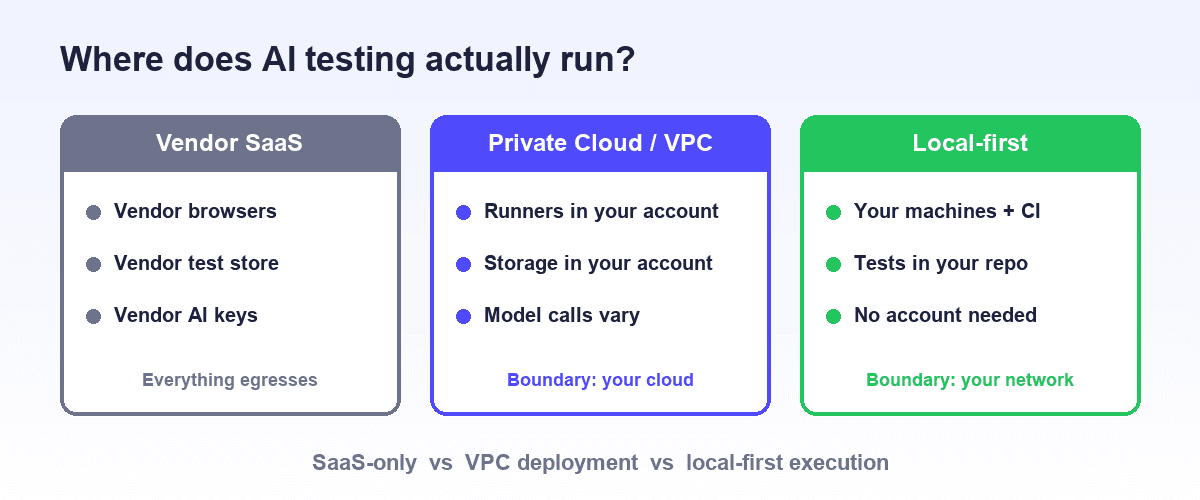
The single biggest security variable is not any vendor's policy but the tool's architecture. This table compares what each data type typically does in a cloud-hosted platform versus a local-first, repo-based tool.
| Data type | Cloud-hosted AI testing platform | Local-first, repo-based tool |
|---|---|---|
| Test definitions | Stored in vendor database | Files in your git repo |
| DOM snapshots | Sent to vendor cloud for generation and healing | Processed locally; model calls limited and auditable |
| Screenshots and videos | Stored in vendor cloud for reporting | Written to local or CI artifact storage you control |
| Test credentials | Stored in vendor secret store | Injected from your own environment or secret manager at runtime |
| Source code | Sometimes uploaded for analysis | Stays in your development environment |
| Browser execution | Vendor-managed grid reaches into your app | Runs on your machines and CI inside your network |
Neither column is automatically right. A cloud platform with a strong SOC 2 Type II report and configurable retention can be a fine choice for testing staging environments with synthetic data.
The local-first column exists because some teams cannot accept the left column at all, and because minimizing the data that leaves reduces the review to a short list of narrow, auditable flows.
Bring-your-own-key patterns
"Can I use my own API keys" has become a standard security question for AI tooling, and vendors answer it in three distinct ways:
- BYO model key. You supply your own API key for the language or vision model, so inference happens under your existing agreement with the model provider, with your negotiated retention and zero-training terms. The testing vendor never proxies the payload, or proxies it without persisting it.
- BYO endpoint. A step further: you point the tool at your own model endpoint, such as a cloud provider's hosted model service inside your account. Inference stays within infrastructure you already govern.
- Vendor-held keys with attestation. The vendor calls models with its own keys and covers the flow in its SOC 2 scope and subprocessor list. Simplest to operate, weakest for teams with strict data-processing terms.
When a tool runs inside a coding agent, there is a fourth pattern worth noticing: the testing tool inherits the agent's model access. If your organization already approved a coding agent and its model provider, a testing layer that works through that same agent adds no new model relationship to review.
Security review checklist for AI testing tools
Send these to the vendor in writing:
- For each of the five data types above: transmitted, stored, or neither? Where, and for how long?
- Do you hold a SOC 2 Type II report, what is its scope, and can we read it under NDA?
- Which model providers do you use, are they listed as subprocessors, and is our data excluded from training?
- Can we bring our own model API keys or endpoint?
- How are test credentials stored, and can they be injected at runtime from our secret manager instead?
- Can screenshots and artifacts be stored only in our own infrastructure?
- What runs locally versus in your cloud, and what breaks if we block egress?
- What deployment options exist for our internal, non-internet-reachable applications?
A vendor that answers all eight crisply is a vendor whose security team has been through this before. Evasive answers on 1, 3, or 5 are the common failure points.
How Shiplight approaches data security
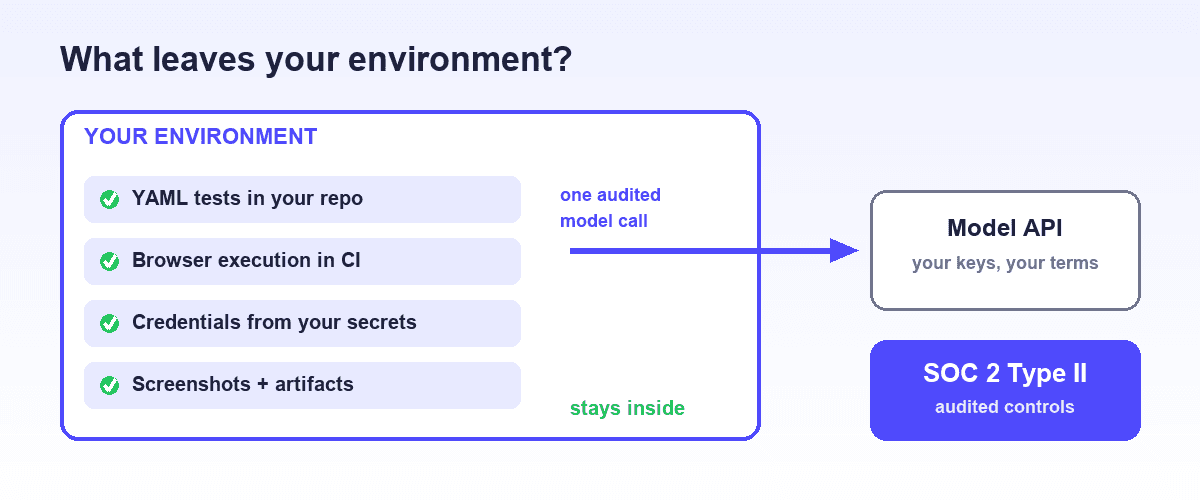
Shiplight's answer to most of the checklist is architectural: the core workflow runs in your environment, so the sensitive data mostly never leaves.
Tests are readable YAML files in your own git repository, and they execute locally or in your CI with npx shiplight test. The browser runs on your machines, credentials are injected from your environment at runtime, and run artifacts land where your CI already puts artifacts.
The MCP plugin that gives coding agents browser automation and test authoring runs locally and requires no Shiplight account or token, so nothing about authoring depends on a vendor cloud.
Your tests and your application stay yours, in the literal sense that they are files and processes you control.
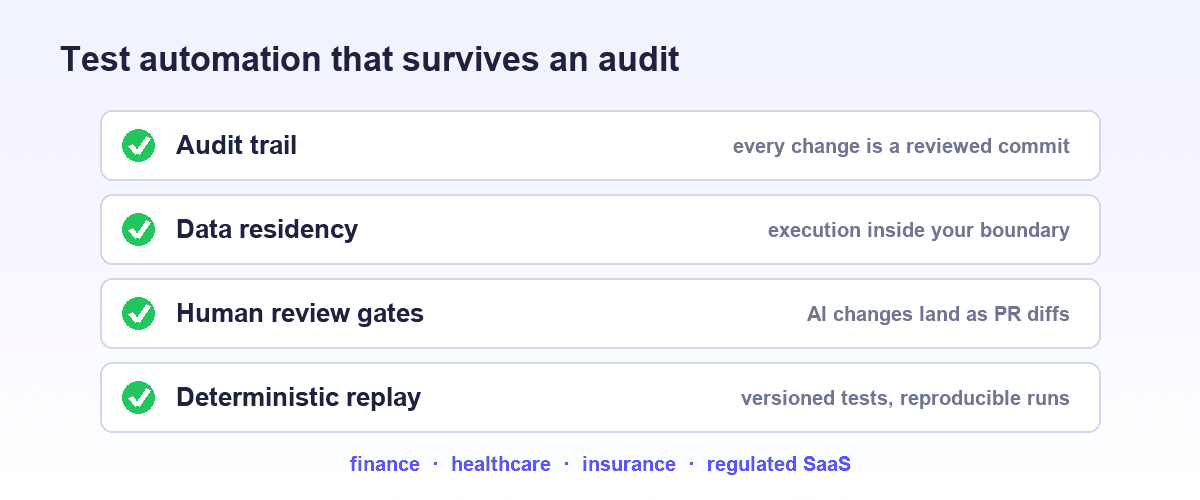
Because tests live in the repo, every change to them is a pull request: a human-reviewable, permanently logged diff, which doubles as the audit trail security teams ask for.
For teams that want managed pieces, Shiplight offers hosted CI runners and private cloud or VPC deployment on enterprise plans, with SOC 2, a dedicated customer success manager. Honest scope note: Shiplight is web-focused, and teams wanting a fully outsourced QA service, or native mobile coverage, should look at other categories.
Frequently Asked Questions
What AI testing tools are SOC 2 compliant?
Many established vendors hold SOC 2 attestations. Rather than trusting a name list, verify three things per vendor: whether the report is Type II or Type I, its scope covers the product and deployment you are buying, and AI model providers appear as subprocessors. Treat "SOC 2 in progress" as not yet attested.
How do AI testing tools handle data security and API keys?
It varies by architecture. Cloud-hosted platforms typically store your tests, credentials, and artifacts in their cloud and call models with vendor-held keys under SOC 2 controls. Local-first tools keep tests in your repo, execute in your own environment, and limit what reaches a model. The strongest key patterns are bring-your-own-key and bring-your-own-endpoint, which keep inference under agreements you already negotiated.
Can I use my own API keys with an AI testing tool?
With some tools, yes. Support falls into three patterns: your own model API key so inference runs under your provider agreement, your own model endpoint, or no BYOK with the vendor using its own keys.
Tools that run through your coding agent inherit the access you already approved, so there's no new key relationship. Ask whether BYOK covers every model call, not just generation.
Do AI testing tools send my source code to the vendor?
Some do, some never touch it. Tools that generate tests by analyzing your codebase may upload source or embeddings to their cloud; tools that work from the rendered application read the DOM and screenshots instead. Repo-based tools that integrate with coding agents keep code analysis inside your development environment. Ask each vendor explicitly, because the answer often surprises teams.
What data does self-healing send to an AI model?
Self-healing typically transmits the failed step's intent, the relevant DOM fragment, and sometimes a screenshot, so the model can locate the element again. The security-relevant details are payload minimization, retention at the model provider, and auditability of what was sent. Tools that surface heals as reviewable diffs, as in our self-healing guide, give a human checkpoint on what changed.
Is a SOC 2 report enough to approve an AI testing vendor?
No. SOC 2 Type II attests that controls operated effectively over an audit window; it doesn't describe which of your data the product transmits, and may not cover the exact deployment you buy.
Pair it with a data-flow review, confirm subprocessors, and match the deployment model to your requirements. For regulatory obligations, add the sector requirements in AI testing for regulated industries.