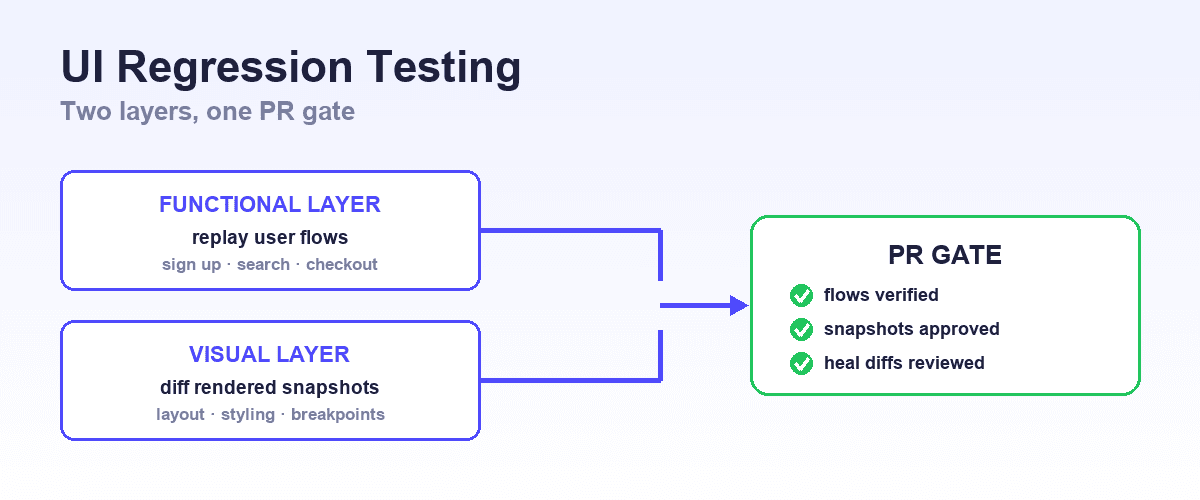
The best AI testing tools for web apps work in three layers: functional E2E (Shiplight, Playwright, Cypress), visual regression (Applitools, Percy), and cross-browser execution (BrowserStack). Each layer catches failures the other two miss.
That is not a preference. A functional E2E tool does not catch layout breaks across viewport breakpoints. A browser grid does not tell you what behavior broke. A visual regression tool does not verify that a checkout flow completes.
Web apps also fail in ways a general testing platform does not anticipate:
- Safari on iOS renders differently from desktop WebKit.
- React hydration introduces async timing that breaks selector-based tests.
- Angular's Zone.js change detection changes how locators resolve.
- A breakpoint regression at 375px is invisible to a suite that only runs at 1440px.
This guide covers each layer: which tools belong in it, what each one actually does, and how React, Vue, Angular, and Next.js teams wire all three together.
What Web App Testing Requires That General AI Testing Platforms Don't
Most AI testing platforms are designed for a single application in a single browser. Web applications face a different problem set.
Cross-browser compatibility. Chrome, Firefox, Safari, and Edge render CSS, JavaScript, and layout differently. Safari on iOS uses WebKit (a browser engine you cannot test on Windows or Linux without a real device or a cloud device farm), and it accounts for a substantial portion of mobile web traffic.
Real-device coverage. Mobile emulators miss rendering gaps that appear only on physical hardware. Safari on a real iPhone behaves differently from desktop Safari in ways that matter to users and that emulators don't surface.
JavaScript framework behavior. React hydration mismatches, Vue's reactivity system, and Angular's Zone.js change detection create timing edge cases that DOM-selector tools miss. A test that passes against server-rendered HTML may fail against a hydrated React component that hasn't finished mounting.
Viewport and breakpoint visual regression. A web application that looks correct at 1440px may break at 768px or 375px. Visual diffs across breakpoints require a dedicated tool; it's not something functional E2E assertions capture.
CI/CD browser-matrix feedback at PR time. A test suite that only runs on Chrome in CI misses the bugs your Safari and Firefox users encounter. Running the full browser matrix on every pull request requires parallel cloud infrastructure that most teams don't self-host.
These requirements mean most web teams need a composed testing stack, not one platform but complementary tools that each solve a distinct layer of the problem.
Quick Comparison: Web App Testing Tools
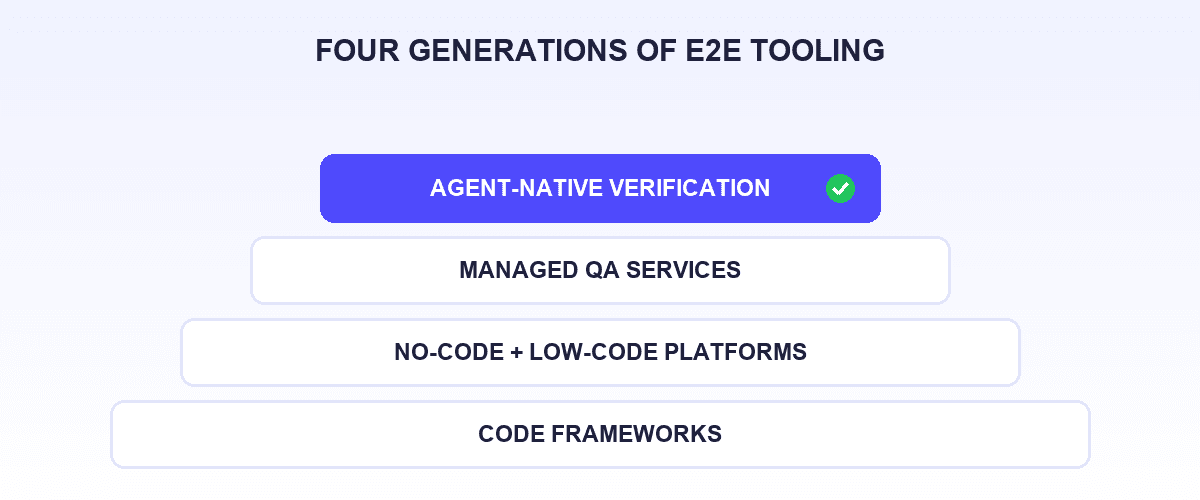
The decision factors that actually matter for web-app E2E testing are who authors the tests, where they live, what maintenance costs when the UI changes, and whether your development workflow (increasingly an AI coding agent) can drive the tool. Device grids and visual-diff services solve different problems and are listed by their own design centers.
| Tool | Design center | Who authors tests | Where tests live | Maintenance model | Coding-agent integration | Run economics |
|---|---|---|---|---|---|---|
| Shiplight AI | Agent-native functional E2E | Your coding agent (or your team) | YAML in your git repo | Intent-level heals as reviewable PR diffs | MCP + Skills across every major coding agent | Local runs need no account, no account |
| Playwright / Cypress (self-managed) | Open-source functional E2E frameworks | Your engineers, in code | Your git repo | Manual: you fix selectors when the UI changes | Via agent tooling you assemble | Free, self-hosted |
| Vendor-console E2E platforms (category) | Low-code / DSL authoring in a vendor web app | Your QA team, in their console | The vendor's cloud, not your repo | Vendor auto-heal in their cloud | Wrappers that drive the vendor's cloud | Typically metered or quote-based |
| Applitools Eyes | Visual-regression layer | n/a (asserts on your existing tests) | Your repo (baselines in their cloud) | Baseline management | MCP (Playwright JS/TS only) | Free trial; quote-based |
| BrowserStack Percy | Visual snapshot review | n/a (snapshots from your suite) | Your repo (renders in their cloud) | Baseline approval workflow | Via BrowserStack MCP | Free tier (5,000 screenshots/mo) |
| BrowserStack Automate | Browser execution infrastructure | n/a (runs your existing suite) | Your repo | n/a | MCP wrapper over the grid | Per-parallel pricing |
Cross-Browser and Real-Device Testing for Web Applications
Cross-browser testing is where most web app quality gaps appear, and it is the layer that AI testing platforms built around a single browser don't cover by default.
BrowserStack Automate
BrowserStack Automate runs your existing Selenium, Playwright, or Cypress tests across a cloud grid of browser, OS, and real-device combinations, including real iPhones and Android devices (not emulators). It doesn't generate or heal tests; it executes the tests you already have across the browser environments your users actually use.
What it does for web applications specifically:
- Runs CI/CD jobs across Chrome, Firefox, Safari, and Edge in parallel, surfacing cross-browser regressions on every pull request
- Provides real iOS Safari and Android Chrome execution: the only path to catching WebKit rendering bugs on mobile without a physical device lab
- Integrates with Playwright, Cypress, and Selenium without requiring changes to test code
- Pairs with BrowserStack Percy for visual diffing on the same CI run, in the same platform
Honest limitation: BrowserStack Automate is execution infrastructure, not authoring intelligence. It doesn't write tests, heal broken locators, or interpret failures. You need a functional E2E tool to create and maintain what runs on it.
The grid itself is also a line item teams re-tender, and BrowserStack alternatives covers who else sells real-device coverage.
Designed for: Web teams with an existing Playwright or Cypress suite that need Safari and mobile browser coverage without managing their own device lab.
Cloud browser grids
Cloud browser grids run an existing suite across many browser and OS combinations without you managing hardware. They solve execution coverage, not test authoring: you still write and maintain the tests, and the grid runs them.
This is a separate layer from where a web-app team's real cost lives (authoring and maintenance), and it only becomes necessary once cross-browser or Safari-specific coverage is a proven requirement rather than an assumption.
What this layer does for web applications specifically:
- Runs your Playwright, Cypress, or Selenium tests against browser and OS versions you cannot install locally, including Safari
- Captures per-browser visual snapshots for responsive layout regressions across viewports
- Parallelises browser execution, reducing CI wait times on multi-browser matrix runs
- Works with Selenium, Playwright, Cypress, and Appium without changes to test structure
What it does not solve: a grid runs the tests you already have. It does not author them, maintain them when the UI changes, or fit into a coding agent's build loop. For a web-app team, that authoring and maintenance work is the larger and more recurring cost, and it is where the functional E2E layer below matters most.
Visual Regression for Web UIs
Functional E2E tests verify that a button click produces the right outcome. They don't catch that the button has shifted 8px left and is now obscured by a nav element at a 768px viewport, or that a font renders incorrectly on Safari. Visual regression tools close that gap.
BrowserStack Percy
Percy captures DOM snapshots at test run time, renders them in a cloud browser grid, and diffs them against a previously approved baseline, across every browser and viewport you configure. It integrates as an additional assertion step on existing Playwright, Cypress, or Storybook runs.
What it does for web applications specifically:
- Captures responsive layout at multiple breakpoints (375px, 768px, 1024px, 1440px) in a single run, surfacing layout breaks across screen sizes
- DOM snapshot approach avoids screenshot flakiness: it re-renders current DOM state rather than comparing raw pixels, making it stable against antialiasing differences between browsers
- Storybook integration enables component-level visual regression, catching breakage at the component before it reaches page-level testing
- Native BrowserStack integration means Percy runs as part of an existing Automate CI job without additional infrastructure
Honest limitation: Visual only. Percy surfaces rendering regressions; it won't detect a functional regression where a button looks correct but fails to submit a form. Pair with a functional E2E tool for complete coverage.
Designed for: Web teams already on BrowserStack who want visual diffs across browsers and viewports without a separate platform.
Applitools Eyes
Applitools is a visual-testing specialist whose Visual AI detects layout shifts, visual bugs, and cross-browser rendering inconsistencies, catching differences that exact pixel comparison would flag as noise from antialiasing.
It adds visual assertions as a layer on top of Playwright, Cypress, or Selenium tests, rather than replacing them. Free trial available; plans are quote-based. Full review at Best AI Testing Tools 2026, and Applitools alternatives if the visual layer is the piece you are replacing.
Functional E2E for JavaScript Web Apps
Cross-browser platforms and visual regression cover the browser and rendering layers. Functional E2E tools cover the behavior layer: does the checkout flow complete? Does the auth redirect land correctly? Does the onboarding wizard write the right state to the database?
The functional layer is where the structural choice lives: who authors the tests and where they live. Where the flows themselves are the hard part rather than the browser matrix, AI E2E platforms for complex user flows is the narrower comparison.
Shiplight AI: Intent-based YAML tests, authored in your git repo, run in a real Playwright browser; larger heals arrive as reviewable PR diffs. Handles SPA routing and dynamic component changes in React, Vue, and Angular without selector rewrites. MCP-callable from Claude Code, Cursor, and Codex.
Best for web teams using AI coding agents. Full review at Best AI Testing Tools 2026.
Playwright or Cypress, self-managed: the open-source path. Your engineers write and own test code in the repo, with full control and no vendor. The cost is the maintenance model: selectors are yours to fix when the UI changes, and the authoring skill requirement stays with your team. See Playwright vs Cypress for that decision.
Vendor-console E2E platforms: a broad commercial category (low-code recorders, plain-English DSLs, ML-scored locator platforms) where your QA team authors tests inside the vendor's web application and the tests live in the vendor's cloud rather than your repo.
The design center is a QA organization that wants a governed console, not an engineering workflow: export paths are typically limited, runs are metered or quote-priced on vendor infrastructure, and coding-agent integrations, where they exist, drive the vendor's cloud.
For an engineering-led web team (the audience of this guide), the structural question is whether tests outside the repo fit how you ship.
React, Vue, and Angular: Framework-Specific Considerations
The JavaScript framework your web application uses shapes which testing problems appear most often.
React and Next.js
React hydration is the most common source of test timing failures: the server renders HTML, the client hydrates it, and a test that clicks before hydration completes sees a non-interactive element. Next.js adds SSR and SSG rendering modes that change when content becomes available in the DOM.
Playwright's auto-wait logic (used by both BrowserStack Automate and Shiplight) waits for elements to reach an interactive state before acting, avoiding the class of hydration-timing failures that affect simpler tools.
Shiplight's intent-based YAML is particularly stable on React applications that change component structure frequently, because intent resolution doesn't depend on stable CSS class names or data attributes that React may generate differently between builds.
Percy's DOM snapshot approach captures post-hydration state rather than an early screenshot, making it reliable for React SSR flows.
Vue and Nuxt
Vue's reactivity system and Nuxt's rendering modes create timing considerations similar to Next.js. Safari compatibility gaps surface more frequently with Vue CSS transitions and animations than with static-HTML applications, making real-device iOS coverage via a cloud grid such as BrowserStack more valuable for Vue-heavy UIs than for server-rendered ones.
Visual regression that captures browser-rendered state including CSS transitions is relevant for Vue applications that rely on transition animations as part of the UX; a DOM-snapshot tool like Percy re-renders that state across browsers and viewports.
Angular and Enterprise Web Apps
Angular's Zone.js patches async operations to trigger change detection, which creates timing behavior that can confuse locator-based tools expecting synchronous DOM updates. Angular's generated ng- attributes also shift between builds, which punishes tests pinned to a single static XPath or CSS selector.
This is exactly the failure mode intent-based resolution avoids: when the test targets "the save button in the billing form" rather than a generated attribute, a build-to-build attribute shuffle changes nothing the test depends on.
For enterprise Angular applications that integrate SAP, Salesforce, or mainframe interfaces alongside the Angular UI, see Best AI Testing Tools 2026 for platforms with cross-platform coverage beyond web browsers.
How Web Teams Build a Testing Stack
Web application testing rarely comes down to picking one tool. It comes down to composing layers that each solve a distinct problem:
| Layer | Problem it solves | Tools |
|---|---|---|
| Browser execution grid | Running an existing suite across many browsers | Execution infrastructure (e.g. a browser grid); only needed once cross-browser coverage is a proven requirement |
| Visual regression | Rendering and layout bugs across viewports | A visual layer (Percy, Applitools) on top of functional tests |
| Functional E2E | Behavior: flows, auth, state, data | Shiplight for agent-authored, repo-owned tests; self-managed Playwright/Cypress for code-first teams; vendor-console platforms if a QA org owns authoring in a recorder or DSL |
| No-code recording | Quick smoke tests, minimal setup | Open-source recorders or vendor consoles: see Best No-Code E2E Testing Tools |
These layers are complementary. A browser grid runs whatever tests your functional E2E tool produces, adding Safari and mobile coverage to a Playwright suite you already maintain. A visual regression tool adds assertions alongside functional tests, not instead of them.
The right stack for a Next.js startup looks different from the right stack for an enterprise Angular application, but all of them need the browser layer.
What no tool in this stack replaces: exploratory testing, accessibility judgment, product-level QA decisions, and business-logic review where human context is required. Automation handles repetitive regression coverage; human testers handle judgment. The goal is the right distribution of work, not elimination of human expertise.
Frequently Asked Questions
Which AI testing tools are best for web apps?
Three layers. A cloud grid like BrowserStack for cross-browser and real-device coverage, Percy or Applitools for visual regression, and a functional E2E tool for behavior. For that E2E layer, Shiplight AI is intent-based and agent-callable. Full reviews in Best AI Testing Tools 2026.
What are the best tools for testing web apps automatically?
Pick by who does the authoring. Shiplight lets AI coding agents author and maintain intent-based tests that live in your repo; Playwright is strongest when engineers write the code themselves. Percy or Applitools adds visual comparison on top of either.
Do I need a cloud browser grid for web application testing?
Only once real-device coverage is a proven requirement, not an assumption. A grid runs your existing suite across devices you cannot install locally, which is the only practical way to catch iOS Safari bugs. But a grid solves execution, not authoring, so get the E2E layer right first.
Does Percy or Applitools work better for React and Next.js applications?
Percy captures post-hydration DOM rather than a timed screenshot, which avoids React's async-rendering timing failures. Applitools uses screenshot comparison that tolerates cross-browser antialiasing, cutting false positives across a wide matrix. In practice: Percy if you are already on BrowserStack, Applitools if you want it framework-agnostic.
Can these tools handle React, Vue, and Angular apps?
Yes. Grids are framework-agnostic and execute any suite. For functional E2E, Shiplight's intent-based tests stay stable where component structure and generated attributes change often, because resolution does not depend on CSS classes. See the framework-specific section.
Do I need both a cross-browser platform and a functional E2E tool?
Almost always. A grid executes tests but does not create or maintain them; an E2E tool does the reverse and usually runs one browser. Common setup: author with the E2E tool in CI, then run the same suite across the full matrix on merge. See the complete guide to E2E testing.
Are there free tools for testing web applications with AI features?
Yes. Playwright and Cypress are free and open source, and Shiplight is free with no account required. On the visual layer Percy has a real free tier with limited monthly snapshots; Applitools offers a trial only. Vendor consoles usually meter real usage.
How do I test a Next.js or Nuxt application in CI/CD?
Both need the server running in the target render mode first. Playwright's webServer config starts it (next start, nuxt start, or a preview URL), waits for a response, then runs. Shiplight's YAML tests work against any URL, including localhost and preview deployments.