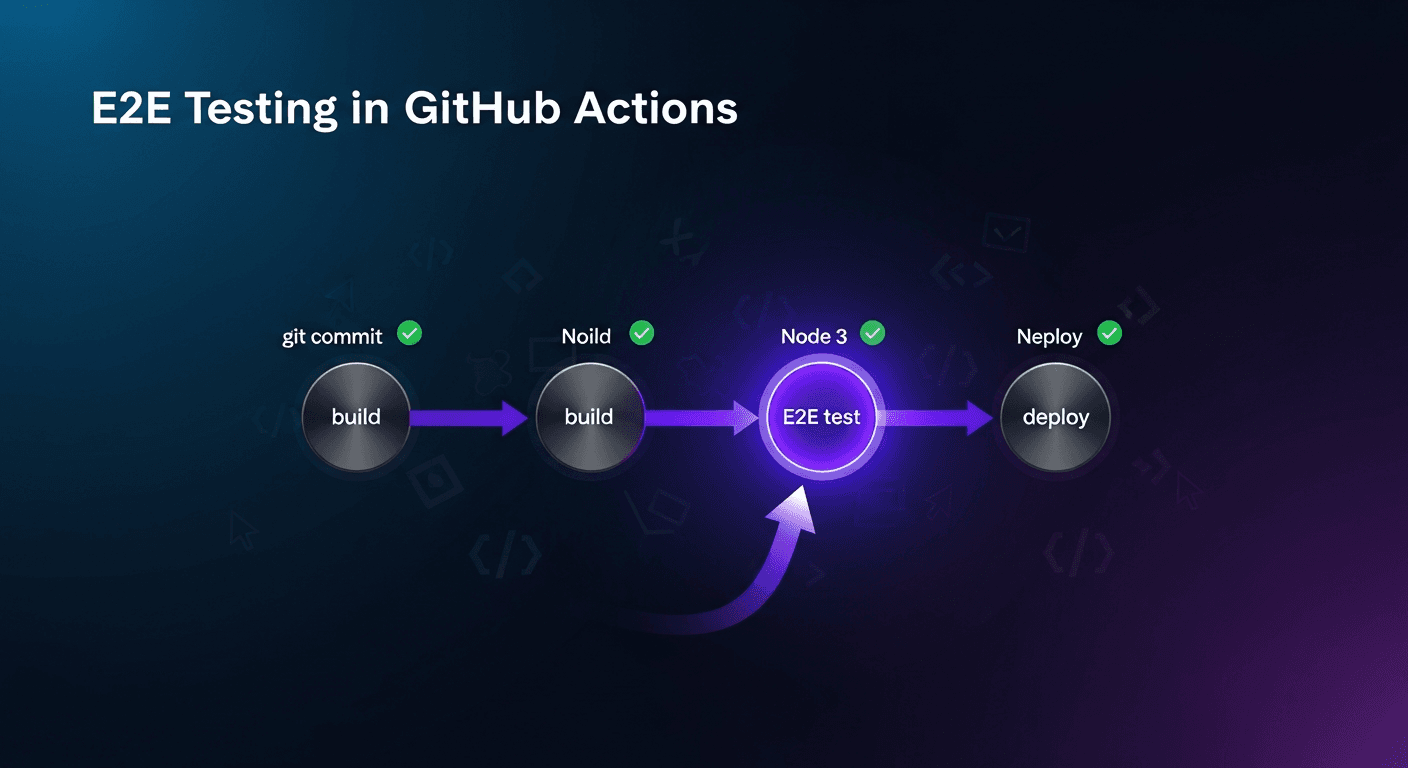
To test every pull request in GitHub Actions, add a workflow that triggers on pull_request, installs your app and browser test runner, runs the suite against a staging or preview URL, uploads failure artifacts, and is marked as a required status check so a red run blocks merge.
The full setup below takes about an hour and works with Playwright, Cypress, or an AI-native runner like Shiplight.
E2E tests in CI have a reputation problem: they're slow, flaky, and often the first thing teams skip when deadlines tighten. This guide covers how to set them up properly (fast, reliable, and self-healing) so they become a trusted release gate rather than a noise source.
For teams where tests break every time a developer renames a component, Shiplight's intent-based self-healing eliminates that maintenance burden automatically.
What You'll Set Up
By the end of this guide you'll have:
- E2E tests running on every pull request via GitHub Actions
- Environment-specific configuration using GitHub Secrets
- Parallelized execution to keep CI under 5 minutes
- Failure artifacts (screenshots, videos) uploaded automatically
- A self-healing layer so tests don't break on routine UI changes
Prerequisites
- A GitHub repository with a web application
- E2E tests written in Playwright (or a tool that wraps it, like Shiplight)
- Node.js-based project
Step 1: Basic GitHub Actions Workflow for Playwright E2E Tests
Create .github/workflows/e2e.yml:
name: E2E Tests

on:
  pull_request:
    branches: [main, develop]
  push:
    branches: [main]

jobs:
  e2e:
    runs-on: ubuntu-latest
    timeout-minutes: 30

steps:
      - name: Checkout
        uses: actions/checkout@v4

- name: Setup Node.js
        uses: actions/setup-node@v4
        with:
          node-version: '20'
          cache: 'npm'

- name: Install dependencies
        run: npm ci

- name: Install Playwright browsers
        run: npx playwright install --with-deps chromium

- name: Run E2E tests
        run: npx playwright test
        env:
          BASE_URL: ${{ secrets.STAGING_URL }}
          TEST_USER_EMAIL: ${{ secrets.TEST_USER_EMAIL }}
          TEST_USER_PASSWORD: ${{ secrets.TEST_USER_PASSWORD }}

- name: Upload test artifacts on failure
        uses: actions/upload-artifact@v4
        if: failure()
        with:
          name: playwright-report
          path: playwright-report/
          retention-days: 7
This is the baseline. It runs on every PR, passes environment secrets safely, and uploads the Playwright HTML report when tests fail.
Playwright config for CI
Add a CI-aware playwright.config.ts so timeouts and workers scale correctly on GitHub-hosted runners:
// playwright.config.ts
export default {
  timeout: process.env.CI ? 45000 : 15000,
  retries: process.env.CI ? 1 : 0,
  workers: process.env.CI ? 2 : undefined,
  reporter: process.env.CI ? 'github' : 'list',
};
The github reporter outputs test results as GitHub Actions annotations directly in the PR diff view, no artifact download required for a quick pass/fail check.
Step 2: Store Secrets Correctly
Never hardcode credentials in your workflow file. Store them in GitHub Secrets (Settings → Secrets and variables → Actions):
| Secret | Purpose |
|---|---|
STAGING_URL | Base URL of your staging environment |
TEST_USER_EMAIL | Test account email |
TEST_USER_PASSWORD | Test account password |
SHIPLIGHT_API_TOKEN | If using Shiplight Cloud for execution |
Reference them in your workflow as ${{ secrets.SECRET_NAME }}. They're masked in logs and never exposed in PR output.
For handling authentication flows specifically, including magic links and email verification codes, see stable auth and email E2E tests.
Step 3: Parallelize to Keep CI Fast
Single-threaded E2E suites slow down as they grow. Playwright's sharding splits your suite across multiple runners:
jobs:
  e2e:
    runs-on: ubuntu-latest
    strategy:
      fail-fast: false
      matrix:
        shard: [1, 2, 3, 4]

steps:
      - uses: actions/checkout@v4
      - uses: actions/setup-node@v4
        with:
          node-version: '20'
          cache: 'npm'

- run: npm ci
      - run: npx playwright install --with-deps chromium

- name: Run shard
        run: npx playwright test --shard=${{ matrix.shard }}/4
        env:
          BASE_URL: ${{ secrets.STAGING_URL }}

- name: Upload shard report
        uses: actions/upload-artifact@v4
        if: always()
        with:
          name: playwright-report-shard-${{ matrix.shard }}
          path: playwright-report/
4 shards typically cuts a 20-minute suite down to 5–6 minutes. Scale the matrix based on your test count; aim for each shard running under 5 minutes.
Step 4: Merge Reports from Parallel Shards
Add a merge job so you get one consolidated HTML report:
  merge-reports:
    needs: e2e
    runs-on: ubuntu-latest
    if: always()

steps:
      - uses: actions/checkout@v4
      - uses: actions/setup-node@v4
        with:
          node-version: '20'
          cache: 'npm'
      - run: npm ci

- name: Download shard reports
        uses: actions/download-artifact@v4
        with:
          pattern: playwright-report-shard-*
          path: all-reports/
          merge-multiple: true

- name: Merge reports
        run: npx playwright merge-reports --reporter html ./all-reports

- name: Upload merged report
        uses: actions/upload-artifact@v4
        with:
          name: playwright-report-merged
          path: playwright-report/
          retention-days: 14
Step 5: Gate PRs on Test Results
Make test failures block merges by adding a branch protection rule in GitHub (Settings → Branches → Add rule):
- Enable Require status checks to pass before merging
- Select the
e2ejob as a required check
Now tests are a real quality gate, not optional feedback.
Step 6: Run Nightly Full Regression
Separate your fast PR suite (critical paths, ~5 min) from deep regression (full coverage, scheduled):
name: Nightly Regression

on:
  schedule:
    - cron: '0 2 * * *'  # 2am UTC every day

jobs:
  regression:
    runs-on: ubuntu-latest
    timeout-minutes: 60

steps:
      - uses: actions/checkout@v4
      - uses: actions/setup-node@v4
        with:
          node-version: '20'
          cache: 'npm'
      - run: npm ci
      - run: npx playwright install --with-deps

- name: Run full regression suite
        run: npx playwright test --project=regression
        env:
          BASE_URL: ${{ secrets.PRODUCTION_URL }}

- name: Notify on failure
        if: failure()
        uses: slackapi/slack-github-action@v1
        with:
          payload: '{"text": "Nightly regression failed, check GitHub Actions"}'
        env:
          SLACK_WEBHOOK_URL: ${{ secrets.SLACK_WEBHOOK_URL }}
Two-suite strategy: fast PR gate + thorough nightly run. See two-speed E2E strategy for the full approach.
Step 7: Add Self-Healing to Stop CI Breakage
The biggest CI pain point isn't slow tests, it's tests that break every time a developer renames a CSS class or moves a button. This creates a pattern where engineers start ignoring red CI because "it's probably just the tests."
The root problem: traditional E2E tests bind to implementation details (CSS classes, DOM structure, element IDs). Every UI refactor, even one that changes zero behavior, breaks tests. Teams respond by adding retries, then quarantining tests, then ignoring red CI entirely.
Shiplight solves this with intent-based self-healing. Instead of storing CSS selectors as the source of truth, Shiplight tests store the semantic intent of each step:
# Shiplight YAML, survives CSS renames, component refactors, layout changes
goal: Verify user can complete checkout
statements:
  - intent: Navigate to the product page
  - intent: Add item to cart
  - intent: Proceed to checkout
  - intent: Enter shipping address
  - VERIFY: order confirmation message is visible
When a UI change breaks a locator, Shiplight's AI resolves the correct element from the live DOM using the intent description, not a list of fallback selectors. A developer renaming btn-checkout to btn-place-order doesn't break a single test.
Shiplight GitHub Actions integration runs your suite in Shiplight Cloud and posts results directly back to the PR:
      - name: Run E2E tests with Shiplight
        uses: shiplightai/run-tests@v1
        with:
          api-token: ${{ secrets.SHIPLIGHT_API_TOKEN }}
          suite-id: ${{ vars.E2E_SUITE_ID }}
          environment-id: ${{ vars.STAGING_ENV_ID }}
          post-pr-comment: true
The PR comment includes a pass/fail summary, AI-generated failure explanation (root cause + expected vs actual), and a link to the full Shiplight run with screenshots and step-by-step trace. Engineers see exactly what failed and why, without digging through raw logs.
See intent-cache-heal pattern and how to make E2E failures actionable for the full picture.
What Tools Help Automate QA in GitHub Actions?
QA automation in GitHub Actions is an assembly of small tools, each covering one layer of the pipeline. The table maps the categories to the common choices:
| Layer | What it does | Common tools |
|---|---|---|
| Test runner | Drives a real browser against your app | Playwright, Cypress, npx shiplight test (YAML intent tests) |
| Workflow actions | Checkout, Node setup, caching | actions/checkout, actions/setup-node, actions/cache |
| Reporting | Surfaces failures in the PR UI | Playwright github reporter, dorny/test-reporter (JUnit) |
| Preview environment | Waits for a per-PR deploy URL | patrickedqvist/wait-for-vercel-preview, deployment_status triggers |
| Artifacts | Stores screenshots, videos, traces | actions/upload-artifact, actions/download-artifact |
| Merge gate | Blocks merge on failure | Branch protection required status checks |
| Test authoring and maintenance | Writes and heals the tests themselves | AI coding agent + Shiplight (MCP), or engineers by hand |
The last row is where most of the ongoing cost lives. The workflow YAML is written once; the tests are maintained forever.
That is why the QA tool that matters most in a GitHub Actions setup is usually not an action at all, but whatever keeps the suite itself from rotting: semantic locators at minimum, intent-based self-healing if the UI changes weekly.
Common Problems and Fixes
Tests pass locally but fail in CI
Cause: Timing differences, missing environment variables, or headless browser behavior.
Fix:
- name: Run tests
  run: npx playwright test
  env:
    CI: true
    PWDEBUG: 0
Add explicit waits for network requests and avoid page.waitForTimeout(), use page.waitForSelector() or page.waitForLoadState() instead.
Tests are flaky in CI but not locally
Cause: Resource contention, slower CI runners, race conditions, or (most commonly at scale) UI changes breaking locators.
Fix for timing/resource flakiness:
// playwright.config.ts
export default {
  retries: process.env.CI ? 2 : 0,  // retry only in CI
  workers: process.env.CI ? 2 : 4,   // fewer workers in CI
  timeout: 30000,                     // explicit timeout
}
Fix for UI-change flakiness: If tests break whenever a developer renames a component or restructures the DOM, retries won't help, the locator is genuinely broken. Migrate to semantic selectors (getByRole, getByTestId) for the short-term fix. For a systematic solution, Shiplight's self-healing layer resolves elements by intent rather than cached selectors, so UI changes don't break tests at all.
For the full breakdown, see how to fix flaky tests.
CI is too slow
Fix: Shard (Step 3), scope your PR suite to critical paths only, move deep regression to nightly, and cache Playwright browsers:
      - name: Cache Playwright browsers
        uses: actions/cache@v4
        with:
          path: ~/.cache/ms-playwright
          key: playwright-${{ runner.os }}-${{ hashFiles('package-lock.json') }}
Artifacts not uploading on timeout
Fix: Use if: always() instead of if: failure() to ensure artifacts upload even when the job times out:
      - uses: actions/upload-artifact@v4
        if: always()
        with:
          name: test-results
          path: test-results/
Full Production-Ready Workflow
name: E2E Tests

on:
  pull_request:
    branches: [main]
  push:
    branches: [main]

jobs:
  e2e:
    runs-on: ubuntu-latest
    timeout-minutes: 15
    strategy:
      fail-fast: false
      matrix:
        shard: [1, 2, 3]

steps:
      - uses: actions/checkout@v4

- uses: actions/setup-node@v4
        with:
          node-version: '20'
          cache: 'npm'

- run: npm ci

- name: Cache Playwright browsers
        uses: actions/cache@v4
        with:
          path: ~/.cache/ms-playwright
          key: playwright-${{ runner.os }}-${{ hashFiles('package-lock.json') }}

- run: npx playwright install --with-deps chromium

- name: Run E2E shard
        run: npx playwright test --shard=${{ matrix.shard }}/3
        env:
          CI: true
          BASE_URL: ${{ secrets.STAGING_URL }}
          TEST_USER_EMAIL: ${{ secrets.TEST_USER_EMAIL }}
          TEST_USER_PASSWORD: ${{ secrets.TEST_USER_PASSWORD }}

- uses: actions/upload-artifact@v4
        if: always()
        with:
          name: report-shard-${{ matrix.shard }}
          path: playwright-report/
          retention-days: 7
Key Takeaways
- Gate PRs on E2E results: branch protection rules make tests a real quality signal
- Shard for speed: 3–4 shards keeps most suites under 5 minutes
- Separate PR gate from nightly regression: fast critical paths on PRs, deep coverage overnight
- Cache Playwright browsers: saves 30–60 seconds per run
- Self-healing tests eliminate CI breakage from UI changes: Shiplight stores intent behind each step so tests survive CSS renames, refactors, and component migrations automatically
For the complete CI/CD setup guide beyond GitHub Actions, see E2E testing in CI/CD. For scaling beyond a handful of tests, see TestOps guide.
Stop chasing broken selectors in CI. Try Shiplight, free, no account required · Book a demo
Related: CI/CD for agent-written code
References: GitHub Actions documentation, Playwright CI documentation, Google Testing Blog
FAQ
How do I automatically test every pull request?
Add a workflow that triggers on pull_request, runs the suite, and uploads artifacts on failure; the Step 1 config above is complete. Then make it mandatory under Settings, Branches, with a required status check. Keep the pull request suite under five minutes and move deep regression to a nightly schedule.
What tools help automate QA in GitHub Actions?
Six pieces: a browser test runner, the standard workflow actions, a reporter that surfaces failures in the PR, a preview-deployment waiter if you deploy per pull request, artifact upload for screenshots and traces, and branch protection as the gate. The differentiating layer is maintenance, not any of these, which is where Shiplight fits.
How do I run E2E tests only when relevant files change?
Use path filters to skip E2E on documentation-only PRs:
on:
  pull_request:
    paths:
      - 'src/**'
      - 'tests/**'
- 'package*.json'How do I test against a preview deployment?
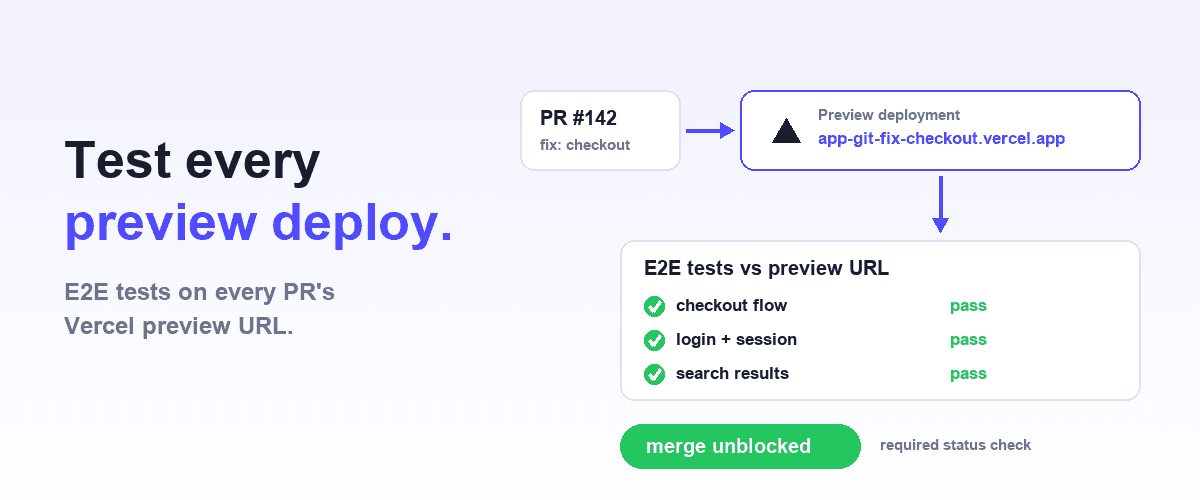
If you use Vercel, Netlify, or similar, wait for the deployment URL before running tests (full walkthrough with merge gating and auth handling: how to test Vercel preview deployments automatically):
      - name: Wait for preview deployment
        uses: patrickedqvist/wait-for-vercel-preview@v1.3.1
        id: vercel-preview
        with:
          token: ${{ secrets.GITHUB_TOKEN }}
          max_timeout: 120

- name: Run E2E tests
        run: npx playwright test
        env:
BASE_URL: ${{ steps.vercel-preview.outputs.url }}How many parallel runners should I use?
A rule of thumb: one runner per 5–10 minutes of tests. GitHub-hosted runners are billed per minute per runner. For most teams, 3–4 shards hits the sweet spot between speed and cost.
Should E2E tests block PR merges?
Yes, with one condition: your suite must be reliable enough to trust. Flaky tests that block merges create false positives and erode trust. Fix flakiness first (see how to fix flaky tests), then enable branch protection.
How much do GitHub Actions minutes cost for E2E tests?
GitHub-hosted runners (ubuntu-latest) are free for public repos. For private repos on paid plans, they cost $0.008/minute. A 5-minute sharded suite across 3 runners costs ~$0.12/run, about $6/day at 50 PRs. Caching Playwright browsers (Step 3) saves ~45 seconds per runner. For high-volume teams, self-hosted runners or Shiplight Cloud (managed parallel execution) reduce per-run costs significantly.
How do I stop E2E tests breaking every time the UI changes?
The root cause is locator-bound tests anchored to CSS classes, IDs, or DOM position, so any refactor breaks them even when behaviour is unchanged. Two fixes: migrate to semantic selectors such as getByRole, or use Shiplight, which stores each step's intent and resolves it against the live DOM at run time.