
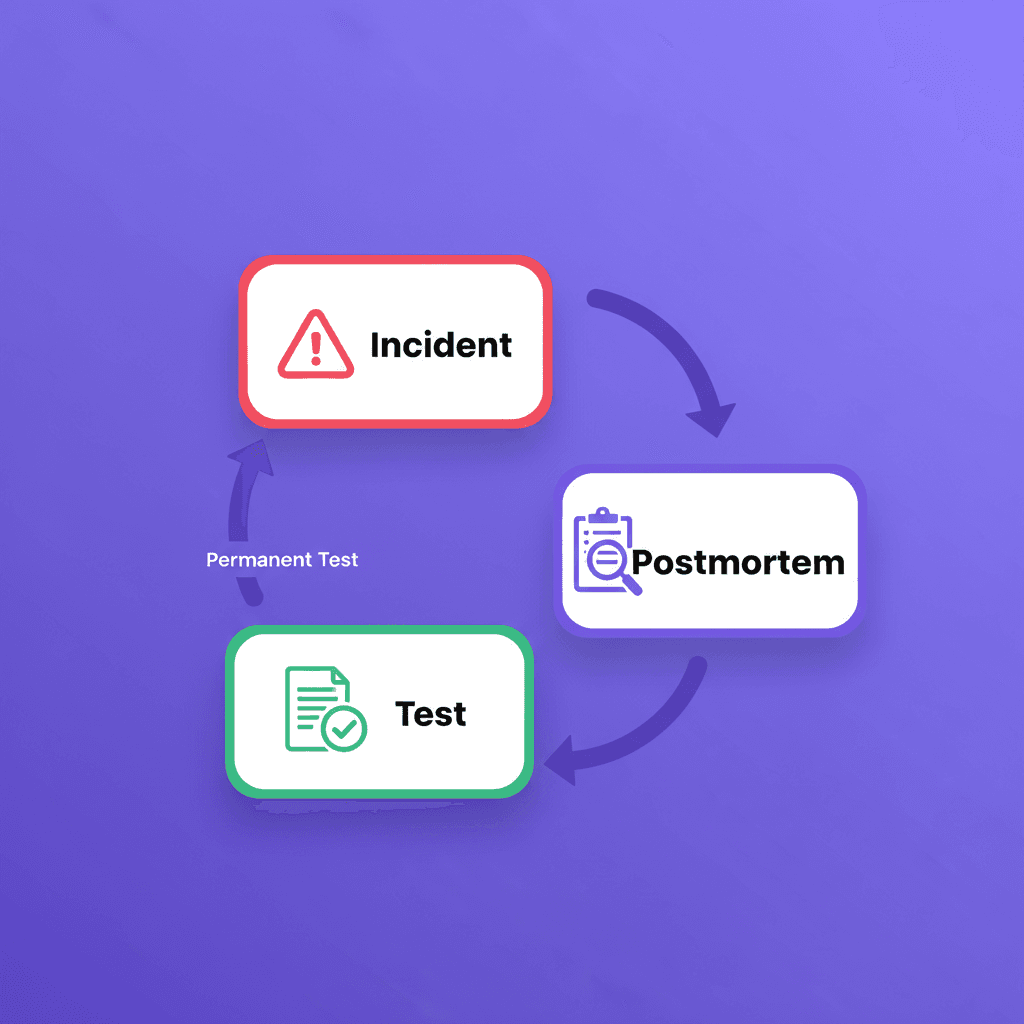
Postmortem-driven E2E testing (also called post-mortem-driven testing) is a methodology where every production incident or regression is converted into a permanent, self-healing end-to-end test.
Instead of brainstorming "all the tests we should have," you build coverage incrementally from failures you have already experienced, turning each incident into an asset that prevents the next one.
Most teams already know what reliable end-to-end (E2E) coverage looks like. The problem is getting there without paying the two taxes that usually come with it: constant maintenance and slow feedback.
Start from what already broke
The fastest way to build meaningful E2E coverage is not to brainstorm “all the tests we should have.” It is to convert the failures you have already experienced into durable, automated checks that run forever. That is the core promise of a postmortem-driven approach: every incident becomes an asset, not a recurring cost.
Shiplight AI is built for this exact loop. It combines agentic test generation, natural-language test authoring, resilient execution, and test operations tooling so teams can expand coverage quickly and keep it reliable as the UI changes.
Below is a practical, repeatable playbook you can run after every incident, regression, or “that should never happen again” bug.
Step 1: Write the incident as a user journey, not a test script
A useful E2E test is a narrative. It starts from a real user goal and ends with a business-relevant outcome.
In postmortems, capture three inputs:
- Starting point: Where does the user begin (URL, screen, role)?
- Critical actions: The few steps that matter (not every click).
- Non-negotiable verification: What must be true at the end.
This framing matters because it produces tests that stay valuable when the UI evolves. Shiplight’s approach is intentionally intent-first, so teams can describe flows in plain English rather than binding themselves to fragile selectors and framework-specific scripts.
Step 2: Encode that journey in a human-reviewable format
Shiplight tests can be written in YAML using natural language statements, with a simple structure: a goal, a starting URL, and a list of steps, including quoted VERIFY: assertions.
A lightweight example might look like this:
goal: Verify user journey
statements:
 - intent: Navigate to the application
 - intent: Perform the user action
 - VERIFY: the expected result
Two details make this especially practical after an incident:
- Tests remain readable across roles. Natural language is easier to review in a postmortem than a wall of automation code.
- You are not trapped in a proprietary runner. Shiplight’s YAML flows are an authoring layer; what runs underneath is Playwright with an AI agent on top, and Shiplight explicitly positions this as “no lock-in.”
Step 3: Make resilience the default, not a separate project
Incident-driven tests often target areas of the product that churn. That is exactly where traditional E2E approaches break down.
Shiplight addresses brittleness in two complementary ways:
- Intent-based execution: Tests are anchored in what the user is trying to do, not a brittle implementation detail.
- Locators as a performance cache: When your team (or Shiplight) enriches steps with explicit locators, those locators speed up replay. If the UI changes and a locator becomes stale, Shiplight can fall back to the natural-language description to recover. In Shiplight’s cloud, the platform can then update the cached locator after a successful self-heal so future runs stay fast.
This is the key shift: you can keep tests fast and resilient without asking engineers to spend their week chasing UI refactors.
Step 4: Debug and refine in the same place engineers work
Postmortem-driven testing only works if the “write the test” step is low-friction.
Shiplight’s VS Code extension is designed for exactly that workflow. It lets you create, run, and visually debug *.test.yaml files inside VS Code, stepping through statements, inspecting the browser session in real time, and iterating without constant context switching.
For teams that prefer a dedicated local environment, Shiplight also offers a desktop app (macOS download via GitHub releases is documented).
Step 5: Operationalize the new test so it prevents the next incident
A test that lives only on a laptop is not an insurance policy. The final step is to wire it into the release process and ongoing monitoring.
Add it to CI as a quality gate
Shiplight provides a GitHub Actions integration that runs Shiplight test suites in CI using configuration for suite IDs, environment IDs, and PR commenting.
Schedule it so you catch drift early
Shiplight schedules can run tests automatically at regular intervals and support cron expressions, with reporting on results, pass rates, and performance metrics.
Route failures to the systems your team already uses
If you need custom alerting or workflow automation, Shiplight webhooks can send structured test run results when runs complete, with signature verification guidance and fields for regressions (pass-to-fail) and flaky tests.
Make failures faster to triage
Shiplight’s AI Test Summary analyzes failed results to provide root cause analysis, expected-versus-actual behavior, and recommendations, including screenshot-based visual context when available. The summary is generated on first view and cached for subsequent views.
Step 6: Cover the real-world edges that cause the most incidents
Many “we shipped a regression” stories are not about a single page. They are about the seams: authentication, email, permissions, and third-party flows.
Shiplight includes Email Content Extraction so tests can read incoming emails and extract verification codes, activation links, or custom content using an LLM-based extractor, without regex-heavy plumbing.
This is especially valuable when incidents involve password resets, magic links, or multi-factor authentication.
A simple operating cadence (that actually sticks)
If you want this to become muscle memory, keep the cadence small:
- After every incident: add one E2E test that would have caught it.
- Every week: review failures and flaky areas, then either fix the product or improve the test intent.
- Every month: promote the top “incident tests” into a release gate and a schedule.
Shiplight supports this full lifecycle: author tests in natural language, debug locally, run in the cloud with artifacts, integrate with CI, schedule recurring runs, and push results outward via webhooks.
Where Shiplight fits, especially for security-conscious teams
If you are operating in an enterprise environment, Shiplight positions itself as enterprise-ready with SOC 2 certification, encryption in transit and at rest, role-based access control, and immutable audit logs, along with private cloud or VPC deployments.
The takeaway
A postmortem-driven E2E strategy is not about testing more. It is about converting hard-learned lessons into permanent protections, without turning QA into a maintenance treadmill.
If you want to see what this looks like in your application, Shiplight can start from a URL and a test account and get you running quickly, then scale into CI, schedules, and reporting as your suite grows.
Key Takeaways
- Verify in a real browser during development. Shiplight lets AI coding agents validate UI changes before code review.
- Generate stable regression tests automatically. Verifications become YAML test files that self-heal when the UI changes.
- Reduce maintenance with AI-driven self-healing. Cached locators keep execution fast; AI resolves only when the UI has changed.
- Integrate E2E testing into CI/CD as a quality gate. Tests run on every PR, catching regressions before they reach staging.
Get Started
References: Playwright Documentation, SOC 2 standard, GitHub Actions documentation, Google Testing Blog
Frequently Asked Questions
Why write tests from incidents?
An incident is proof that a path matters and proof that it can break. Coverage chosen that way is grounded in what your product actually does under load.
What should the test assert?
The user-visible outcome the incident denied, not the specific defect. Fixing the root cause is separate work; the test exists so the symptom cannot return by another route.
Where does this test belong?
In the gate, permanently. A regression test that only runs on a schedule lets the same failure merge and waits until the evening to mention it.
How many incidents does this take to be worth it?
One, if it is the right one. The first postmortem test is also the argument for the practice, because everyone already agrees that failure mattered.
Related posts

Engineering
Actionable E2E failures
Mar 25, 2026 · 5 min read

Engineering
E2E coverage ladder
Mar 25, 2026 · 6 min read
Engineering
Requirements to E2E coverage
Mar 25, 2026 · 6 min read
Guides
How to fix flaky tests
Apr 7, 2026 · 18 min read
Engineering
Tests that survive product change
Mar 25, 2026 · 10 min read
Engineering
AI-native E2E testing buyer''s guide
Mar 25, 2026 · 6 min read