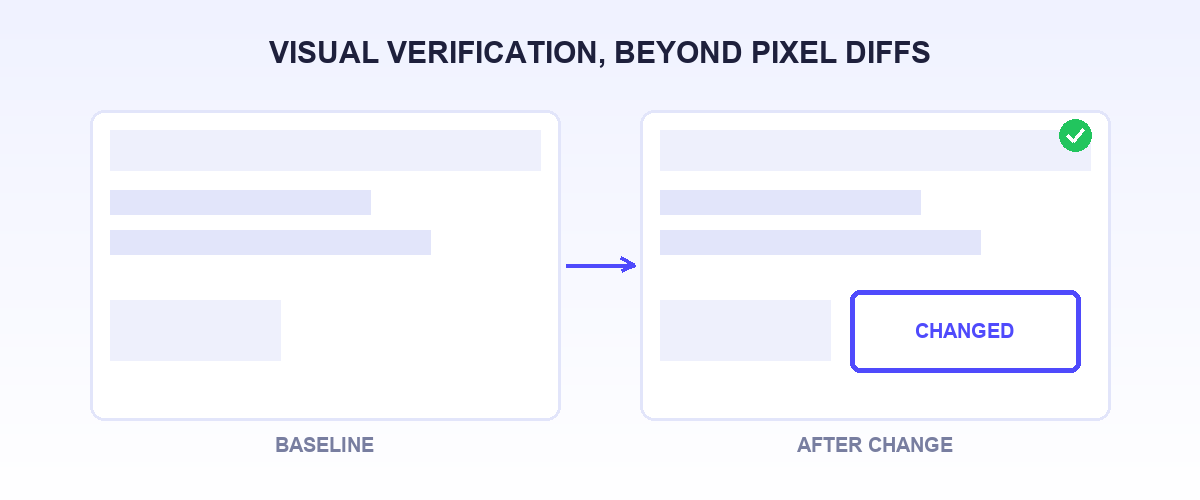
The strongest Applitools alternative depends on which failure you are actually chasing.
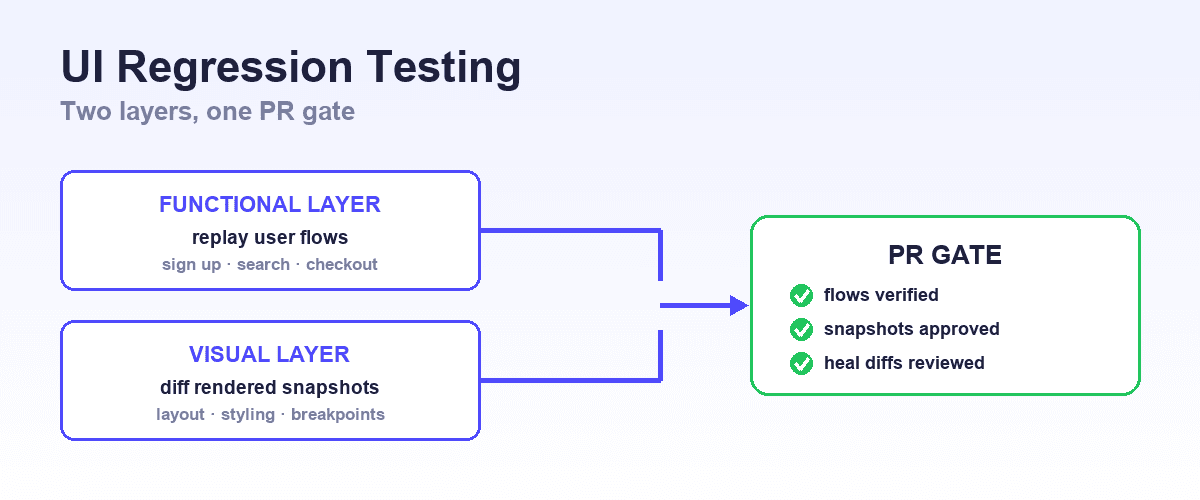
If your real question is "did this UI change break the behavior," and increasingly that change comes from an AI coding agent, the answer is not a pixel-diff tool.
Shiplight is the agent-native option: it verifies function and visible correctness in a real browser, in the development loop. AI VERIFY assertions are written in-flow, and the check is committed as a YAML regression test in your git repo.
Be clear about scope: Shiplight is not a pixel-diff engine and will not catch a two-pixel logo shift or a slightly wrong brand color.
For that specialist visual-regression job, Applitools and Percy remain the right layer, and Chromatic, Playwright's built-in assertions, BackstopJS, and Lost Pixel cover the rest. Pick the layer where your regressions actually happen.
What Applitools actually does
Applitools sells a specific, narrow capability: Visual AI. Its Eyes product adds visual-comparison assertions to a test framework you already run, and the comparison happens server-side against baselines stored in Applitools' cloud. It does not execute your flows, does not author your tests, and does not tell you whether a button works.
It tells you whether the pixels moved. For teams that need pixel-level assurance across a wide browser and viewport matrix, that is genuinely valuable, and we say so below.
But most teams typing "Applitools alternatives" are not really after pixel fidelity. The trigger is usually one of two things: the bill (usage metered in test units, quote-based on annual contracts, no free plan) or a newer problem the category was not built for.
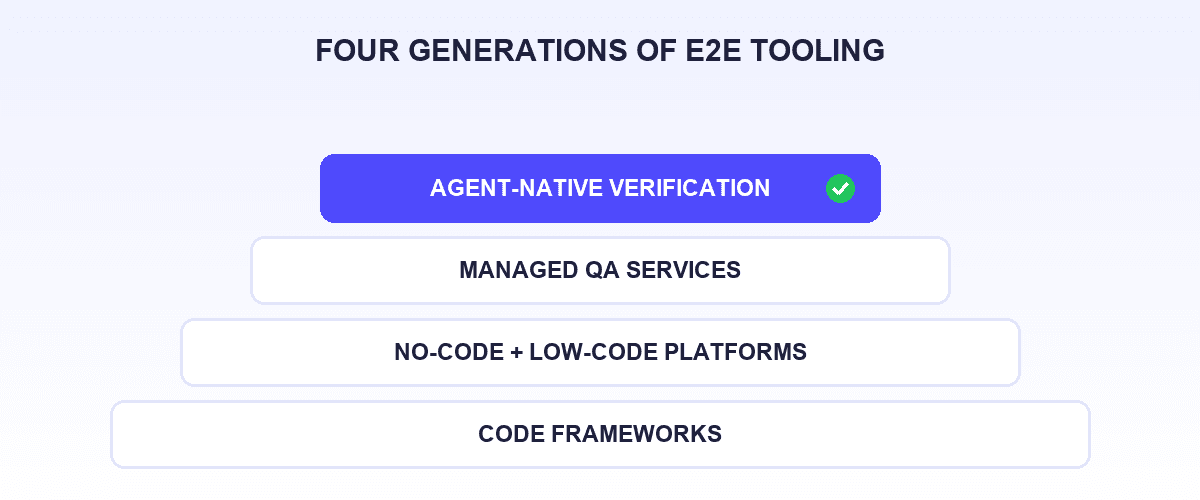
When AI coding agents make dozens of frontend changes a day, the question that matters is "did the agent's change break anything," and a diff queue you review after the fact lags the rate of change.
That is a functional-verification job, not a screenshot job, and it is the layer where Shiplight is decisively different.
So the useful split is by layer, not by vendor. We build Shiplight, which does agent-native functional verification, so it leads the list, and we are explicit about where a dedicated pixel-comparison tool is still the better buy.
Why teams look for Applitools alternatives
- Budgeting by test unit. Applitools plans meter usage in test units, quote-based on annual contracts, and its live pricing page shows no free plan (trial only). Teams that want predictable published pricing, or no bill at all, look elsewhere.
- Overlap with the E2E stack. Applitools is an assertion layer you add to a test framework you already run, with baselines and match settings managed in its cloud. Modern E2E frameworks ship built-in screenshot assertions, so teams already paying for an E2E platform question a second visual line item.
- False-positive fatigue. Pixel diffs flag anti-aliasing, font rendering, and animation noise. AI grading helps, but every screenshot-first workflow still needs humans reviewing diff queues.
- Agent-driven development. When coding agents make dozens of frontend changes a day, review-the-diff-queue workflows lag the rate of change. Some teams want verification in the loop instead of after it.
The 8 best Applitools alternatives
1. Shiplight AI
Shiplight is not a screenshot-diff service, and that is exactly why it belongs at the top of this list. Applitools asserts that the pixels did not move; Shiplight asserts that the feature still works and looks right, and it does that inside the development loop.
It plugs into your coding agent and gives it eyes and hands in a real browser.
When the agent edits the frontend, /shiplight verify confirms the change looks and behaves correctly before it merges; /shiplight create-yaml-tests then turns those checks into YAML regression tests committed to your git repo.
Visual understanding is built into the runtime: Shiplight marks interactive elements on the page before resolving locators (set-of-marks), and falls back to a vision model when locators fail entirely, such as canvas UIs or hard-to-click regions.
For many teams evaluating visual testing, the real goal underneath is "catch UI regressions before users do." Shiplight covers that goal functionally and semantically (the button renders, is clickable, and the flow completes), and its MCP server and Skills install into Claude Code, Cursor, Codex, VS Code, and more with one line. The local MCP needs no account.
At a glance
- Approach: AI-native functional verification in a real browser, agent-in-the-loop
- Test format: YAML in your git repo
- Pricing note: Free $0, Pro $60/mo
- Migration effort: Not a migration; runs alongside existing visual or E2E tooling
- Best for: Teams using AI coding agents that want UI changes verified as they build
Pros:
- Verification happens in the development loop, not in a post-hoc diff queue. The agent that changed the frontend checks its own work with an AI VERIFY assertion before merge. Applitools is a diff-and-approve step that runs after the fact, which lags agent-speed change.
- AI VERIFY assertions in-flow check behavior, not just appearance. Shiplight confirms the flow completes and the element is actually clickable, the kind of failure a pixel comparison never sees. Applitools grades how the page looks against a stored baseline; it does not exercise the flow.
- Tests are YAML in your git repo, reviewed in PRs, and heals arrive as PR diffs, never silent rewrites. Applitools keeps its baselines, match settings, and approval history in its own cloud.
- Your own coding agents drive it, agent-natively, via MCP and Skills. Applitools ships an MCP server too, but it wraps its cloud service and supports Playwright JS/TS only.
- Built on Playwright, so compatibility is free for existing Playwright shops: run alongside your current suite, eject anytime. Enterprise path includes SOC 2, VPC, RBAC, and hosted CI runners.
Cons:
- Not a pixel-diff engine: it will not catch a two-pixel logo shift or a slightly wrong brand color. For that, keep a visual-diff tool.
- Web only; no native mobile app screenshot testing.
- Assumes a repo and coding-agent workflow.
When to choose Shiplight: your real problem is "did the agent's UI change break anything," not "is every page pixel-identical across nine browsers." Many teams pair it with a lightweight visual-diff tool below.
2. Wopee.io
Wopee.io is a Playwright-native platform that combines functional and visual regression in one AI-driven workflow: point it at a URL, and its agents explore the app, generate tests for critical journeys, run them, and self-heal when the UI changes, with a human reviewing the result. Execution happens in a hosted "Cockpit" console, with live monitoring and the ability to take over mid-run for CAPTCHAs or MFA.
The distinguishing detail is the escape hatch: generated tests export as plain Playwright code that runs without Wopee's runtime, so a team is not locked into a proprietary format the way they are with some console-native tools.
At a glance
- Approach: AI-driven functional and visual regression, Playwright-native
- Test format: Generated in Wopee's cloud console; exports as Playwright code
- Pricing note: Free tier (2 projects, 50 test steps/session); paid plans from €19/user/month
- Migration effort: Low for teams already on Playwright
- Designed for: Teams that want visual and functional coverage from one AI-assisted vendor without hand-writing every assertion
Pros:
- Combines visual and functional checks instead of treating screenshots as a separate line item
- Playwright-native, with a working code-export path rather than cloud-only lock-in
- Published, per-seat pricing with a real free tier, unlike Applitools' quote-only model
Cons:
- Early-stage: no independent review footprint on G2 or Capterra as of this writing, so reliability and support claims are unverified outside the vendor's own site
- Test generation and execution run through Wopee's hosted console, not your local dev loop
- Newer than Percy, Chromatic, or Applitools, with a shorter track record
When to choose Wopee.io: you want visual and functional regression from a single Playwright-based vendor and are comfortable evaluating an early-stage platform yourself, since third-party validation is still thin.
3. Drizz
Every other tool on this list tests the web. Drizz is the native-mobile equivalent: teams describe a flow in plain English, and Drizz runs it on real iOS and Android devices rather than emulators, reading the screen visually instead of matching selectors, locators, or the accessibility tree. That covers functional and visual verification for a native app in one pass, and the same vision-based approach carries the self-healing when a screen changes.
At a glance
- Approach: Vision AI functional and visual verification for native mobile
- Test format: Plain-English flows, run on Drizz's platform
- Pricing note: No published tiers; demo-gated
- Migration effort: N/A to this article's web tools; relevant if you also ship native iOS/Android
- Designed for: Native mobile teams that want visual and functional verification without an Appium selector suite
Pros:
- Vision-based element location sidesteps the selector/locator maintenance tax Appium suites carry
- Runs on real devices, not emulators
- Covers visual and functional checks in the same run instead of two tools
Cons:
- Native mobile only; does not test web at all, so it does not compete with anything else on this page
- Not a pixel-baseline diffing service in the Percy/Applitools sense
- Young company (founded 2024), no independent review footprint yet to weigh against vendor claims
When to choose Drizz: your regressions live in a native iOS or Android app, not a browser. Teams shipping both web and native product typically pair a web tool from this list with a native-mobile tool like Drizz rather than expecting one vendor to cover both.
4. Percy (BrowserStack)
Percy is the established page-level screenshot service, with pixel-diff heritage going back to before its BrowserStack acquisition. It captures snapshots from your existing test suite or CI, renders them across browsers and widths, and gives reviewers a diff-and-approve workflow tied to your git commits and pull requests.
At a glance
- Approach: Cloud screenshot capture and review
- Test format: Snapshot calls added to your existing tests or CI
- Pricing note: Genuine free tier; usage-based paid plans through BrowserStack
- Migration effort: Low; SDK calls slot into an existing suite
- Designed for: Teams layering page-level visual review onto the E2E suite they already run
Pros:
- Mature review workflow with team approvals and baselines
- Integrates with most E2E frameworks and CI systems
- Free tier makes it easy to trial before committing
- BrowserStack backing gives it a broad browser matrix
Cons:
- Screenshot-volume pricing scales with shipping frequency
- Pixel-diff noise still requires human review time
- Snapshots live in the vendor cloud, not your repo
When to choose Percy: you already run an E2E suite and want cross-browser visual review layered on top with minimal code change.
5. Chromatic
Chromatic tests UI where design systems actually live: Storybook. Built by Storybook's maintainers, it snapshots every story on every commit, detects visual and interaction regressions at the component level, and doubles as a UI review tool for designers.
At a glance
- Approach: Component-level snapshot testing for Storybook
- Test format: Your existing Storybook stories
- Pricing note: Free tier with 5,000 snapshots/month; Starter at $179/month for 35,000
- Migration effort: Near zero if you maintain Storybook; significant if you do not
- Designed for: Design-system and component-library teams working in Storybook
Pros:
- Stories are the tests, so coverage tracks the component library automatically
- Catches regressions at the component level, before pages compose them
- Free tier covers small component libraries
Cons:
- Component snapshots do not cover full-page flows or real user journeys
- Value depends entirely on Storybook discipline
- Snapshot volume grows fast with large libraries and multiple viewports
When to choose Chromatic: your frontend is built on a maintained Storybook and you want regressions caught at the source component.
6. Playwright visual comparisons
Playwright ships screenshot assertions natively: toHaveScreenshot() captures a baseline, compares subsequent runs, and fails on diffs beyond a configurable threshold. Baselines live in your repo next to the tests.
At a glance
- Approach: Built-in screenshot assertions in an open-source E2E framework
- Test format: TypeScript/JavaScript tests plus committed baseline images
- Pricing note: Free, open source
- Migration effort: One assertion per check if you already use Playwright
- Best for: Playwright teams that want basic visual coverage without a new vendor
Pros:
- Zero additional cost or vendor; baselines version with your code
- Threshold and masking options tame common noise sources
- One tool for functional and visual checks
Cons:
- No review UI, no baseline management workflow, no cross-browser rendering cloud
- Baseline churn across OS/font rendering environments is a known pain
- All triage is manual, in CI output
When to choose Playwright visual comparisons: you are already invested in Playwright and want visual checks on a handful of critical screens, not a review platform. For the broader framework decision, see Playwright vs Cypress.
7. BackstopJS
BackstopJS is the long-standing open-source visual regression tool: configure a list of URLs and viewports, capture references, and get an HTML diff report. It is unglamorous and dependable.
At a glance
- Approach: Open-source page screenshot diffing
- Test format: JSON scenario config in your repo
- Pricing note: Free, open source
- Migration effort: Low; point it at your URLs
- Best for: Budget-zero visual coverage of key pages
Pros:
- Completely free with full local control
- Simple mental model: URLs in, diff report out
- CI-friendly and scriptable
Cons:
- No cloud, no team review workflow, no AI grading
- Maintenance and flake management are on you
- Limited for flows that require complex authenticated state
When to choose BackstopJS: a small team wants basic visual guardrails on marketing or app pages without any spend.
8. Lost Pixel
Lost Pixel is a newer open-source visual regression tool that covers Storybook stories, full pages, and Ladle, with a managed platform option for teams that outgrow self-hosting the review workflow.
At a glance
- Approach: Open-source visual regression with an optional managed platform
- Test format: Config in your repo; baselines in repo or platform
- Pricing note: Open-source core is free; platform plans are listed on their site
- Migration effort: Low for Storybook users; comparable to BackstopJS for pages
- Designed for: Teams that want an open-source component-and-page snapshot workflow
Pros:
- Covers both component (Storybook) and page-level snapshots
- Open-source core avoids lock-in; upgrade path to a managed review UI exists
- Modern developer experience relative to older OSS options
Cons:
- Smaller community and ecosystem than the established vendors
- The full review workflow lives in the paid platform
- Same pixel-noise triage burden as any diff engine
When to choose Lost Pixel: you want component-and-page visual diffing with open-source control and the option to add a managed workflow later.
Comparison table
| Tool | Level | Diff method | Baselines in your repo? | Review workflow | Pricing note |
|---|---|---|---|---|---|
| Shiplight | Functional + semantic UI verification | Agent with vision, not pixel diff | Yes (YAML tests in git) | PR review of tests and heals | Free $0, Pro $60/mo |
| Wopee.io | Functional + visual regression | AI agent + pixel comparison | No (exports as Playwright code) | Console review, human takeover for CAPTCHAs/MFA | Free tier; paid plans from €19/user/month |
| Drizz | Native mobile app (functional + visual) | Vision AI screen-reading, not pixel diff | No (vendor platform) | Failure-reasoning reports in-platform | No published tiers; demo-gated |
| Percy | Full page | Pixel diff, cloud rendering | No | Yes, team approvals | Free tier; usage-based (BrowserStack) |
| Chromatic | Component (Storybook) | Snapshot diff | No | Yes, UI review for designers | Free tier; published monthly plans |
| Playwright visual comparisons | Page/element | Pixel diff, local | Yes | No | Free, open source |
| BackstopJS | Page | Pixel diff, local | Yes | HTML report only | Free, open source |
| Lost Pixel | Component + page | Pixel diff | Yes (OSS mode) | In paid platform | OSS free; platform priced separately |
| Applitools (baseline) | Page/component | Visual AI grading | No | Yes | Free trial only; quote-based tiers |
How to decide
Start with the failure you are trying to catch. Broken flows and non-rendering UI: an E2E or verification layer (Shiplight, or Playwright assertions) catches those; a screenshot service is the wrong layer. Pixel-level drift in a design system: Chromatic or Lost Pixel at the component level. Cross-browser rendering differences on real pages: Percy.
Then match the workflow. Teams shipping with AI coding agents get the most from verification in the loop, because the diff-queue model lags agent speed. Teams with dedicated design review get the most from snapshot platforms with approval workflows. Teams with neither budget nor review staff should take the free options and cover only critical screens.
Budget shape matters too. Published per-snapshot or per-month pricing (Chromatic, Cypress-style tiers) suits predictable planning; quote-based visual AI suits enterprises that negotiate annually.
Where Shiplight is not the right fit
If your requirement is pixel fidelity, catching a wrong brand color, a shifted logo, or a cross-browser rendering artifact, use a real pixel-diff tool; Shiplight verifies function and visible correctness through an agent's eyes, and it will not diff two images for you. Mobile-first teams also need a different stack, since Shiplight is web only: if the regressions you need visual and functional verification on live in a native iOS or Android app, that is Drizz's job, not this article's web-focused tools.
And teams with a Playwright suite plus visual assertions that already works and is not their bottleneck do not need to replace anything; Shiplight runs alongside Playwright when the agent-verification need shows up.
The bottom line
Applitools built its product around AI-graded visual comparison, and organizations that need pixel-level assurance across a big browser matrix are its design center. But most teams' actual need splits cleanly: component-level snapshots (Chromatic, Lost Pixel), page-level review (Percy), visual plus functional regression on Playwright (Wopee.io), free assertions on critical screens (Playwright, BackstopJS), or verification that keeps up with agent-speed frontend change (Shiplight).
Pick the layer where your regressions actually happen. For the wider tooling picture, see the best E2E testing tools in 2026 and best AI testing tools in 2026.
Frequently Asked Questions
What are the best Applitools alternatives?
The best Applitools alternatives in 2026 are Shiplight (AI-native verification of UI changes in a real browser, tests as YAML in git), Wopee.io (AI-driven functional and visual regression on Playwright), Percy (page-level cloud screenshot review), Chromatic (component snapshots for Storybook), Playwright's built-in visual comparisons, and open-source page diffing like BackstopJS. For native iOS and Android apps rather than web, Drizz covers the same functional-plus-visual job with vision AI instead of pixel diffing. Choose by the level you need to test: component, page, or the functional correctness of UI changes.
Is Applitools free?
No. As of mid-2026, Applitools' pricing page shows quote-based tiers billed in test units on annual contracts, with a free trial rather than a free plan. Teams that want fully published pricing usually compare Chromatic's tiers, and teams that want zero cost use Playwright visual comparisons or BackstopJS.
What is the best open-source Applitools alternative?
For full pages, BackstopJS or Playwright's toHaveScreenshot() assertions. For Storybook components, Lost Pixel's open-source core. None of these include AI-graded diffing or a hosted review workflow; the trade is triage time for license cost. Teams often start open source, then move to Percy or Chromatic when diff review starts eating real hours.
Do I need a visual testing tool if I have E2E tests?
They catch different failures. E2E tests confirm flows work; visual tools catch rendering problems those assertions never see, like a broken layout or an overlapping modal.
Agent-based verification narrows the gap, since an agent viewing a real browser notices a page rendering wrong in a way selector assertions cannot, but pixel-precision needs still want a diff tool. See the complete guide to E2E testing.
Which Applitools alternative works best with Playwright?
Playwright's own visual comparisons are the zero-friction option, and Percy integrates with existing Playwright suites through an SDK. Shiplight is built on Playwright, so compatibility comes free for existing Playwright shops: it runs alongside your current suite and adds agent-driven verification with YAML regression tests. See best Playwright alternatives if you are reconsidering the framework layer itself.
Which alternative should AI-native teams pick?
Teams whose frontend changes are increasingly authored by coding agents should weight verification-in-the-loop heavily: the volume of UI changes outruns human diff-review queues. Shiplight was built for that pattern, with the agent verifying its own changes in a real browser via MCP and committing YAML tests as the byproduct. See verifying AI-written UI changes for the workflow.