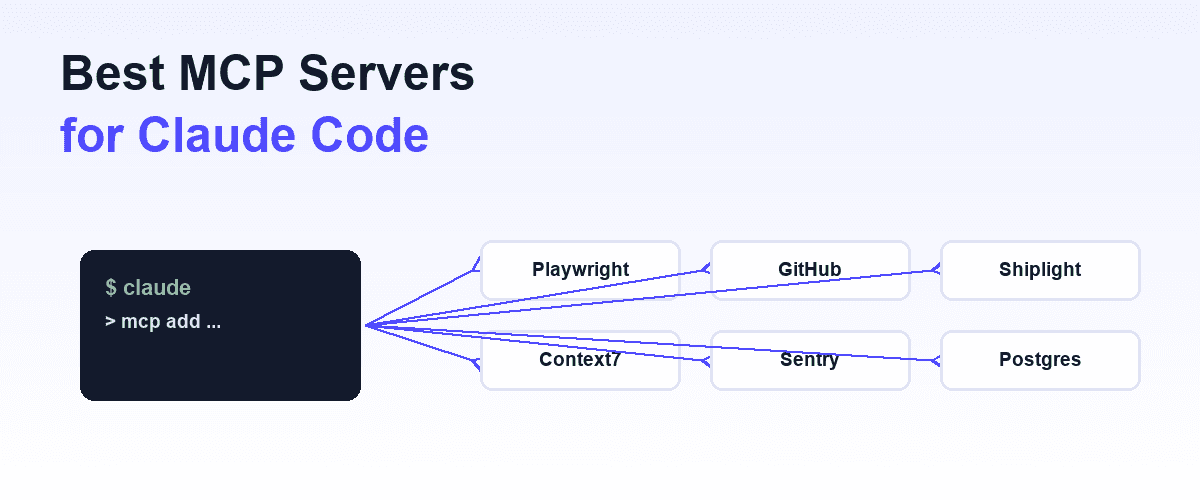
The best MCP servers for Claude Code are the ones that give the agent a capability it does not have natively: eyes and hands in a real browser, write access to your issue tracker, your production error feed, current documentation for the libraries you actually use. Everything else is context spent for nothing.
Why a short list beats a long one
That is the organizing principle of this list, and it cuts against how most people approach the question. The instinct after discovering MCP is to install everything that looks useful. But every connected server injects its tool schemas into the model's context on every request, whether or not the task needs them.
A server you never invoke still costs tokens, and a long tool list measurably degrades the model's ability to pick the right tool for the job.
The best configuration is not the longest one. It is the shortest one that covers your actual work.
So this list is short: ten servers, grouped by the job they do. For each one, what it adds that Claude Code cannot do on its own, and where it is not the right fit.
Claude Code ships with file editing, shell access, and code search built in, which rules out a whole category of servers that merely duplicate those. The bar for inclusion here is a capability gap, not popularity.
One trust note before the list: an MCP server is code that runs with your permissions, against your credentials. Treat adding one like adding a dependency, not like installing a browser extension. More on that at the end.
Browser and testing
1. Playwright MCP
Microsoft's official browser automation server, and the most common first MCP install for Claude Code. It drives Chromium, Firefox, or WebKit and feeds the agent the page's accessibility tree as a structured snapshot instead of screenshots, so navigation, clicks, and form fills are fast, deterministic, and cheap in tokens.
No vision model required. Install is one line: claude mcp add playwright -- npx @playwright/mcp@latest.
This is how Claude Code checks its own frontend work: build the feature, open the page, click through it. We wrote a full setup guide at Playwright MCP. Where it is not the fit: the session is ephemeral. What the agent verified today is gone tomorrow, and nothing stops the same regression next week. Browsing is not a test suite.
2. Shiplight browser MCP
Disclosure: Shiplight is our product. It is a browser MCP server plus Skills that installs into Claude Code in one line, no account needed for local use.
The difference from raw browser automation is what happens after the agent verifies something: /shiplight verify gives the agent a real browser to check its work, and /shiplight create-yaml-tests turns those verifications into intent-based YAML tests that live in your repo and run again on every change.
Tests self-heal when the UI shifts, and /shiplight fix reports app bugs instead of rewriting tests to pass. Everything transpiles to standard Playwright, so you can eject anytime.
Use it when you want verification to accumulate instead of evaporate. Skip it if you have no UI: it is built for web apps, not APIs or CLIs. Setup lives at our coding agents page, and Claude Code testing shows the full workflow.
Code and repo
3. GitHub MCP server
GitHub's official server connects Claude Code to the platform itself: read and triage issues, create and review pull requests, inspect Actions workflow runs and their failure logs, query Dependabot and security findings. Authentication is OAuth in the current hosted version, so there is no token to mint and paste.
The practical win is closing loops without leaving the session: the agent reads the failing CI log, fixes the code, and updates the PR description in one pass.
Honest caveat: if all you need is "open a PR", the gh CLI already does that from Claude Code's shell with zero context cost. The MCP server earns its schema budget when your workflow spans issues, reviews, and Actions together. Full walkthrough at GitHub MCP server.
4. Filesystem MCP
The reference filesystem server from the modelcontextprotocol project provides file operations with explicit, configurable access controls: you declare which directories are reachable, and nothing outside them is. Claude Code already reads and writes files in your project natively, so inside the working directory this server adds nothing.
It earns a slot in two cases: giving the agent scoped access to a directory outside the project (a shared design-assets folder, a data drop) without opening the whole disk, and standardizing file access across MCP clients that lack native file tools.
If neither applies to you, skip it. This is the clearest example of a popular server that duplicates a built-in.
5. Figma MCP
Figma's Dev Mode MCP server gives Claude Code structured access to design files: the node tree, layout constraints, variables and design tokens, plus tools like get_code and get_image for a selected frame.
Instead of screenshotting a mock and hoping, the agent reads the actual spacing, type, and token values and generates code that matches. With Code Connect mapped, it reuses your real components rather than inventing lookalikes.
Constraints to know: it requires a paid Figma plan with Dev Mode, and the local server runs through the Figma desktop app. And generated code still needs verification in a rendered browser; matching the design file is not the same as rendering correctly at runtime.
Data and docs
6. Context7
Context7, from Upstash, fixes a specific failure mode: Claude's training data is months behind the library you are using, so it writes code against APIs that have since changed. The server resolves a library name to an ID, then pulls current, version-specific documentation into context on demand.
Ask for "Next.js 15 middleware, use context7" and the agent works from today's docs, not remembered ones. Recent versions rerank server-side, so you get the relevant slice rather than a documentation dump.
Scope: it covers public libraries and frameworks. Your internal APIs are not in it, and for stable, well-known libraries the model's own knowledge is usually sufficient. Reach for it when you are on a fast-moving framework or a recent major version.
7. Postgres MCP
For databases, the current standout is Postgres MCP Pro (from Crystal DBA): schema inspection, query execution, EXPLAIN-plan analysis, index tuning suggestions, and configurable read-only versus read-write access. The everyday value is mundane and real: the agent stops guessing your column names and reads the actual schema, then checks its query plan before you ship it.
Run it read-only against anything that matters, full stop. A coding agent with write access to a production database is a category of incident, not a workflow. Point read-write mode at local or staging databases only. Note that Anthropic's original reference Postgres server is archived, so pick a maintained implementation rather than the one older tutorials mention.
8. Memory MCP
The reference memory server is a knowledge-graph store: entities, relations, and observations persisted to a local JSONL file across sessions. Claude Code forgets everything between conversations; this gives it a place to record durable facts ("the staging URL is X", "team convention: no default exports") and retrieve them later.
Be honest about the overlap: CLAUDE.md already handles curated, human-written project context, and for most teams it is the better tool because you can read and edit it. The memory server is for facts the agent accumulates on its own across many sessions. If you are not running long-lived, repeated workflows, you will not miss it.
External APIs
9. Nango
Most servers on this list connect the agent to your own systems: your repo, your database, your design files. Nango covers the other direction: the third-party SaaS APIs your product integrates with, on a user's behalf.
Your backend creates an agent session that defines whose connections the agent may use, a user's personal Gmail, an org-wide read-only Salesforce, and which tools it gets, then exposes that as an MCP server. The agent never sees raw credentials and cannot widen its own scope. Tools are searchable rather than fully listed, so a session spanning hundreds of API actions costs a few tool definitions in context, not hundreds.
That structure matters more than it sounds for exactly the trust reasons this article keeps returning to: giving an agent direct API credentials is a different risk profile than giving it a scoped session it cannot escalate. The reasoning is in Nango's guide to secure API authentication for AI agents.
Where it is not the fit: it is integration infrastructure, not a specific API's client. You still need Nango configured with the providers you actually use, and it solves a different problem than any single-purpose server on this list.
Observability
10. Sentry MCP
Sentry's official MCP server is hosted at mcp.sentry.dev with OAuth, so there is nothing to install or keep updated. It lets Claude Code pull real production signals: issues, stack traces, error frequency, affected releases.
The debugging loop changes shape: instead of pasting a stack trace into the chat, you say "look at the top unresolved issue in checkout and fix it", and the agent reads the trace, finds the code, and proposes the patch with the actual failure in front of it.
The obvious scope limit: it is only useful if Sentry is already your error tracker. And it closes the loop on errors that already reached production; it does not replace the verification that should have caught them before merge.
Which server for which task
| Task | Server |
|---|---|
| Verify a UI change in a real browser | Playwright MCP |
| Turn verifications into durable, self-healing tests | Shiplight |
| Triage issues, review PRs, read CI failures | GitHub MCP |
| Scoped file access outside the project directory | Filesystem MCP |
| Build a screen from a design file | Figma MCP |
| Code against a fast-moving library version | Context7 |
| Query or tune a database schema | Postgres MCP Pro |
| Persist facts across sessions | Memory MCP |
| Call Slack, Salesforce, Notion, etc. on a user's behalf | Nango |
| Debug from production errors | Sentry MCP |
More servers is not better
The failure mode with MCP is accumulation. Each connected server publishes its tool schemas into every request: a dozen tools here, twenty there, and soon a meaningful slice of the context window is spent describing capabilities the current task will never touch.
Worse than the token cost is the selection cost: the more tools the model can see, the more often it picks a plausible-looking wrong one, or burns a turn deciding.
Anthropic's own guidance points the same direction, and it matches what we see in practice.
A working heuristic: start from zero, add a server the second time you need what it does, and audit monthly.
Most Claude Code setups do their best work with two to four servers matched to the project: a browser server for anything with a UI, GitHub if your workflow lives in PRs and issues, then at most one or two from the data and observability groups.
Per-project configuration helps here; scope servers to the repos that need them instead of registering everything globally. The config mechanics, including project versus user scope, are covered in Claude MCP.
And the trust caveat deserves restating plainly: a third-party MCP server executes with your permissions and your credentials. It can read what you can read and, if you let it, write what you can write. Prefer official servers from the vendor whose service they front, pin versions, and read MCP security before connecting anything to production data.
Frequently Asked Questions
What are the best MCP servers for Claude Code?
The best MCP servers for Claude Code are Playwright MCP for browser automation, the GitHub MCP server for repo workflows, Context7 for current library docs, Sentry MCP for production errors, and Shiplight for turning browser verification into durable tests. Pick two to four that match your work rather than installing all of them.
How many MCP servers should I connect to Claude Code?
Two to four, matched to the project. Every connected server spends context on its tool schemas in every request and makes tool selection less reliable, so each one must earn its slot. Add a server the second time you need its capability, and remove ones you have not used in a month.
Do I need an MCP server for file access in Claude Code?
No, not for your project directory. Claude Code reads, writes, and searches files natively. The reference filesystem server is only worth adding when you need scoped access to directories outside the project, or a consistent file interface across other MCP clients that lack built-in file tools.
Are MCP servers safe to install?
Treat them like dependencies, not extensions: an MCP server runs with your permissions and can use your credentials. Prefer official servers from the vendor behind the service, keep database access read-only, and pin versions. The risks and mitigations are covered in our MCP security guide.
How do I add an MCP server to Claude Code?
Use the CLI: claude mcp add <name> -- <command> registers a local server, and remote servers connect over HTTP with OAuth. Servers can be scoped per project or per user. Our Claude MCP guide walks through configuration, scopes, and troubleshooting.
What is the difference between Playwright MCP and Shiplight?
Playwright MCP gives Claude Code a browser for one-off checks; the session's findings disappear when it ends. Shiplight (our product) uses the browser for verification, then persists the result as intent-based YAML tests in your repo that self-heal and transpile to standard Playwright. Use Playwright MCP for exploration, Shiplight when verification should accumulate.
References
microsoft/playwright-mcp, github/github-mcp-server, upstash/context7, Sentry MCP docs, modelcontextprotocol/servers, crystaldba/postgres-mcp, Figma MCP server help.