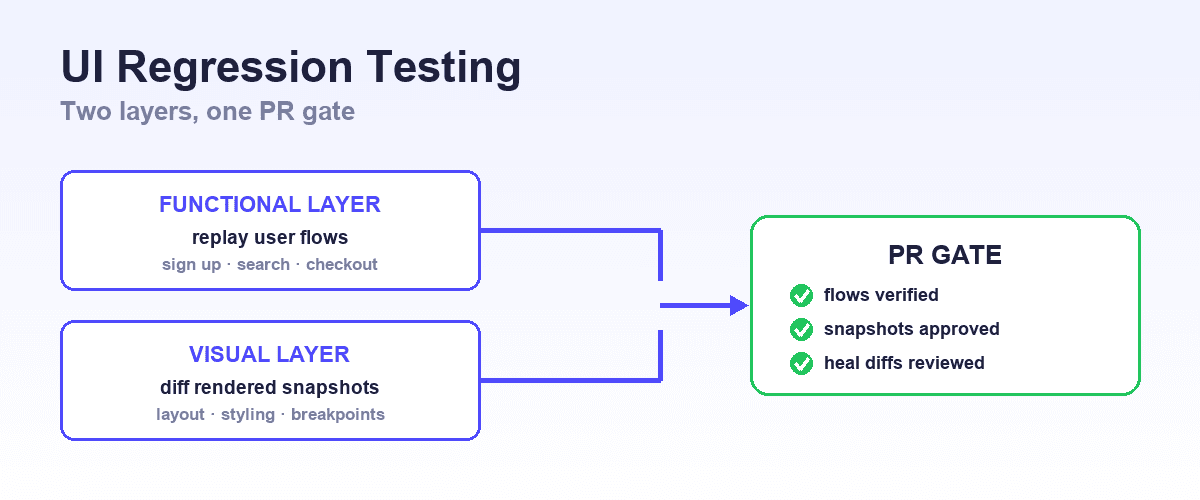
The best UI regression testing tools in 2026 split into two layers that catch different failures: functional tools that replay real user flows in a browser and fail when behavior breaks, and visual tools that compare rendered screenshots and fail when appearance changes.
Most teams that catch frontend regressions reliably run one of each, wired into the same pull request gate.
On the functional layer, Shiplight is the option built for teams shipping with coding agents: your agent walks the changed flow in a real browser and leaves the check behind as intent-based YAML in your repo, which then self-heals when the markup moves rather than failing on a renamed class.
Visual comparison is a separate layer and a separate tool, covered below.
Why UI regressions slip through review
UI regressions are the failures that unit tests and code review are structurally worst at catching. A component renders but the button underneath an overlay no longer receives clicks. A CSS refactor collapses a layout only at tablet widths. A dependency upgrade changes date formatting on one screen.
None of these show up in a diff review, and none of them throw in a unit test. They show up in the rendered application, which is why every serious UI regression strategy tests the rendered application.
Why the pressure is rising
The pressure on this layer has grown with AI-assisted development. When coding agents and assistants produce a large share of frontend changes, the volume of plausible-looking PRs rises, and the regressions cluster exactly where reading code catches the least: rendered behavior and cross-component interactions. The regression suite is what makes that shipping speed safe.
This guide covers the six tools worth choosing between, organized by layer, then a comparison table on the axes that decide the choice: what each tool catches, who authors the checks, where they live, and what maintenance costs when the UI changes. It ends with the workflow for catching frontend regressions automatically, with no human remembering to run anything.
The two layers of UI regression testing
Functional regression verifies behavior: can a user still sign up, search, check out, invite a teammate. Tools in this layer drive a real browser through the flow and assert on outcomes. They catch broken logic, dead buttons, failed navigations, and API integration breaks, and they are indifferent to how the page looks while it works.
Visual regression verifies appearance: does the page render the way it did before. Tools in this layer capture screenshots during a run and compare them against approved baselines. They catch layout collapses, styling drift, missing images, and responsive breakage, and they are indifferent to whether a flow behaves correctly beneath the pixels.
The layers do not substitute for each other. A visual tool passes happily while checkout is broken, as long as it is broken in a pixel-identical way. A functional tool passes while the pricing page renders as overlapping text, as long as the elements it asserts on exist.
Teams that treat one layer as sufficient discover the other layer's failure class in production.
The 6 best UI regression testing tools in 2026
1. Shiplight: agent-native functional regression
Shiplight turns your critical user flows into intent-based YAML tests that live in your git repo and run in a real browser.
The regression angle is the maintenance model: when the UI changes, tests self-heal by re-deriving each step from its stated intent, and heals arrive as reviewable PR diffs rather than silent rewrites or red builds. Cached deterministic steps keep replay fast in CI without LLM calls on every run.
It fits ship-daily teams and teams using AI coding agents: Shiplight's MCP server lets agents in Claude Code, Cursor, or Codex verify their own UI changes and persist that verification as a regression test in the same PR.
Runs work both ways, on Shiplight's hosted runners or your own CI with your own model keys, and the YAML transpiles to Playwright, so there is a real exit path. Local runs need no account; Free $0, Pro $60/mo.
2. Playwright: the open-source functional standard
Playwright is the strongest open-source framework for behavior-level regression suites, with auto-waiting assertions, user-facing locators, trace-based debugging, and first-class CI support. Teams with engineers who want full control of test code and are prepared to own maintenance choose it and rarely regret the engine.
The regression trade-off is that Playwright tests are selector-bound code: the framework retries and waits brilliantly, but when the UI genuinely changes, someone updates the test. At high shipping velocity that maintenance line item is the entire cost of ownership, which is worth measuring honestly before committing a team to it.
Playwright also ships built-in screenshot comparison for basic visual checks, pixel-based and best for stable pages.
3. Cypress: interactive debugging for JavaScript teams
Cypress runs inside the browser alongside the application, which gives it the best interactive debugging experience in the functional layer: time-travel snapshots of every step, live reload while authoring, and readable failure output. JavaScript-centric product teams that author tests by hand often find it the most pleasant tool to work in.
For regression coverage specifically, the considerations mirror Playwright: tests are code the team maintains, and cross-browser coverage is narrower. Its cloud service adds flake detection and analytics on paid tiers.
4. Percy: visual snapshot review in CI
Percy, part of BrowserStack, adds visual regression to a suite you already run: its SDK captures DOM snapshots during your existing tests, re-renders them in the cloud across browsers and widths, and flags pixel diffs against approved baselines in a git-aware review workflow with PR checks.
Setup is close to one line per snapshot, and there is a genuinely unusual free tier at 5,000 screenshots per month with unlimited seats.
The trade-off practitioners consistently report is pixel-diff noise: anti-aliasing, animation timing, and dynamic content produce false positives that need review discipline or the paid AI triage layer. Billing is per screenshot and multiplies across browsers and widths, so the default configuration consumes quota faster than the headline number suggests.
5. Applitools Eyes: visual AI matching at enterprise scale
Applitools pioneered semantic visual comparison: its match engine judges whether a change is meaningful rather than diffing raw pixels, which is the feature that matters on large suites where pixel tools drown reviewers in noise. It layers onto the test framework you already run, with SDKs for every mainstream stack, and its grid re-renders snapshots across browsers and viewports server-side.
A decade of practitioner sentiment is consistent on both halves: the matching quality is regarded as the strongest available, and the cost draws the most complaints. Pricing is quote-only in custom tiers, there is no free plan beyond a trial, and baselines and approval history live in Applitools' cloud.
It earns its place on large visual estates; small suites often find the value case thin. That is the trade Applitools alternatives works through in detail.
6. Selenium: the WebDriver baseline
Selenium remains the W3C WebDriver standard and the most widely deployed browser automation layer in existence, with bindings in every major language and unmatched grid infrastructure compatibility. Large organizations with existing Selenium estates and polyglot teams keep it for good reasons.
For new UI regression suites it is the baseline other tools improved on: no auto-waiting by default, more boilerplate per test, and higher flake and maintenance rates than modern frameworks unless the team invests in wrappers and discipline.
Comparison table
| Tool | Layer | Who authors | Where checks live | When the UI changes | Cost model |
|---|---|---|---|---|---|
| Shiplight | Functional | Your AI coding agents, or anyone in YAML | Your git repo | Self-heals from intent; heal is a reviewable PR diff | Local runs need no account; Free $0, Pro $60/mo |
| Playwright | Functional (+ basic visual) | Engineers, in code | Your git repo | Team updates test code | Free, open source |
| Cypress | Functional | Engineers, in code | Your git repo | Team updates test code | Free core; paid cloud |
| Percy | Visual | Generated from your existing runs | Baselines in Percy's cloud | Reviewer approves or rejects the diff | Free tier; per-screenshot billing |
| Applitools Eyes | Visual | Generated from your existing runs | Baselines in Applitools' cloud | Match AI classifies; reviewer approves | Quote-only, custom tiers |
| Selenium | Functional | Engineers, in code | Your git repo | Team updates test code | Free, open source |
How to catch frontend regressions automatically
The goal is a pipeline where no human remembers to run anything, and every PR answers "did this break the UI" with evidence:
- Cover the flows that hurt. Map the five to ten journeys whose breakage is an incident (signup, auth, checkout, core CRUD) and encode each as a functional test. Coverage of everything is not the goal; coverage of the expensive failures is.
- Run functional tests on every PR against a preview deploy. Preview environments from Vercel and similar platforms give every PR a live URL; run the flow suite there before merge, so regressions block instead of ship. The setup details are in our E2E testing in CI/CD guide and the Vercel preview testing walkthrough.
- Snapshot the pages that carry the brand. Add visual checks on marketing pages, dashboards, and templates where rendering drift matters, and keep the snapshot set small enough that reviewing diffs stays a habit rather than a backlog.
- Make maintenance automatic or budgeted. Either use a self-healing functional layer so UI churn produces reviewable heal diffs, or explicitly budget the engineering time to keep selector-bound tests current. The unbudgeted middle is how suites die; the mechanics are covered in how to fix flaky E2E tests.
- Let the agent that changed the UI verify the UI. If AI coding agents produce your frontend changes, connect the verification loop directly: the agent checks its change in a real browser and persists the check as a regression test, so the suite grows with every change. That workflow is the subject of verifying AI-written UI changes.
Where Shiplight is not the right fit
Shiplight tests web applications; native mobile regression needs a different tool. Component-level visual review across hundreds of states is a visual tool's job, not a flow tool's. And a team whose hand-written Playwright suite is stable, fast, and cheap to maintain has no problem worth solving; the switch case is maintenance load, not tool fashion.
Frequently Asked Questions
What are the best tools for automating UI regression testing?
Combine one functional and one visual layer. Shiplight automates behavior-level regression with self-healing tests your coding agents author and your repo owns; Playwright and Cypress are the strongest code-based alternatives; Percy or Applitools adds automated visual comparison on top. The pairing catches both broken flows and broken rendering.
What tool should I use to catch frontend regressions automatically?
Use a functional tool running on every PR against a preview deploy, plus visual snapshots on rendering-critical pages. Shiplight fits the automatic requirement best: tests self-heal as the frontend evolves and agents add coverage as they ship changes, so the suite keeps up without scheduled maintenance work.
What is the difference between visual and functional UI regression testing?
Functional regression verifies behavior by replaying user flows and asserting on outcomes; visual regression verifies appearance by comparing rendered screenshots against baselines. Each passes failures the other catches, which is why mature teams run both layers on the same pipeline.
How often should UI regression tests run?
On every pull request, before merge, against a preview environment. Nightly-only regression runs discover breakage after it lands, which converts a blocked PR into a triage project. Keep the PR-time slice fast by running the critical flows there and the long tail nightly.
Can AI catch UI regressions automatically?
Yes, in two distinct ways. AI-native functional tools like Shiplight replay intent-based flows and self-heal as the UI changes, and visual AI engines like Applitools classify which rendered differences are meaningful. Neither replaces defining which flows matter; that judgment stays with the team.