Software testing is the systematic practice of verifying that a software product behaves the way it is supposed to, and finding the places where it doesn't, before users do.
The discipline is built around four test levels (unit, integration, system, acceptance), a dozen named test types (functional, regression, performance, security, exploratory, and more), two authorship models (manual and automated), and seven foundational principles ratified by the ISTQB.
This guide walks through every fundamental, with clear definitions, examples, and the modern context: how AI coding agents and intent-based testing are changing the practice without changing the basics.
Key takeaways
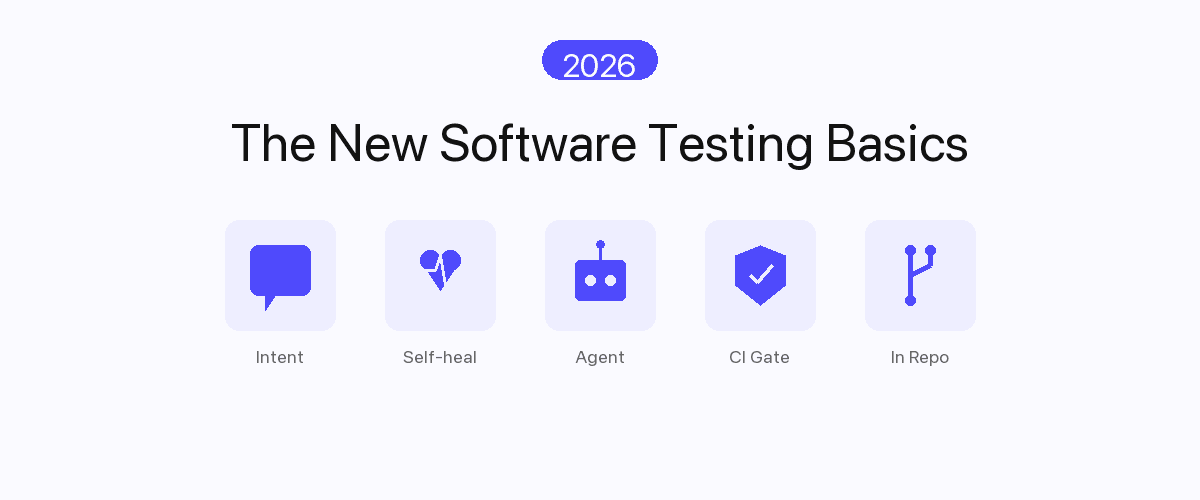
For the "what's new in 2026" angle, pair this guide with software testing basics in 2026.
- Software testing is verification + validation. Verification asks "are we building it right?"; validation asks "are we building the right thing?" Both matter.
- There are four test levels that match the structural hierarchy of a software product: unit, integration, system, and acceptance.
- There are roughly a dozen test types that cross-cut the levels: functional, regression, performance, security, usability, exploratory, smoke, sanity, and more.
- Two authorship models dominate: manual testing (human-executed) and automated testing (machine-executed); each has a place and they are complementary, not exchangeable.
- The seven ISTQB principles still hold in 2026: testing shows the presence of defects (not absence), exhaustive testing is impossible, early testing saves time, defects cluster, the pesticide paradox, testing is context-dependent, and the absence-of-errors fallacy.
- The AI era changes the how, not the what.* Intent-based authoring, self-healing, and agent-native verification reshape the practice, but the fundamentals above remain the foundation. See software testing basics in 2026 for the modernization layer.
What is software testing?
Software testing is the process of evaluating a software product to determine whether it meets specified requirements and identifies defects. It has two complementary purposes:
- Verification. "Are we building the product right?" Does the software conform to its specifications? Do the components do what they were designed to do? Do APIs return the expected shapes? Does the database write the expected rows?
- Validation. "Are we building the right product?" Does the software solve the user's actual problem? Is the workflow intuitive? Does the feature actually deliver the value it was scoped to deliver?
Both perspectives matter and a complete testing strategy covers both. A product that passes every unit test can still be the wrong product. A product that everyone says solves their problem can still have memory leaks that crash it under load. Software testing answers both questions, at different levels of abstraction.
For the broader category that adds artificial intelligence into the testing function, see what is AI testing. For the specifically 2026 framing of what the basics look like today, see software testing basics in 2026.
Why software testing matters
Three categories of value:
- Risk reduction. Software bugs in production cost orders of magnitude more than the same bug caught in development. A 2002 NIST study put the U.S. cost of inadequate software testing infrastructure at $59.5 billion annually; the modern equivalent for the cloud / AI-coding-agent era is higher.
- Confidence to ship. A green test suite is the engineering team's permission to deploy. Without it, every release is a gamble and the release cadence slows to whatever pace senior engineers feel personally comfortable with.
- Living documentation. Well-written tests describe what the software is supposed to do in executable form. A new engineer reads the tests to learn the product. A refactor is safe because tests catch regressions. See tribal knowledge to executable specs.
Real-world failures that show why software testing matters
The clearest argument for software testing basics is the record of what untested or under-tested software has cost, and the failure mode has shifted toward AI-introduced defects in the 2020s:
Recent large-scale software failures
- 2024: CrowdStrike global outage. A faulty content update shipped without adequate validation crashed an estimated 8.5 million Windows machines worldwide, grounding flights and disrupting hospitals and banks: one of the costliest IT incidents in history (multi-billion-dollar estimated impact).
- 2023: UK NATS air-traffic-control failure. A single malformed flight plan triggered a software fault that grounded UK air travel for hours and disrupted ~700,000 passengers: an unhandled-edge-case defect.
- 2022: Rogers nationwide outage (Canada). A maintenance configuration change took down a national telecom network for ~15 hours, including 911 emergency service for millions.
- 2021: Meta global outage. A configuration change took Facebook, Instagram, and WhatsApp offline worldwide for ~6 hours.
AI-specific failures (the 2020s failure mode)
- 2024: Air Canada chatbot ruling. The airline's AI support chatbot hallucinated a refund policy that did not exist; a tribunal held Air Canada legally liable for what its AI told a customer: a landmark "the company owns its AI's output" decision.
- 2024: NYC "MyCity" AI chatbot. A government AI assistant confidently advised business owners to take actions that were actually illegal (e.g., regarding worker tips), because nothing validated its outputs against the actual rules.
- 2023: Mata v. Avianca (ChatGPT legal brief). A lawyer filed a brief containing fabricated case citations hallucinated by ChatGPT; the court sanctioned the filing: a now-standard cautionary case for unverified AI output.
- 2024: Google AI Overviews. AI-generated search answers surfaced dangerous and absurd guidance ("add glue to pizza," "eat rocks") because the system synthesized from unvetted sources without an output-validation layer.
Classic textbook cases (still worth knowing)
- 1996: Ariane 5 Flight 501. An unhandled numeric overflow destroyed the rocket 37 seconds after launch: a ~$370M loss from one untested conversion.
- 1999: Mars Climate Orbiter. A metric-vs-imperial unit-mismatch defect lost a $327M spacecraft.
The pattern is consistent across four decades: each failure was a defect a disciplined testing process was designed to catch.
What changed in the 2020s is where the defects come from: increasingly from AI-generated code and AI features that are plausible but wrong, shipped without an output-validation layer (see testing strategy for AI-generated code and how to test vibe-coded applications for reliability).
The case for software testing has not weakened in 30 years; the cost structure flipped: testing used to be the slow thing that compressed against deadlines; in 2026, well-designed automated testing is faster than the development cycle it gates.
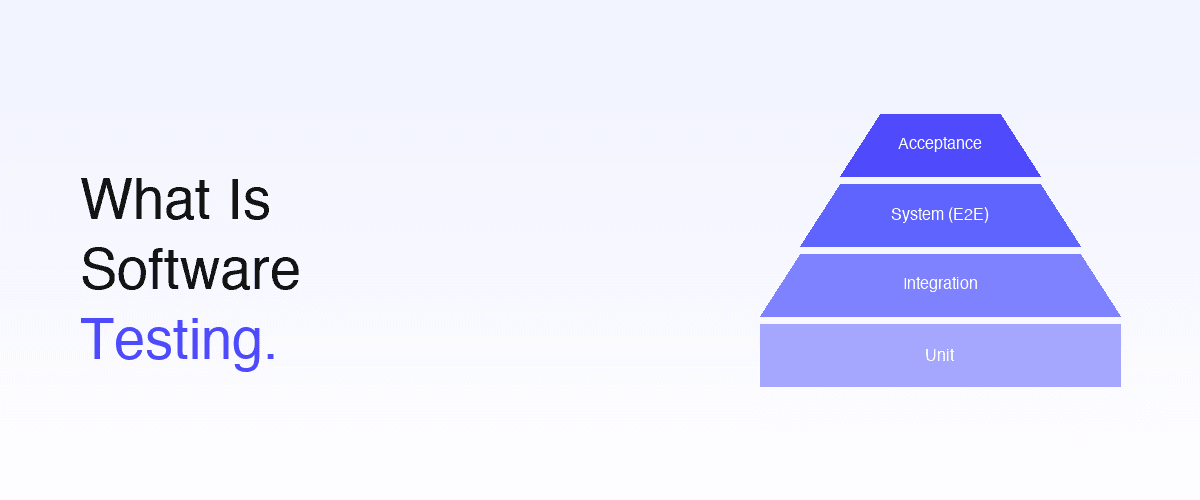
The 4 test levels (the test pyramid)
- AcceptanceThe product against user and business criteria. A handful of tests.
- System (end-to-end)The whole application as a user experiences it. Tens to hundreds.
- IntegrationTwo or more modules or services working together. Hundreds.
- UnitA single function, class or module in isolation. Thousands.
Software testing is organized by level of integration: from a single function up to the full deployed product. The "test pyramid" visualization captures the canonical distribution:
| Level | Tests What | Speed | Volume | Typical Tools |
|---|---|---|---|---|
| Unit | Single function, class, or module in isolation | Milliseconds | High (1,000s) | Jest, JUnit, pytest, RSpec |
| Integration | Two or more modules / services working together | Seconds | Medium (100s) | Supertest, Pact, language-specific frameworks |
| System (end-to-end) | The whole application as a user experiences it | Tens of seconds | Lower (10s–100s) | Playwright, Cypress, Selenium, Shiplight |
| Acceptance | The product against user / business criteria | Variable | Lowest (handful) | Manual sign-off; cucumber-style BDD; UAT |
The pyramid shape reflects an economic reality: unit tests are cheap and fast, so you can have many; system and acceptance tests are slower and more expensive to maintain, so you have fewer of them but they catch a different (and more user-visible) class of defect.
Unit testing
Tests a single unit of code (function, method, class) in isolation, with dependencies mocked or stubbed. A unit test confirms the unit's behavior: given these inputs, the unit returns these outputs or raises this error. Unit tests run in milliseconds and are typically written by the engineer who wrote the code, often alongside it (test-driven development).
Integration testing
Tests that two or more modules work together correctly across their interfaces. Integration tests run slower than unit tests because they involve real (or near-real) collaborators: actual database connections, real HTTP calls between services, genuine queue producers and consumers. They catch the bugs that live between units, which unit tests by design cannot.
See E2E testing vs integration testing for the boundary between this level and the next, and what API testing is for the interface layer most integration suites spend their time on.
System testing (end-to-end)
Tests the entire application as deployed, from the user's entry point through the full system. A system test of an e-commerce checkout exercises the frontend, the order service, the inventory service, the payment gateway, and the email service: every layer the user's action touches.
This level is where the 2026 evolution is most visible: intent-based authoring and self-healing are replacing selector-bound Playwright as the dominant model. See the E2E coverage ladder and near-zero maintenance E2E testing.
Acceptance testing
Tests the product against acceptance criteria: defined by the user, the customer, or the business. Acceptance testing answers the validation question: is this the right product? Often manual, sometimes automated as part of BDD frameworks. User Acceptance Testing (UAT) is the canonical sub-category, where the actual user (not a developer) confirms the product meets their needs.
The major software testing types
Test levels cut by integration depth. Test types cut by what is being verified. The major types every team should know:
Functional testing
Verifies that each feature does what its specification says it should do. The largest category by volume. Includes the bulk of unit, integration, and system tests.
Non-functional testing
Verifies how well the system performs, not just whether it works. Sub-categories:
- Performance testing. Latency, throughput, scalability under realistic and peak load.
- Security testing. Vulnerability scanning, penetration testing, authentication and authorization checks.
- Usability testing. Whether real users can find their way around the product.
- Accessibility testing. WCAG compliance, screen-reader navigation, keyboard-only operation.
- Compatibility testing. Behavior across browsers, devices, OS versions, and locales.
Regression testing
Re-runs previously-passing tests after a change to confirm the change didn't break existing behavior. The single largest category by count in any mature test suite: every test you've ever written becomes part of the regression set. See from natural language to release gates.
Smoke testing
A small, fast subset of tests that runs on every build or deploy to verify the system is not obviously broken. If the smoke test fails, you don't bother running the full regression; you have a more fundamental problem.
Sanity testing
A narrow, targeted retest of the specific area changed in a release, to confirm a specific bug fix or new feature works as expected. Smaller than a smoke test, more focused.
Exploratory testing
A human tester actively explores the application without a pre-written script, looking for surprising failures. The bug class exploratory testing catches (surprising user paths, unexpected combinations, "I didn't expect that" issues) is the bug class automation is worst at finding.
In the AI era, exploratory testing is more important, not less, because AI handles the regression floor and frees QA engineers to spend more time exploring. See the QA role in the AI era.
Visual regression testing
Compares screenshots of UI components or pages across versions to detect unintended visual changes: a layout shift, a color regression, a missing icon. Often AI-augmented with visual diff scoring to reduce false positives from anti-aliasing or rendering jitter.
Software testing methods
Distinct from levels and types, methods describe how the test is executed:
Manual vs automated testing
- Manual testing. A human executes test steps and observes outcomes. Best for exploratory testing, UAT, accessibility, and any test where human judgment is the verification (e.g., "does this UI feel right?").
- Automated testing. A script or AI system executes test steps and records outcomes. Best for regression, repeatable scenarios, anything that runs more than a handful of times.
Most teams need both. Manual testing for exploratory work and new-feature validation; automated for regression and CI gates. See test authoring methods compared for the deeper breakdown.
Black-box vs white-box vs gray-box testing
- Black-box testing. The tester knows what the system should do (inputs → outputs) but not how it does it internally. Tests are designed from specifications, not from source code.
- White-box testing. The tester has full visibility into the internal code structure. Tests exercise specific code paths, branches, and conditions.
- Gray-box testing. A middle ground: the tester has partial knowledge of internal structure, used to design more effective black-box tests.
Unit tests are typically white-box (you can see the function you're testing). System tests are typically black-box (you exercise the UI without caring how the backend implements it).
Static vs dynamic testing
- Static testing. The code is analyzed without being executed: linting, type checking, code review, security scanning, formal verification.
- Dynamic testing. The code is executed and its behavior observed: everything described above falls under dynamic.
Both are part of a complete testing strategy. A 2026 team uses static analysis on every save (TypeScript, ESLint, code review with AI assistance) and dynamic tests at unit, integration, and system levels on every PR.
The Software Testing Life Cycle (STLC)
The standard sequence of activities that produces software testing work:
- Requirements analysis. Read the user stories, specs, or acceptance criteria. Identify what needs to be tested and what risks exist.
- Test planning. Decide which test levels and types are in scope, what tools to use, and how the work is staffed. Owned by QA leadership or the release engineer.
- Test case design. Write specific tests that cover the identified scenarios: including positive cases (does it work?), negative cases (does it fail safely?), and edge cases.
- Test environment setup. Provision the systems, data, and tooling the tests need to run.
- Test execution. Run the tests, manually or automatically. Capture results, screenshots, logs, and traces for failures.
- Defect reporting. File the bugs found, with reproduction steps and severity ratings.
- Test cycle closure. Compare actual results to planned scope; document what was learned; archive artifacts.
The STLC is iterative: in continuous deployment environments, it runs on every PR rather than once per release. See the modern E2E workflow for the agile-style cycle.
The 7 software testing principles (ISTQB)
The International Software Testing Qualifications Board codified seven principles that still hold in 2026:
- Testing shows the presence of defects, not their absence. A passing test suite is evidence that you haven't yet found a defect; not proof that none exist.
- Exhaustive testing is impossible. Every input combination of a non-trivial system is infinite. Testing must be risk-prioritized, not exhaustive.
- Early testing saves time and money. A bug found in development costs orders of magnitude less than the same bug found in production.
- Defects cluster. A small fraction of modules contains most of the defects. Risk-prioritize accordingly.
- The pesticide paradox. Running the same tests repeatedly stops finding new bugs. Refresh the test set periodically.
- Testing is context-dependent. Testing a flight-control system is different from testing a marketing site. Strategy must match context.
- The absence-of-errors fallacy. Software with zero defects is still useless if it doesn't solve the user's problem. Validation (the right product) is as important as verification (built right).
These principles predate AI agents, predate cloud computing, predate microservices; they still apply.
Key terms in software testing (glossary)
Every software testing basics reference uses the same core vocabulary. The terms you will see most often:
- Test case: a set of inputs, preconditions, steps, and expected results that verifies one specific behavior works correctly.
- Test suite: a collection of related test cases grouped to exercise a feature or area together.
- Test plan: a document defining the scope, objectives, resources, schedule, and approach for a testing effort. (Distinct from a test strategy, which is the org-level operating model: see software testing strategies.)
- Defect / bug: a flaw where the software's actual behavior differs from its expected behavior.
- Test script: the automated, executable form of a test case (code or intent-based YAML).
- Assertion: the check inside a test that decides pass or fail by comparing an observed result to an expected one.
- Fixture / test data: the known data and environment state a test runs against.
- Regression: a defect introduced into previously-working functionality by a later change; regression testing re-runs prior tests to catch it.
- Flaky test: a test that passes and fails intermittently without a code change. See flaky test.
- Coverage: a measure of how much of the application (code lines, branches, or user journeys) the tests exercise.
- Smoke test: a fast, shallow check that the build is not fundamentally broken before deeper testing runs.
- Self-healing test: a test that automatically re-resolves to the correct UI element when the interface changes, instead of breaking. See self-healing test.
For the full, continuously-updated vocabulary of modern QA, see the AI testing glossary.
How software testing is changing in 2026
The fundamentals above (levels, types, methods, principles) are stable. What is changing rapidly is the execution layer: specifically how tests are authored, maintained, executed, and analyzed. Five 2026 shifts to know:
- Intent-based authoring is replacing selector-bound automation. Tests are written in natural language ("click checkout"), not CSS selectors. The runtime resolves intent against the live DOM. See YAML-based testing.
- Self-healing is default, not premium. Every test re-resolves on every run; unhealed steps surface as PR-reviewable patch suggestions. See self-healing vs manual maintenance.
- Agent-native verification. AI coding agents like Claude Code, Cursor, and OpenAI Codex author tests in the same session they write features, via SDK or MCP integration. See agent-native autonomous QA.
- PR-time CI gates replace nightly regression as the primary gate. Bugs are caught before merge, not the next morning.
- Coverage is measured in user-journey reach, not test count. See the agentic QA benchmark.
For the full 2026 modernization story, see software testing basics in 2026 and AI in test automation.
Software testing tools landscape (2026)
The honest landscape across categories:
| Category | Representative tools | Where they fit |
|---|---|---|
| Unit testing frameworks | Jest, Vitest, JUnit, pytest, RSpec, Go test | Unit level, language-native |
| Integration testing | Supertest, Postman, Pact, REST Assured | API contracts and service boundaries |
| Code-bound E2E | Playwright, Cypress, Selenium, WebdriverIO | System level, traditional automation |
| Natural-language E2E | Shiplight YAML (intent-based, tests in your repo), testRigor (constrained plain-English DSL, tests in its cloud) | System level, natural-language authoring |
| AI-augmented E2E platforms | Pre-agent low-code consoles retrofitting AI features | System level, AI features on script-based core |
| Agentic QA platforms | Shiplight for AI coding agents | System level + agent integration |
| Managed QA services | QA Wolf | System level, vendor QA engineers own the suite |
| Visual testing | Applitools, Percy, Chromatic | Visual regression sub-category |
| Performance testing | k6, JMeter, Gatling, Locust | Non-functional load and latency |
| Security testing | OWASP ZAP, Burp Suite, Snyk, Dependabot | Non-functional vulnerability scanning |
For deeper comparisons, see best AI testing tools in 2026, best AI automation tools for software testing, and best agentic QA tools in 2026.
Conclusion: the fundamentals are stable, the practice is modernizing
Software testing as a discipline rests on a stable foundation: four test levels, a dozen test types, two authorship methods, seven principles. None of that has changed since the 1990s, and none of it is going to change in 2026, 2027, or the years after.
What is changing rapidly is the practice: how tests are authored (intent-based, not selector-bound), maintained (self-healing, not manual repair), executed (PR-time, not nightly), and analyzed (AI-clustered failures, not engineer-by-engineer triage).
For teams ready to apply the fundamentals with the 2026 modern practice, Shiplight AI is a system that combines all the layers: YAML Test Format for intent-based system-level tests, MCP Server for agent-native authoring, AI Fixer for self-healing on every run, and Cloud runners for PR-time gates.
Book a 30-minute walkthrough and we'll map your current testing practice to each fundamental and project the modernization delta.
Frequently Asked Questions
What is software testing in simple terms?
Running a product through planned scenarios to confirm it behaves as intended and find where it does not. Two purposes: verification, are we building the product correctly, and validation, are we building the right product. It happens at every level from unit to acceptance.
What are the main types of software testing?
Functional (does the feature meet its spec), regression (did a change break existing behavior), smoke (does the build run at all), plus performance, security, accessibility, exploratory, and visual regression. Most teams combine several, matched to what a release puts at risk.
What are the four levels of software testing?
In increasing scope: unit, single functions in isolation; integration, modules working together; system, the whole application as a user experiences it; acceptance, the product against business criteria. The pyramid gives the distribution: many unit, fewer integration, fewer still system.
What is the difference between manual and automated testing?
Manual is human-executed and best where judgment is required: exploratory work, UAT, accessibility. Automated is machine-executed and best for regression, repeatable scenarios, and CI gates. Most teams need both, because they are complementary rather than substitutes.
What is the difference between verification and validation?
Verification asks whether the implementation matches the specification, which is the focus of unit, integration, and system testing. Validation asks whether it solves the user's actual problem, which is the focus of acceptance testing, UAT, and exploratory work.
Is software testing the same as quality assurance?
Not exactly. Testing is a practice: designing, running, and analyzing tests to find defects. Quality assurance is the discipline around it, including process design, defect prevention, and the roles that own them. Testing is what you do; QA owns it. See the QA role in the AI era.
What are the 7 principles of software testing?
The ISTQB set: testing shows the presence of defects, not their absence; exhaustive testing is impossible; early testing saves money; defects cluster; repeated tests stop finding new bugs; testing is context-dependent; and software with no defects is still useless if it solves the wrong problem.
Where do I start if I'm new to software testing?
Read this plus software testing basics in 2026 for modern context, then write unit tests for one module of a small project. Once that is comfortable, add one E2E test for your most critical flow. Go deep before going wide.